Registry Administration
The built-in container registry is managed by a platform admin from Admin → Container Registry. It is disabled by default, so single-node installs are unaffected until you turn it on.
Enabling the registry
Turn it on under Admin → Container Registry → Configuration: set a Host, tick Enable the registry, and save. Point DNS for that hostname at the gateway. Miabi then:
- runs the registry container on the platform's private network (
MIABI_INTERNAL_NETWORK), and - seeds its gateway route + middlewares (TLS redirect, authentication, and namespace rewrite) automatically.
Changes apply immediately — the container is recreated and the gateway route rewritten on save. No restart.
Every user and namespace check happens in the gateway in front of the registry, so the registry joins only the platform's private network — the fabric its own components share, which app containers never join. It also requires HTTP Basic auth there, held by the gateway alone, so reaching it over the network is not the same as being allowed to use it.
Miabi finds that network by its role label (io.miabi.role=platform-internal), so a stack from miabi setup or examples/compose needs no configuration. MIABI_INTERNAL_NETWORK names it explicitly, for a network that carries no label or when there are several.
If neither finds one, the registry refuses to start and logs what to do. Earlier versions fell back to the shared proxy network with a warning; that fallback is gone, because a warning in a log is not a boundary. A stack that predates the private network needs the network added, or MIABI_INTERNAL_NETWORK set, before the built-in registry will run.
Everything on that page can equally be set in the environment, which is what an install declared by docker-compose, a Helm chart, or any other infrastructure-as-code needs:
MIABI_REGISTRY_ENABLED=true
MIABI_REGISTRY_HOST=registry.example.com   # optional; defaults to registry.<external-base-domain>
MIABI_REGISTRY_STORAGE=filesystem          # filesystem | s3
The environment pins, it does not replace
A MIABI_REGISTRY_* variable that is set owns its field: the console shows the value with a lock and the variable that decides it, and the server ignores that field on save. Your compose file keeps describing the install it deploys, and nobody can edit a value out from under it.
A variable that is absent leaves the field to the console. An install that sets none of them is configured entirely from the UI.
The lock is per field, so mixing works: pin the hostname in the environment and manage the quota and S3 credentials from the console, or the reverse.
MIABI_REGISTRY_ENABLED=false pins the registry off — the console's switch is then read-only, and a registry enabled there stays down with the reason logged. Remove the variable entirely to hand the switch back to the console.
An invalid MIABI_REGISTRY_HOST (a scheme, a path, a wildcard, or a single-label name like registry) refuses to boot rather than starting with a value nothing matches. The console applies the same rule and rejects the value in the form.
Settings
| Setting | Tab | Description |
|---|---|---|
| Enable the registry | Configuration | Runs the container and seeds its gateway route. |
| Host | Configuration | The public hostname for docker login. |
| Per-workspace quota (MB) | Configuration | Caps each workspace namespace's total image size (0 = unlimited). |
| Enable tag deletion & garbage collection | Configuration | Allows deleting tags and reclaiming space. |
| Storage driver and its settings | Storage | Local volume, or S3/MinIO with bucket, region, endpoint and credentials. |
Changes that ask for confirmation
Two changes cannot be undone for you, so each is refused once with an explanation and applied only when you confirm:
- Moving the hostname. Every image reference Miabi has recorded — on past deployments and releases — is anchored to the old name, and matching against it is how one workspace's images are told apart from another's. Existing apps keep referencing the old host and fail to pull until they are redeployed.
- Switching the storage driver or bucket. Blobs are not migrated between backends: images already pushed stay in the old one and become invisible.
Both are legitimate operations — a domain move, a migration to S3. The confirmation exists so they can't happen by mis-click while you are saving the form for another reason, and it tells you how many repositories are at stake.
Neither prompt appears when there is nothing to strand: naming a host for the first time, or switching storage on a registry that holds no images, applies straight away.
Monitoring
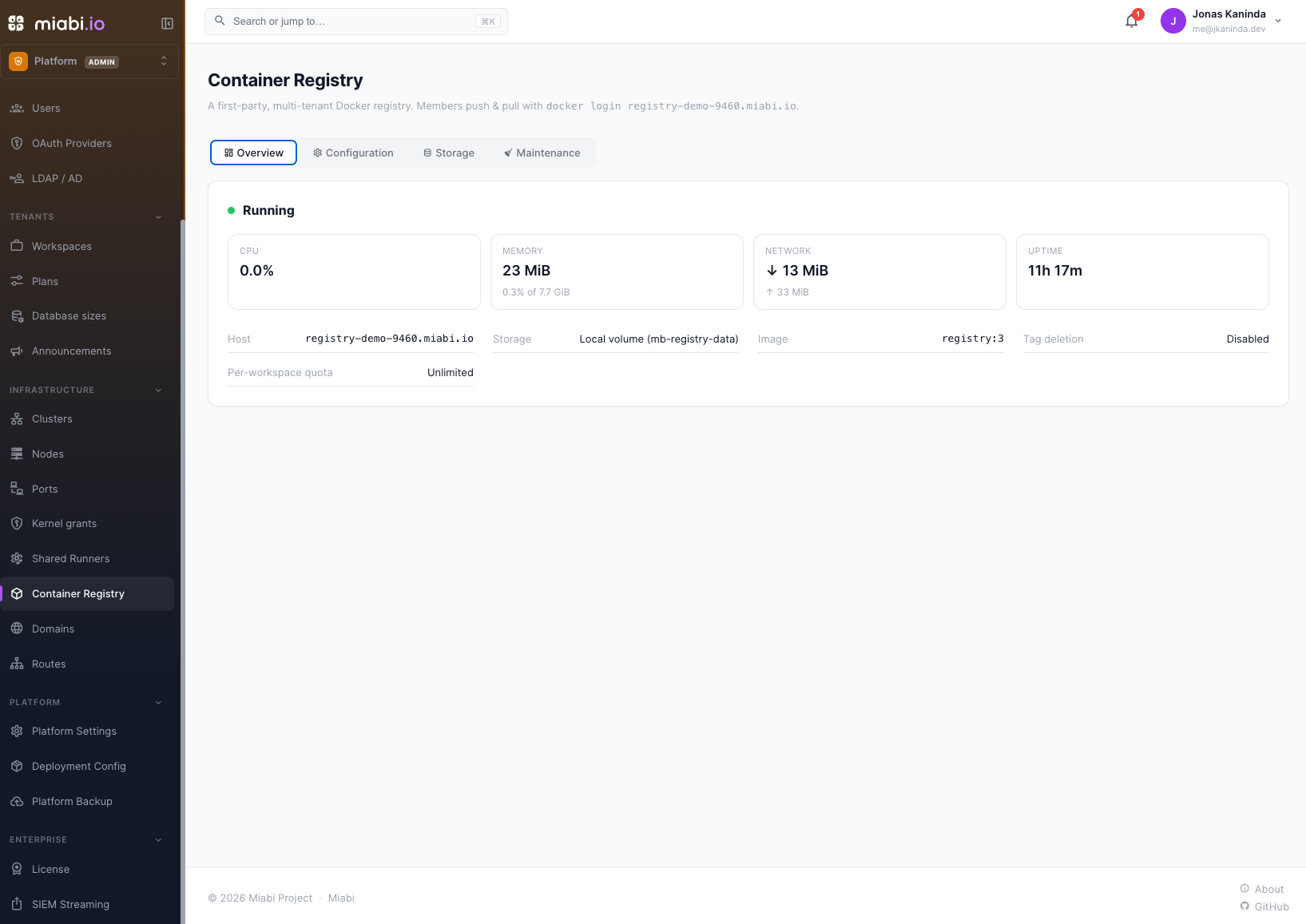
The Overview tab reports what the registry is actually doing, which no other page can show — the registry belongs to no workspace, so it is invisible to the app-level monitoring:
- whether the container is running, its health, and how many times it has restarted (a crash loop looks healthy in any snapshot taken between restarts);
- live CPU, memory (with the limit and percentage), network I/O, and uptime;
- the effective host, storage backend, image, and the current quota and deletion settings.
Usage is sampled while the tab is open. A registry that is down reports no usage rather than a misleading zero.
Storage
Configured under Admin → Container Registry → Storage, or pinned in the environment.
Local (filesystem) — free
Images are stored in a managed Docker volume on the control-plane node. This is the default and is included in the Community edition.
S3 / MinIO — Enterprise
Storing images in S3-compatible object storage (durable, off-box, shareable) requires an Enterprise license (the registry_s3 entitlement). Without it the driver is disabled in the console and refused by the API.
Fill in the bucket, region, endpoint and credentials on the Storage tab, or set them in the environment:
MIABI_REGISTRY_STORAGE=s3
MIABI_REGISTRY_S3_BUCKET=my-registry
MIABI_REGISTRY_S3_REGION=us-east-1
MIABI_REGISTRY_S3_ENDPOINT=https://minio.example.com   # optional; omit for AWS S3
MIABI_REGISTRY_S3_ACCESS_KEY=...
MIABI_REGISTRY_S3_SECRET_KEY=...
MIABI_REGISTRY_S3_FORCE_PATH_STYLE=true                # required by MinIO
The secret is encrypted at rest and never returned by the API — leave the field blank when saving to keep the stored one.
Selecting the driver is refused without the registry_s3 entitlement, and it is checked again where the driver is used: on every boot and before a garbage collection. The second check is what covers the paths no API call passes through — a driver set purely in the environment, and a license that lapses after S3 was already chosen.
When the check fails — a Community install, or a licensed one without the flag — the registry is not started, the reason is logged, and the Overview tab shows it. Images already in the bucket are untouched; switch back to a local volume or install a license to bring the registry back.
An expired license that granted registry_s3 keeps the registry serving from S3 (the flag stays usable once degraded), because stranding images already in the bucket is not a reasonable expiry behavior — you simply cannot reconfigure storage without a valid one.
Selecting s3 with no bucket is refused the same way.
Changing the storage driver recreates the registry; existing images are not copied between drivers. Miabi asks you to confirm when the registry already holds images, and names how many. Plan a migration (re-push) if you switch.
Garbage collection
Deleting a tag removes its manifest but not the underlying blobs. Garbage collection reclaims that space. Because collecting while images are being pushed is unsafe, Miabi runs it with the registry in read-only mode — pulls keep working, pushes pause briefly — then restores read-write automatically.
- A daily GC runs automatically when the registry is enabled with deletes on.
- You can also run it on demand from the Maintenance tab.
GC requires Enable tag deletion & garbage collection to be on.
Multi-node image distribution
To let other nodes pull Git-built images (so deploys and rollbacks work across the cluster), the platform uses an internal registry token. It is derived automatically from the master encryption key, so no configuration is required for a standard install. To pin a specific value (e.g. to share with external tooling), set it explicitly — this overrides the derived token, and every party must then agree on the value:
MIABI_REGISTRY_PLATFORM_TOKEN=<a long random secret>
With the registry enabled, a successful Git build is tagged and pushed as registry.<domain>/ws_<workspace-id>/<app-name>:<deployment-id> (the deployment's platform-wide id), and a :v<release-version> tag is added once the deployment succeeds; both are recorded on the release. On deploy, a node that lacks the image pulls it from the registry. The push is best-effort — if it fails, the image stays node-local and the deploy proceeds, so single-node installs are unchanged.
The recorded reference uses the immutable ws_<id> namespace rather than the workspace name you push to by hand, so a workspace rename cannot break a rollback to an older deployment. Both forms address the same storage.
Cross-workspace images are refused
A node pulls a distributed image with the platform credential, which is accepted for every workspace namespace — that is what lets a runner push on any tenant's behalf. So the image reference itself is checked: an app may only reference the built-in registry under its own workspace's namespace, whether written as registry.<domain>/<your-workspace>/… or registry.<domain>/ws_<your-id>/….
Naming another workspace's namespace is rejected when the app is saved and again at deploy time. Images in other registries (Docker Hub, GHCR, a private registry) are unaffected — those are pulled with the workspace's own registry credential.
Configuration (environment)
Setting any of these pins the matching field: it becomes read-only in the console, and a change takes an environment edit and a restart. Leave one unset to manage it from Admin → Container Registry.
| Variable | Pins | Purpose |
|---|---|---|
MIABI_REGISTRY_ENABLED | ✓ | Run the registry (default false). Setting it to false pins it off. |
MIABI_REGISTRY_HOST | ✓ | Public host; defaults to registry.<external-base-domain>. |
MIABI_REGISTRY_STORAGE | ✓ | filesystem or s3; s3 requires the registry_s3 entitlement. |
MIABI_REGISTRY_S3_ENDPOINT / _BUCKET / _REGION / _ACCESS_KEY / _SECRET_KEY / _FORCE_PATH_STYLE | ✓ | S3/MinIO storage (Enterprise). Pinned individually. |
MIABI_REGISTRY_IMAGE | — | Override the registry image (default registry:3). |
MIABI_REGISTRY_AUTH_URL | — | Address the gateway uses to reach Miabi's auth endpoint (default http://miabi:9000). |
MIABI_REGISTRY_HTTPS_REDIRECT | — | Redirect plaintext registry requests to HTTPS (default true). Set false when a TLS terminator in front of the gateway (Cloudflare, nginx, a cloud load balancer) forwards plain HTTP and the gateway's trusted proxies aren't configured; otherwise every push and pull loops on the redirect. |
MIABI_REGISTRY_PLATFORM_TOKEN | — | Shared secret enabling multi-node build distribution. |
The quota and the tag-deletion switch have no environment variable — they are console-only, and apply without a restart.
See Configuration for the full environment reference.
Related
- Container registry overview — pushing, pulling, and browsing images.
- Community vs Enterprise — local storage is free; S3/MinIO is Enterprise.