Platform Admin
The platform admin (super-admin) is the account responsible for the Miabi instance as a whole — the parts of the system that sit above any single workspace.
How the platform admin is created
The platform admin is seeded from configuration on first boot — not by the first person to sign
up. Miabi creates it from MIABI_ADMIN_EMAIL and MIABI_ADMIN_PASSWORD before anyone can register,
so an admin always already exists.
| Variable | Default | Purpose |
|---|---|---|
MIABI_ADMIN_EMAIL | admin@example.com | Login of the seeded platform admin |
MIABI_ADMIN_PASSWORD | — | Required in production. Miabi refuses to start outside dev while this is empty or left at its built-in default |
The one-line installer generates a password, prints it once at the end of the run, and stores it in
/etc/miabi/miabi.yaml — the only copy, so back that file up. Sign in with those credentials;
every account created afterwards — by an admin, through SSO, or by
self-service sign-up if you
open it — is an ordinary user unless an admin makes it a platform admin.
On a stack install you never set those two variables yourself: Miabi derives them and writes them
into the manifest, which is what it feeds the container. The login is whichever email you installed
with — admin_email and acme_email fall back to each other, so supplying either is enough, and
only if you supply neither does it become admin@<domain> (see
Installation). The admin@example.com default
above is what the container falls back to when nothing sets it, which is the Compose path.
Treat this account as a privileged operations identity. Change the generated password after first sign-in, enable any available SSO/MFA, and reserve it for platform tasks rather than day-to-day app work.
What the platform admin manages
Platform administration is global: the server, the fleet, and the configuration everything
else runs on — not the contents of any one workspace. It has its own console, separate from the
workspace console: platform admins switch between the two, and a bare /admin lands on the
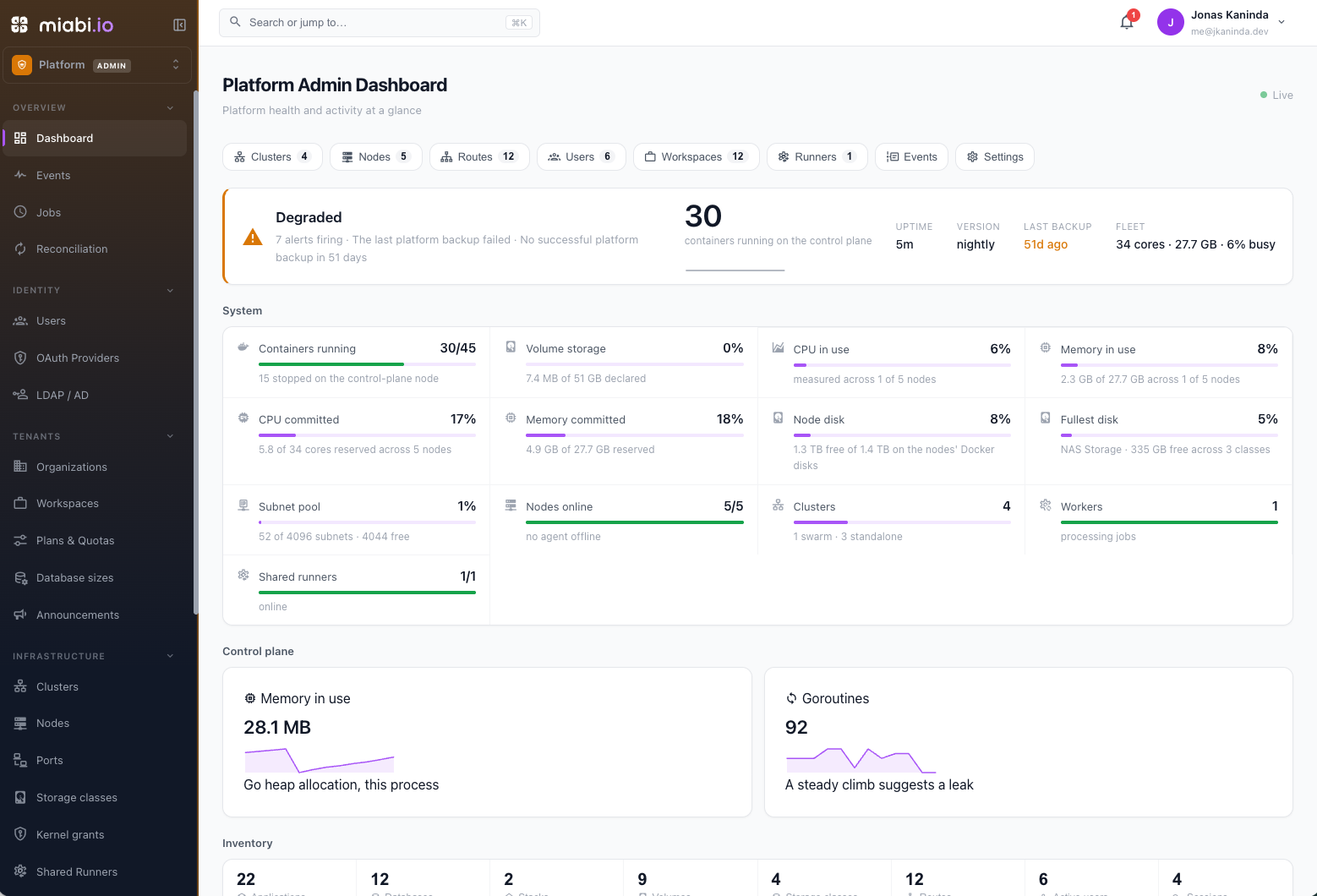
dashboard. The sidebar is grouped as below, and this table is the map.
Overview
| Section | Responsibility |
|---|---|
| Dashboard | Instance health at a glance: an overall status with the reasons behind it, nodes online (and offline or cordoned), clusters (swarm vs standalone, and converted nodes awaiting a gateway decision), workers, containers, volume storage, the subnet pool, an inventory of apps, databases, stacks, volumes, routes, users and sessions, and recent activity. /admin/metrics redirects here. |
| Events | The platform-wide activity feed (Enterprise). See Audit log. |
| Jobs | The background sweeps that keep the platform consistent. See Scheduled Jobs. |
| Reconciliation | Apps, swarm services, node gateways and data volumes that disappeared from under Miabi, as the control manager sees them. See Reconciliation. |
Identity
| Section | Responsibility |
|---|---|
| Users | Create accounts, reset credentials, revoke sessions, set per-user limits, and schedule deletions. See Users & Accounts. |
| OAuth Providers | External identity providers for sign-in. See SSO. |
| LDAP / AD | Directory-backed authentication (Enterprise). See SSO. |
Tenants
| Section | Responsibility |
|---|---|
| Organizations | Tenant realms owning workspaces, users, their own SSO and their own locations (Enterprise beyond the built-in one). See Organizations. |
| Workspaces | Cross-workspace visibility, privileged workspaces, and key rotation. See Workspace Oversight. |
| Plans | Define what a workspace may consume and which capabilities it unlocks. See Plans & Quotas. |
| Database sizes | Named CPU and memory sizes plans offer (Enterprise). See Database sizes. |
| Announcements | Broadcast a notice to user inboxes — to everyone or selected workspaces, scheduled or immediate, with an optional expiry and a pinned banner (Enterprise). |
Infrastructure
| Section | Responsibility |
|---|---|
| Clusters | Standalone and swarm clusters, the locations workspaces deploy to. See Cluster Mode. |
| Nodes | The fleet: status, health, pools, container inventory, housekeeping and Docker import. See Nodes & Capacity. |
| Storage classes | The disks volumes may be created on, beyond Docker's own data root (Enterprise). See Storage classes. |
| Kernel grants | Every application holding an extra Linux capability or host device. See Capabilities & devices. |
| Shared Runners | The platform-shared build machines pipelines execute on. See Runners. |
| Container Registry | The built-in multi-tenant OCI registry. See Registry administration. |
Networking
| Section | Responsibility |
|---|---|
| Domains | Verify, force-verify or ban a domain in any workspace. See Workspace Oversight. |
| Routes | Every route on the instance. See Workspace Oversight. |
Platform
| Section | Responsibility |
|---|---|
| Security | The Security Center: host-port policy and approval queue, the admin console unlock, and the decision log. See Security Center. |
| Platform Settings | The typed, cached key-value configuration governing instance-wide behaviour. See Platform Settings. |
| (fields pinned by the install manifest) | A setting stated in /etc/miabi/miabi.yaml — a backup destination, the external base domain, the registry host — is read-only in the console, shown with the variable that decides it. That is deliberate: it keeps an install described by infrastructure-as-code authoritative. Remove the field from the manifest and converge to hand the setting back. |
| Branding | The sign-in page and console identity: name, logos, favicon, accent policy and sign-in notice (Enterprise). See Branding. |
| Deployment Config | Registry mirror and platform image pins. See Scheduled Jobs & Image Defaults. |
| Platform Backup | Backing up and restoring the platform itself (Enterprise). See Platform backup & disaster recovery. |
Enterprise
| Section | Responsibility |
|---|---|
| License | Enterprise entitlement. See Licensing. |
| SIEM Streaming | Streaming audit events to an external SIEM. See SIEM. |
Upgrading the instance is not a console action: it runs from the host. See Upgrades.
What a platform admin cannot do
The boundary matters as much as the capability list. Admin visibility is structural, not contents:
- Workspace secrets stay unreadable. They are encrypted with per-workspace keys and the admin console holds none of them. There is no "view secret" for another tenant.
- Managed containers are not directly operable from the node view (see below).
- The last platform admin cannot be removed, deactivated or demoted. There is no supported route to an instance nobody can administer.
Everything a platform admin does do is written to the audit log, which is the record you will want when someone asks why an account was reset or a domain was banned.
Managed containers are protected
The node view lists every container on a node, including the ones Miabi manages (apps, databases, gateways). By default a platform admin cannot stop or remove a Miabi-managed container from that list — those are operated through the resource that owns them, so the platform can't be desynchronised from what is actually running.
| Variable | Default | Purpose |
|---|---|---|
MIABI_SECURITY_ENFORCEMENT | true | Blocks raw stop/remove of managed containers in the admin node view. Set false as a break-glass escape hatch |
This is unrelated to MIABI_PLAN_ENFORCEMENT, despite the similar name: that one gates per-workspace
quotas and capability gates. Both default to true.
Platform admin vs workspace roles
Platform administration is separate from the per-workspace permission model. Inside a workspace, access is governed by the Owner, Admin, Developer, and Viewer roles, which control who can create apps, deploy, manage domains, and so on. Those roles are scoped to a single workspace and do not grant any platform-level access.
A user can be a platform admin and hold a workspace role — the two layers are independent and enforced separately.
For the full breakdown of workspace-level capabilities, see Roles & Permissions.
Where to go next
- Users & Accounts — creating accounts and recovering locked-out users.
- Workspace Oversight — privileged workspaces, and moderating domains and ports.
- Branding — white-labeling the sign-in page and console.
- Nodes & Capacity — the operational view of your fleet.
- Scheduled Jobs & Image Defaults — background sweeps and platform image pins.
- Platform Settings — instance-wide configuration.
- Upgrades — moving to a newer release.