Secrets
Every workspace has a secret vault for sensitive values. It's a general-purpose store — not limited to application settings. Keep any secret your workloads need: third-party API keys, access tokens, webhook signing keys, database passwords, connection strings, SMTP credentials, and so on. Values are encrypted at rest, never logged, and never returned in plain text. Open Secrets in the workspace sidebar to manage them.
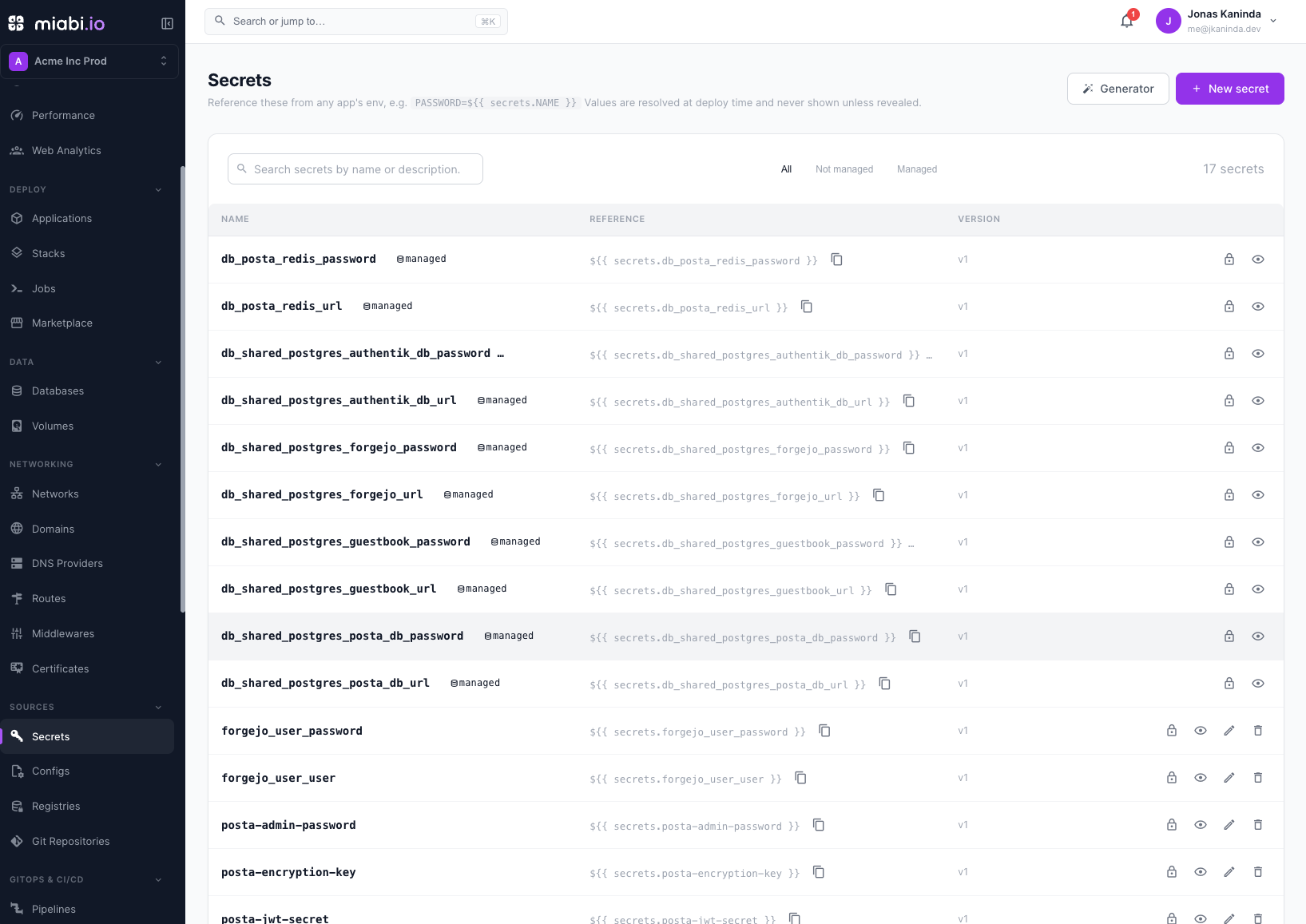
A secret has a unique name (the handle you reference), an encrypted value, an optional description, and a version that bumps every time the value changes.
Referencing a secret
Reference a secret anywhere an environment variable is set — an app or a one-off job — with:
${{ secrets.NAME }}
The reference is resolved into the container's environment at deploy/job time — the plaintext never lives in the stored config, the API, or the logs. A deploy fails loudly if it references a secret that doesn't exist, rather than injecting a blank. See Environment Variables & Secrets for the env-var side.
Because the vault is shared across the workspace, you define a secret once and reference it from every workload that needs it — rotate it in one place and every consumer picks up the new value on its next deploy.
Custom secrets
Custom secrets are the ones you create and own.
- Create — give it a name (letters, digits,
_or-), a value, and an optional description. Store whatever you like here; it doesn't have to be tied to a specific app. - Edit / rotate — set a new value to rotate it. The version increments, and every app that references the secret is redeployed so it picks up the new value — rotate in one place, not workload by workload. (Editing only the description doesn't trigger a redeploy.)
- Reveal — because values are masked, treat secrets as write-only. A workspace admin can reveal a value when needed; every reveal is audit-logged.
- Delete — allowed only when no app references the secret. If it's still in use, Miabi refuses and tells you to remove the references first, so a deploy can never break on a missing secret.
Generating a value
Nobody should be inventing a database password by hand, and nothing should be routed through a password manager and back to get one. The Generator produces passwords, passphrases and tokens inside the console:
- A page, under Developers → Generator, for the deliberate case.
- A button on the vault's toolbar, which can name and save the result as a secret in one step — the value never touches the clipboard.
- Inline, beside every field that already collects a secret: the vault's value box, a secret env var, a registry or Git credential, and middleware fields like a basicAuth password or an OIDC client secret.
Three kinds:
| Kind | For | Entropy |
|---|---|---|
| Password | Service and app credentials. Choose length, character classes, and minimum digits/symbols. | ~6.5 bits per character with the full alphabet |
| Passphrase | Something a person has to read out or type. Drawn from the 7,776-word EFF list. | 12.9 bits per word |
| Token | Webhook signing secrets, API tokens, JWT keys. N random bytes as hex or base64url. | 8 bits per byte |
Every value shows its entropy in bits — how many equally-likely values the generator could have produced. Under 45 is too weak for anything network-reachable; 70–110 is comfortable for a service credential; past 128 the value stops being the weakest part of the system.
Values come from crypto.getRandomValues, entirely client-side. A value you discard never crossed
the network, never entered the audit log, and was never in the platform's memory. Your options
are remembered between visits; the values are not — a generator history would be a list of
plaintext secrets in browser storage.
The same policy is available in a manifest — see generate: in the
manifest reference, which draws from the same alphabet.
Managed secrets
Some secrets are managed — auto-created and owned by a platform resource rather than by you. The common case is a managed database: when you provision one, Miabi generates its credentials and stores them as managed secrets so you can reference them from your apps instead of copying connection strings by hand.
Managed secrets are marked with a managed badge in the vault and behave differently from custom ones:
- Their value is derived from the owning resource and written by it, not by you. Edit and delete are disabled for them in the vault. (Managed databases don't offer credential rotation, so a database's secrets keep the values generated at provisioning.)
- Their lifecycle follows the owner — deleting the owning resource removes its managed secrets; a hand delete is refused.
- You reference them exactly like a custom secret, with
${{ secrets.NAME }}.
This keeps credentials in the vault, encrypted and versioned, while ensuring a managed value and its owner can never drift apart.
Where secrets can be referenced
Beyond application and job environments, a secret can back:
- Registry and Git credentials. Instead of pasting a token into the credential, point it at a
secret with
${{ secrets.NAME }}. The value is read from the vault at every pull or clone, so rotating the secret rotates every credential referencing it. Both credential forms are in the add/edit dialog under Use a secret. - Declarative manifests.
{{ .secrets.NAME }}resolves at apply time in an app'senvand in aRegistrypassword — and aSecretresource can declare or generate the value in the same bundle, so a manifest never has to carry one. - Configuration files. A config's files
can contain
${{ secrets.NAME }}, resolved for each app that mounts the config when it deploys. Rotating the secret redeploys those apps too, and it can't be deleted while a mounted config still references it. - Pipelines. A pipeline's
env, at pipeline or step level, so a build gets its npm token or deploy key without the value ever entering the repository. Resolved when the job is dispatched, masked in the live logs, and stored on the run unresolved.
Who can do what
- View the secret list (names, descriptions, versions) — any workspace member with read access.
- Create, edit/rotate, delete custom secrets — members with edit permission (see Roles & Permissions).
- Reveal a value — workspace admins only, and it's audited.
Related
- Configuration files — the file-shaped counterpart: whole config files mounted into apps.
- Sealed secrets — encrypted values you can commit to Git.
- Environment Variables & Secrets — referencing secrets from app config.
- Manifest reference — declaring and referencing secrets declaratively.
- Jobs — one-off tasks that can also reference secrets.
- Databases — where managed credential secrets come from.
- Encryption — how secret values are protected at rest.