Platform Settings
Platform settings are the instance-wide configuration knobs that control how Miabi behaves across every workspace. They're stored as typed, cached key/value entries and managed centrally by the platform administrator.
Typed and cached
Each setting is typed — string, int, bool or json — and the type decides how its stored
value is read. The console renders each type with a matching control: a switch for booleans, a number
field for integers, and a list for settings with a fixed set of values, such as the control manager mode, so a near-miss
can't be typed in. The API itself does not check a value
against its type, so use the console or send well-formed values.
Settings are also cached in memory, so they're read on the hot path without a database lookup every time. Saving refreshes the cache of the process that handled it at once; other control-plane processes pick the change up within 15 seconds. No restart is needed.
| Property | Meaning |
|---|---|
| Typed | Each key has a type that decides how its value is read |
| Cached | Values are served from memory for fast, low-overhead reads |
| Key/value | Simple, addressable configuration entries |
Who can change them
Platform settings are instance-wide, not workspace-scoped, so they are managed by the platform administrator rather than by individual workspace members. This keeps cross-tenant configuration in one trusted place. See Platform administration for the full admin surface and who holds that role.
Platform settings differ from a workspace's own configuration. A workspace member (Owner, Admin, Developer, Viewer) manages resources inside their workspace; platform settings sit above workspaces and apply to the whole instance.
Notable settings
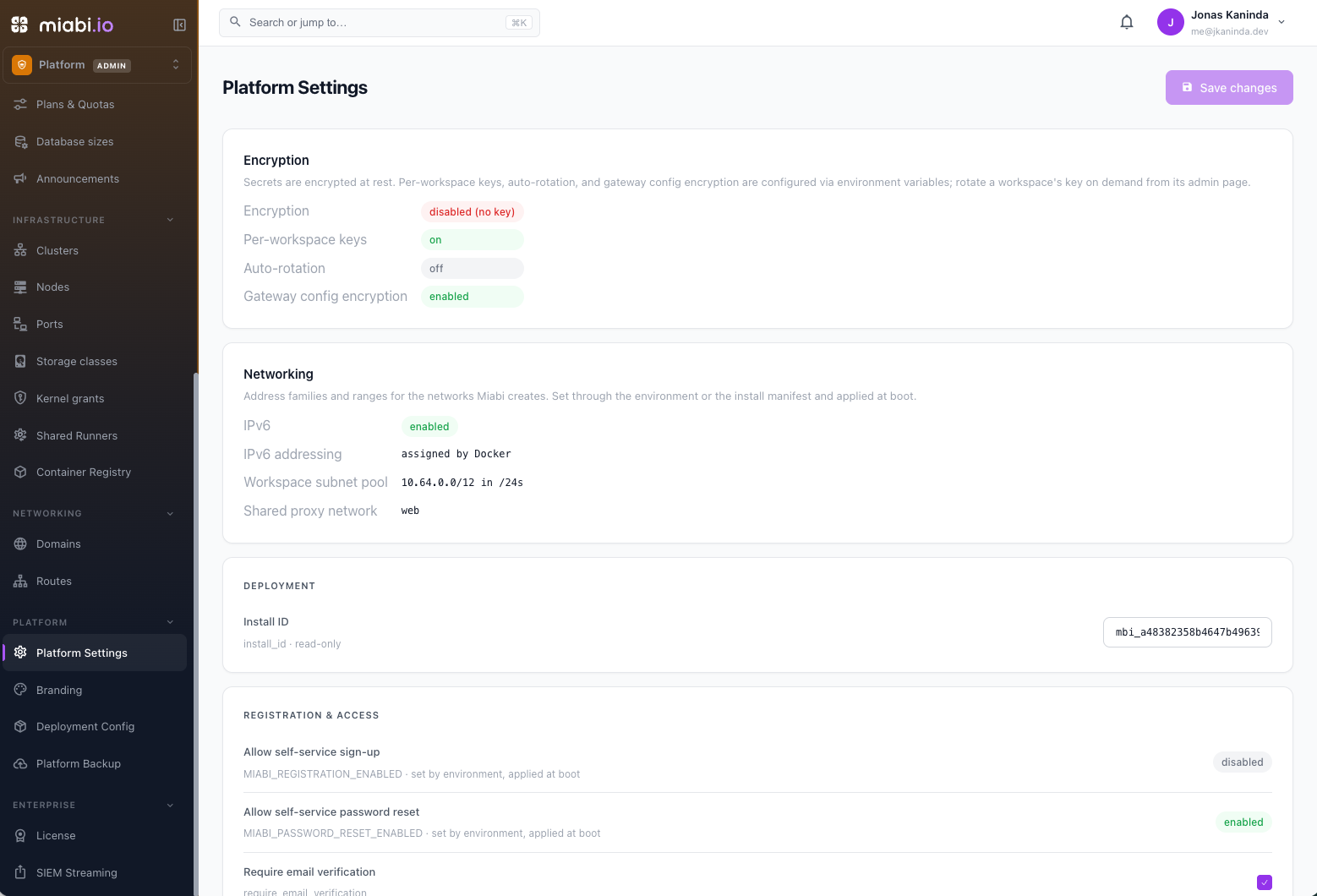
Admin → Platform → Platform Settings groups the settings into cards:
| Card | Setting | Effect |
|---|---|---|
| Registration & access | Require email verification (require_email_verification) | New self-service accounts must confirm their address before signing in |
Allowed signup domains (allowed_signup_domains) | Comma-separated allow-list for self-service sign-up; blank admits any domain | |
Let invitees create their account from the invitation (invitation_signup_enabled) | An invitee without an account can sign up from the invitation, even while self-service sign-up is closed (default on) | |
Who can create workspaces (workspace_creation) | anyone, except_invited (default) or admins_only — see Who can create workspaces | |
| Platform | Maintenance mode (maintenance_mode) | API requests are refused with HTTP 503, except sign-in, health checks and the platform admin endpoints, so admins can still operate the platform |
Allow custom container labels (custom_labels_enabled) | Fleet-wide kill-switch for custom container labels. When off, the feature is disabled everywhere regardless of any plan capability; when on, the per-plan capability decides | |
Allow pipelines from .miabi/pipeline.yaml (repo_pipelines_enabled) | Fleet-wide kill-switch for adopting a pipeline from a repository; when off, git apps always build directly | |
Control manager (control_manager_mode) | off, observe (default) or enforce — see Reconciliation | |
| Limits & retention | Default max workspaces per user — owned / — joined as member | The per-user caps for the whole install. With an Enterprise licence an organization may carry its own instead. Defaults: 10 owned, unlimited joined. -1 = unlimited, 0 = none |
Audit log retention (days) (audit_log_retention_days) | See Audit Log (default 90; 0 keeps entries forever) | |
| Resource limits | Max CPU cores per app / Max memory per app, MB | Per-application caps (0 = unlimited) |
Some keys are handled specially:
- Set by environment.
require_email_verification,allowed_signup_domains,invitation_signup_enabled,workspace_creationandcontrol_manager_modecan be pinned fromMIABI_REQUIRE_EMAIL_VERIFICATION,MIABI_ALLOWED_SIGNUP_DOMAINS,MIABI_INVITATION_SIGNUP_ENABLED,MIABI_WORKSPACE_CREATIONandMIABI_CONTROL_MANAGER_MODE. A pinned key is re-applied on every boot, shown as set by environment, and can't be edited. - Boot-time access controls. Allow self-service sign-up (
MIABI_REGISTRATION_ENABLED) and Allow self-service password reset (MIABI_PASSWORD_RESET_ENABLED) aren't stored settings. The Registration & access card shows them read-only — see Authentication. - Read-only. The Install ID is system-managed and shown under Deployment. The Encryption and Networking cards are read-only too: they report what boot configuration produced — encryption posture, and the address family, subnet pool and shared proxy network of Networks & subnets.
- Reserved. Keys named
cluster_nameor starting withapp.,image.orbrand.belong to other admin pages. They are hidden from this list and refused by the settings API.
Settings vs. environment variables
Some configuration is supplied at boot through environment variables (for example the metrics scrape interval and retention covered in Configuration), while platform settings are managed live in the console.
- Environment variables — set at startup; good for deployment-level and infrastructure values.
- Platform settings — changed at runtime through the admin UI; good for operational values you want to adjust without redeploying.
Prefer platform settings for values you expect to tune over time, and environment variables for values that belong to how the instance is deployed.