Audit Log
The audit log is an append-only record of every mutating action taken in Miabi. Whenever someone changes something — creates, updates, or deletes a resource — an entry is written that can't be edited or removed after the fact. It's your authoritative answer to who did what, and when.
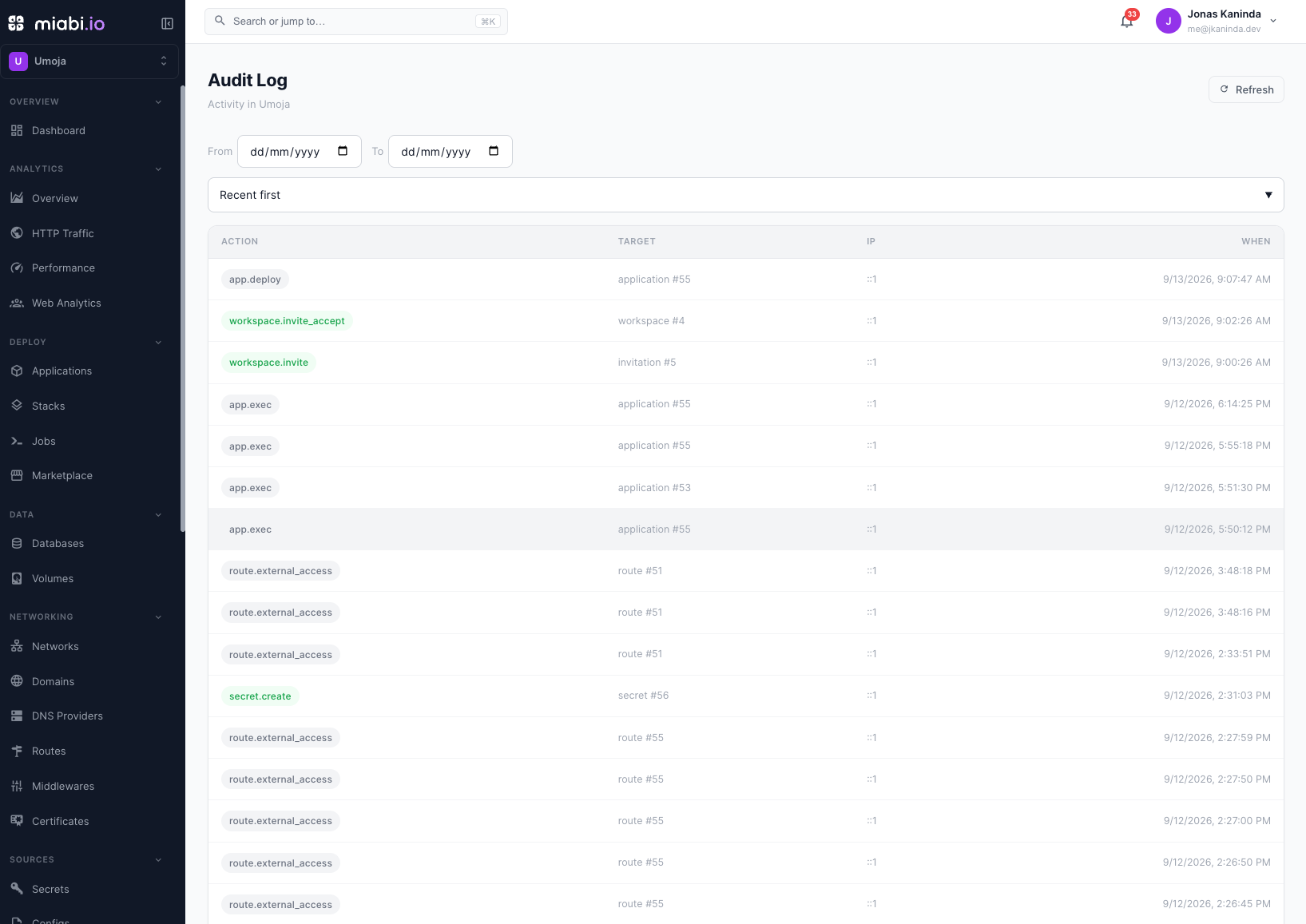
Entries are recorded in every edition, but viewing the audit log needs an Enterprise license with the
audit_log entitlement (Professional tier and up); without it the audit endpoints return HTTP 402.
Exporting it needs the separate audit_export entitlement. See
Community vs Enterprise.
What's recorded
Every action that changes state produces an audit entry, including:
- Application lifecycle — create, deploy, update, rollback, delete
- Domain and SSL changes
- Database provisioning, backups, and restores
- Volume and backup-target changes
- Workspace membership and role changes (invites, removals, role updates)
- Settings and configuration changes
Each entry captures who performed the action, what was affected, and when it happened — enough to reconstruct the sequence of changes to any resource.
The log records mutations (state-changing actions). Read-only activity like viewing a page or listing resources is not an audit event.
Querying per workspace
The audit log is scoped per workspace, so each workspace sees its own history and nothing from other tenants. Open Workspace → Audit Log to browse entries, narrow them to a From/To date range, and sort newest or oldest first. Open an entry to see its details, including the actor's name and email. Reading a workspace's audit log requires the Admin role.
Platform administrators see the platform-wide feed, with search and an action filter, under Admin → Overview → Events.
Exporting
With the audit_export entitlement, the log can be downloaded as JSON or CSV, streamed so an
export of any size stays cheap:
- Platform-wide — the JSON and CSV buttons on Admin → Events, or
GET /api/v1/admin/audit/export?format=csv&from=…&to=…. - One workspace —
GET /api/v1/workspaces/{workspace}/audit/export?format=json&from=…&to=…(workspace Admin).
from and to accept a date (2026-09-01) or an RFC 3339 timestamp. To ship events continuously
instead, use SIEM streaming.
Why it matters
An append-only audit trail is a cornerstone of operational and compliance practice:
- Accountability — every change ties back to a specific member.
- Incident response — when something breaks, the log shows exactly what changed and when, so you can correlate a failure with the action that caused it.
- Compliance — many frameworks (SOC 2, ISO 27001, and similar) require a tamper-evident record of administrative actions; an append-only log satisfies that requirement.
Pair the audit log with monitoring when investigating an incident: the audit log tells you what changed, and the metrics history tells you how the system responded.
Retention
Entries are append-only — never edited in place — but they are not kept forever. A daily job
deletes entries older than the audit_log_retention_days platform setting (default 90 days).
Set it to 0 to keep them indefinitely, and export anything you need beyond the window.
The audit log is a source of truth for what happened, but it is not a substitute for backups. It records that an action happened; it does not restore data.