Multi-node & clusters
One node is the default and the whole platform. Adding more changes where containers run, not how you use Miabi: a single control plane drives every node, grouped into clusters.
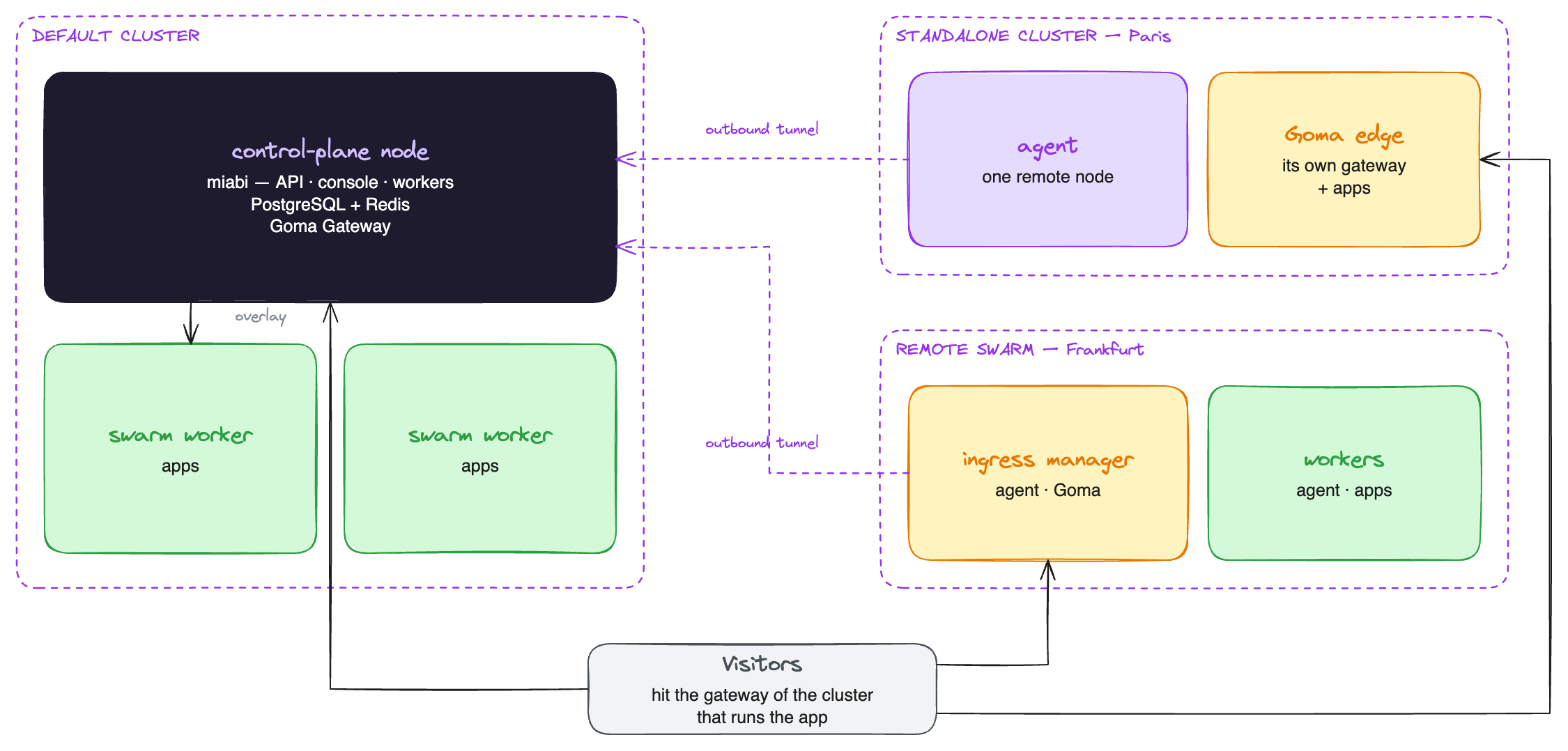
Clusters
Every node belongs to exactly one cluster. A cluster is the unit that shares private networking and a gateway, and there are three shapes:
| Cluster | What it is | Gateway serving its apps |
|---|---|---|
| Default | The control-plane node, plus every node that joins its swarm | The control plane's Goma Gateway |
| Standalone | One remote node connected to the manager over its agent tunnel. Every node you add starts as one | The node's own Goma (edge gateway) |
| Remote swarm | A Docker Swarm of remote nodes, made by enabling Swarm on a standalone node and joining others to it | The Goma on the swarm's ingress node |
Workspaces see clusters as locations. A new app, database, volume or stack is placed in a location, then on a node inside it; see Locations. Nothing crosses clusters at runtime: networks, volumes and database links stay inside one, and a reference to another location is refused. With an Enterprise license, a plan can bind its workspaces to locations and a node pool.
The tunnel goes outward
The agent dials the control plane, not the other way round. That single decision is what makes a homelab box, a NAT'd VPS or a machine behind a corporate firewall usable as a node: no inbound port, no exposed Docker socket, no VPN.
Once connected, the control plane holds a live Docker API client for that node and uses it exactly as it uses the local engine — the same code path creates a container whether it lands here or three hops away.
Every remote node is reached this way, a remote swarm's managers included, so the control plane drives a swarm in another region without opening a connection into that network. Miabi can install the agent on every member of a swarm for you.
How traffic reaches an app
Each cluster is served by its own gateway, and the DNS records for an app's routes point at it:
| Where the app runs | Gateway | DNS points at |
|---|---|---|
| Default cluster | The control plane's Goma, over the ingress overlay for swarm members | The cluster's public address |
| Standalone cluster | The node's own Goma | The cluster's public address |
| Remote swarm | The Goma on the swarm's ingress node, over that swarm's overlay | The cluster's public address |
Every app of the default cluster is served by the control plane's Goma, so its nodes run no gateway of their own. A cluster's public address is an IPv4 address, an IPv6 address, or both, plus a hostname for a record that cannot use an IP, set under Networking & DNS on the cluster's page: its gateway, or a load balancer in front of it. A remote cluster learns one address from the public IP its ingress node's agent connects from, until an administrator sets one; the other family is never guessed.
A remote gateway pulls its routes from the control plane over HTTP with its own token and reloads on demand, so routing and middleware definitions stay workspace-level wherever they are served. An administrator picks a remote swarm's ingress node from the cluster's page.
A node's connectivity says whether it runs a gateway of its own:
| Node connectivity | Meaning |
|---|---|
| Edge gateway | The node runs its own Goma and serves its apps. New nodes are always added this way |
| Cluster gateway | The node runs no gateway: its cluster's gateway reaches its apps. The control-plane node and swarm members |
A node without public ports 80/443 should join a swarm cluster as a worker, where it is served by the cluster's gateway.
Earlier releases could reach a node's apps through auto-allocated host ports. Upgrading converts such a node to an edge gateway, or to a cluster-gateway node when it is a swarm member, and removes the host ports Miabi held for it. The cluster page of a converted node then offers to keep its gateway or join it to a swarm cluster. Port bindings requested for TCP apps and database port forwarding are unchanged.
A gateway close to its apps is the point: traffic for a distant node or region terminates there instead of crossing the network twice.
Swarm in each cluster
Cluster mode promotes a cluster to a Docker Swarm, which adds encrypted overlay networks spanning its nodes, replicated apps, and cross-node service discovery. Each cluster is its own swarm: the default cluster's is auto-detected on the control-plane engine, and any other cluster runs one on its manager node, driven over the agent tunnel. It is opt-in: a plain single-node install behaves exactly as it did before, and nothing in the console asks you to think about Swarm.
A cluster other than the default one only takes and releases empty nodes, so its workspace networks are overlays from the start. Deploys are rationed per cluster, so a slow region cannot hold every worker slot.
Nodes, clusters and workspace_id scoping exist from the first install, so going from one node to
many, or from one cluster to several, adds rows — it never rewrites what is already there.
Technology stack
| Layer | Choice |
|---|---|
| Backend | Go, Okapi framework, REST + OpenAPI |
| ORM / DB | GORM over PostgreSQL |
| Cache / queue | Redis — cache, rate limiting, asynq queue, analytics stream |
| Scheduler | robfig/cron via a cron manager |
| Runtime | Docker Engine via the Moby Go client (github.com/moby/moby/client); Docker Swarm opt-in per cluster |
| Reverse proxy / TLS | Goma Gateway (routing + ACME); managed DNS-01 certs via go-acme/lego |
| Object storage | S3 (aws-sdk-go-v2) or filesystem |
| Metrics / logging | Prometheus client · jkaninda/logger |
| Frontend | Vue 3 + Pinia + Vite + TypeScript, embedded in the binary |