Cluster Mode
Cluster mode is Miabi's optional orchestration layer for running workloads across multiple nodes. It is built on auto-detected Docker Swarm, and gives you cross-node networking, service deployments, and automatic rescheduling — while keeping the single-node experience trivial for everyone who doesn't need it.
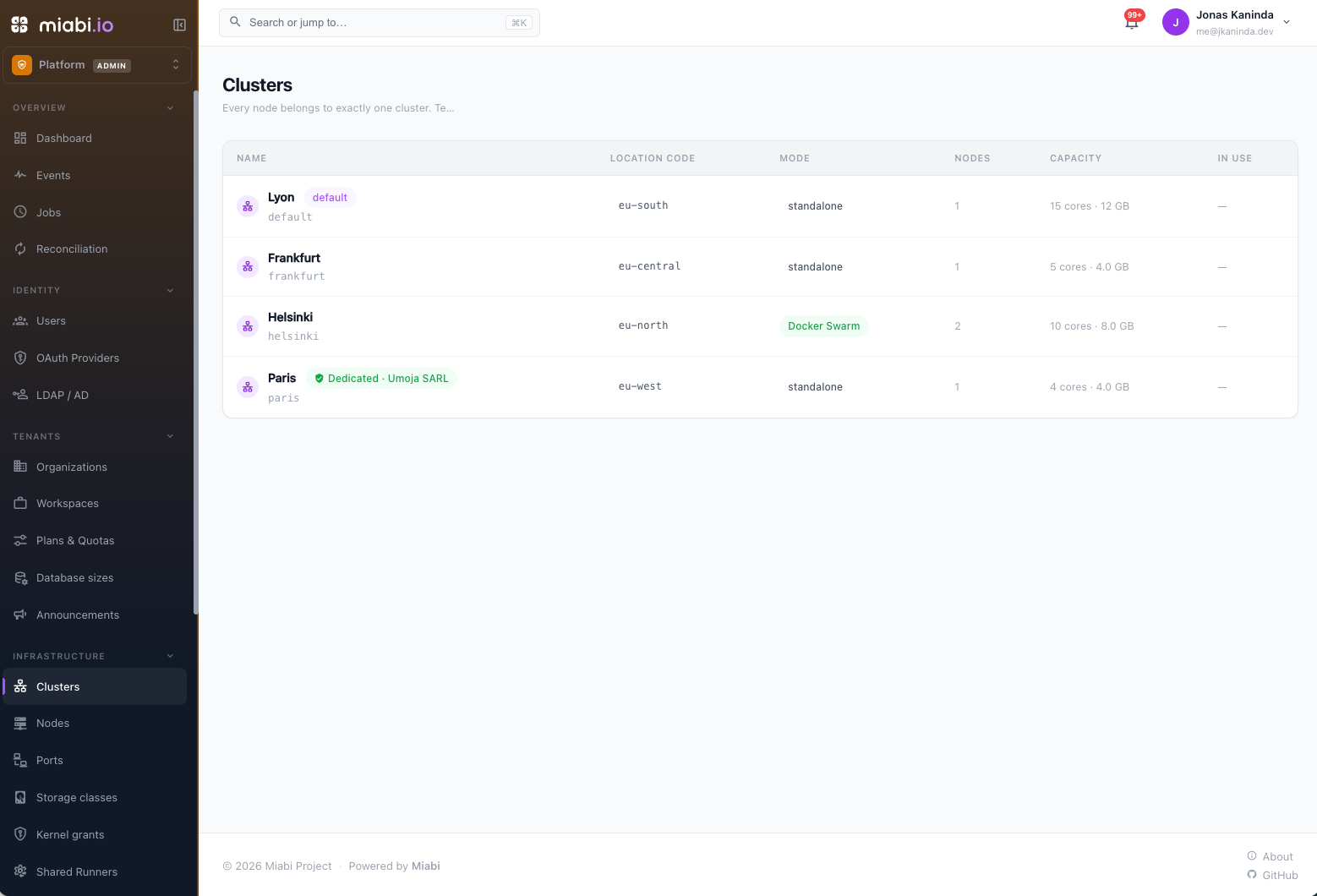
Single-node default vs cluster
By default, Miabi runs your nodes as standalone Docker hosts and deploys plain containers. Each node is an island: an app can reach a database on the same node, and Miabi enforces that — it refuses to attach an app to a database on a different node, because the workspace network is node-local and the name simply would not resolve. The same applies between two applications: a manifest whose app addresses a sibling on another node is refused at apply, for the same reason.
Cluster mode removes that limit. Your nodes become one fabric: apps, databases and sibling applications reach each other across hosts by name, over an encrypted overlay.
Nothing changes for single-node installs. Cluster mode is opt-in, and plain Docker stays first-class.
Before you enable it
Miabi runs a preflight check when you open the enable dialog, and it will tell you if this host cannot do the job. Two requirements are worth knowing up front, because both fail in the same confusing way — the swarm forms, names resolve, and then every connection between nodes times out.
The manager must be a Linux host
Docker Desktop, OrbStack and Rancher Desktop run the Docker daemon inside a Linux VM. Container networking lives inside that VM, behind the host's network stack — and Swarm's data plane cannot get in:
- VXLAN (
4789/udp) is never delivered to the VM; it only receives explicitly published ports. - IPSec is IP protocol 50, not a port at all, so there is nothing to forward.
The swarm will form and cross-node DNS will resolve. Then every connection between nodes will hang. Single-node cluster mode works fine on these engines — this is specifically about spanning hosts. For multi-node, run the manager on a Linux host with a routable address.
Miabi detects this and says so before the swarm exists.
Ports open between every pair of nodes
| Port | Purpose | Symptom if blocked |
|---|---|---|
2377/tcp | Cluster management (managers only) | Nodes cannot join |
7946/tcp + 7946/udp | Gossip and service discovery | Cross-node DNS does not resolve |
4789/udp | VXLAN — the overlay data plane | Names resolve, every connection times out |
esp (IP protocol 50) | IPSec for the encrypted overlay | Identical to a blocked 4789 |
That last row is the one people miss. Miabi creates the workspace overlay encrypted, so its data plane is IPSec — and ESP is a protocol number, not a port. A firewall or cloud security group that happily opens 4789/udp will still drop every packet.
sudo ufw allow 2377/tcp
sudo ufw allow 7946/tcp && sudo ufw allow 7946/udp
sudo ufw allow 4789/udp
sudo ufw allow proto esp from <peer-ip>      # IP protocol 50
Swarm has no NAT traversal. Each node dials the others directly on the ports above. A node behind NAT or CGNAT cannot join a swarm, however it was added to Miabi — the outbound agent tunnel does not help here, because Swarm does not use it.
Enabling cluster mode
Cluster mode is a platform-admin action (see Platform Administration):
- Open Clusters in the admin console, open the default cluster and choose Enable Swarm.
- Read the preflight findings.
- Set the advertise address — the address swarm peers reach this manager on.
Name the cluster and give it a location code (for example Frankfurt · eu-central) with Edit on the same page.
Miabi initializes (or adopts an existing) Docker Swarm and promotes the control-plane node as a manager. If a host is already part of a swarm it is recognized rather than reinitialized.
Swarm in other clusters
Every node you add is a standalone cluster of its own. To run another swarm, for example in a second region, open that node's cluster under Clusters and choose Enable Swarm. Miabi initializes the swarm on the node over its agent tunnel, so the control plane never opens a connection into that network. Join more nodes from the same page.
A cluster other than the default one only takes and releases empty nodes: a node with apps, databases or volumes is refused when it would join or leave, and Swarm is enabled or disabled only on an empty cluster. Its workspace networks are overlays from the start, so there is nothing to migrate. To bring a node that already runs workloads into a swarm, join it to the default cluster, which accepts it, or enable Swarm on an empty node in that location instead.
Each cluster has its own agent service and token, and deploys to a slow cluster cannot take every worker slot while deploys to other clusters wait.
A swarm outside the default cluster serves its own public traffic: the gateway on its ingress node, by default its manager, serves every route in the cluster, and DNS records for those routes point at the cluster's public address. The ingress node must run its own gateway (edge-gateway connectivity). To use another node, open the cluster and choose Gateway → Change. Nodes of the default cluster never run a gateway of their own: the control plane's gateway serves every app there.
Locations
Workspaces see clusters as locations. When a workspace can use more than one, the create forms for
apps, databases, volumes, stacks and marketplace installs show a Location picker, and manifests use
placement.location. A new resource is created in the location it
names, else the workspace's default location (set by workspace owners and admins under
Settings → General), else the first location the workspace may use. Only platform admins can pin a
node.
Inside a location, a new resource goes to the online, uncordoned node with the least container memory already placed on it. A service app is scheduled by Swarm, and a standalone cluster has one node.
From a cluster's Edit dialog, administrators can:
- restrict it to platform admins only, which hides it from workspaces;
- cordon it, so nothing new lands there while running workloads stay;
- set its public address, the IP (or hostname) that DNS records for its routes point at: its gateway, or a load balancer in front of it. A remote cluster learns the IP from the public address its ingress node's agent connects from until you set one;
- set its external domain for one-click app URLs (see External access);
- choose how service apps are reached by name (see Service load balancing).
Private networks never span locations. Attaching a database, mounting a volume, joining a stack, or referencing an app or database from a manifest across two locations is refused with a message naming both. Across two nodes of one location it is allowed only when the cluster runs a swarm.
A resource stays in the location it was created in. To move an application later, together with its volumes and databases, use a location migration (Enterprise).
External access
Each cluster has its own external domain for one-click app URLs,
with an optional certificate provider, both set in the cluster's Edit dialog. Point *.<domain> at the
cluster's gateway; the dialog shows the address to use. An app's generated URL is <label>.<domain> under
the domain of the cluster it runs in, from the console and from a manifest's externalAccess alike, and a
cluster without a domain has external access off. Two clusters cannot share a domain.
Changing the domain moves every generated URL in the cluster to the new domain, after a confirmation that says how many apps are affected; clearing it removes those URLs. Custom domains are untouched.
The default cluster's domain and provider can be pinned from the environment with
MIABI_EXTERNAL_BASE_DOMAIN and MIABI_EXTERNAL_BASE_PROVIDER, which the dialog then shows read-only. The
built-in registry is published as registry.<domain> under the default cluster's domain.
Service load balancing
A service app is reached by its name, from the gateway and from other apps. With Virtual IP, the default, the name resolves to one stable address that Docker balances across the replicas with the kernel's IPVS. Some hosts cannot run IPVS inside Docker's network namespaces, most often nodes that are LXC containers, for example on Proxmox. There the name still resolves but every connection is refused, so neither the gateway nor other apps reach the service, although its tasks run fine.
On such a cluster, set Service load balancing to DNS round-robin in the cluster's Edit dialog. The name then resolves to the replicas' own addresses. Running services switch in place, and later deploys use the setting. A client that caches DNS keeps using the replica it resolved until its cache expires, so traffic spreads less evenly than through a virtual IP. The network check tests a virtual IP on one node and tells you when to switch.
Node pools
A pool groups nodes by hardware or tier, for example pro or gpu. Set a node's pool from the
pool chip on its detail page, or clear it to take the node out. Miabi mirrors the pool onto the
node's Swarm label miabi.pool, so service placement can use it.
Pools bind nothing on their own: plan placement, an
Enterprise feature, gives them meaning. A plan that names a pool keeps its workspaces on that pool's
nodes, and a plan without one keeps them off every pooled node. Pools match by name in every location,
so pro in two locations is the same pool. A platform admin pinning a node bypasses the pool.
Cluster networking
This is what makes cross-node work.
Outside cluster mode, a workspace's default network is a node-local bridge — recreated on each node with the same name and subnet, but as disconnected islands. In cluster mode it becomes a Swarm overlay: one network that spans every node, attachable, and encrypted.
Because every app and every database already joins the workspace's default network, that single change is what lets an app on one node resolve and reach a database on another, by name, with no published ports.
Applying it to existing workspaces
Enabling cluster mode converts your workspaces automatically. But an install that was already in cluster mode when it upgraded never saw that transition, so its workspaces are still on node-local bridges — and cross-node connectivity silently does not work.
The default cluster's page will tell you:
N workspace networks are still node-local bridges. Apps and databases in them can't reach each other across nodes.
Click Apply cluster networking. Miabi creates the overlay, moves every container onto it (carrying its DNS aliases across), and removes the bridge.
Containers are not restarted. Connections already open inside a workspace drop briefly while it switches over, and apps reconnect through. No connection string changes — they address a database by its alias, not by its network.
Disabling cluster mode does the reverse first, before leaving the swarm: overlays exist only inside a swarm, so every workspace is moved back to a bridge or the disable is refused.
Managed vs unmanaged nodes
A swarm node with no Miabi agent runs tasks perfectly well — Swarm ships them to it and never involves Miabi — but Miabi has no Docker connection to it. That node is unmanaged, and it is a real limitation:
| Unmanaged node | Managed node (agent) | |
|---|---|---|
| Runs tasks | ✅ | ✅ |
| Logs | ✅ (the manager aggregates them) | ✅ |
| Uptime, status, placement | ✅ | ✅ |
| Metrics, CPU/memory stats | ❌ | ✅ |
| Shell (exec), processes | ❌ | ✅ |
| Housekeeping, disk usage | ❌ | ✅ |
Metrics and exec have no manager-side equivalent in Docker — there is no docker service stats, and you cannot exec into a task from the manager. So an app scheduled on an unmanaged node shows no resource usage and offers no shell, and the node's disk fills with nobody watching.
Manage cluster nodes
You do not have to SSH to each host. Swarm can carry the agent for you:
Clusters → a swarm cluster → Manage cluster nodes deploys the agent as a global service — one task on every node in the cluster, and on every node that joins later. Every node becomes managed, with no per-host step and no drift as the cluster grows.
Nodes that register this way appear in the Nodes list with a cluster badge: the swarm brought them in, an admin did not. Filter the Nodes list by cluster to see a cluster's nodes.
This grants Miabi the Docker socket — root-equivalent — on every machine in the swarm, now and in future. That is the right default for machines you already administer, and a surprising one for a shared cluster. It is an explicit action, not something enabling cluster mode does silently.
If your control plane uses a self-signed or private-CA certificate, the agents will fail to connect until you tell them about it — the host may trust your CA, but the agent container has its own certificate bundle. See Node agent → Private certificate authorities.
Running apps in a cluster
Runtimes
With cluster mode on, new apps created in the console default to the replicated service runtime: replicas, rolling updates, and rescheduling across nodes. You can switch any app back to a single container.
Declarative sources — GitOps, Terraform, marketplace templates — are deliberately excluded from that default, so a manifest produces the same runtime every apply regardless of whether cluster mode happened to be on. They stay containers unless the manifest sets deployment.runtime: service, along with deployment.replicas, deployment.update and placement.constraints, and they still join the workspace overlay, so they reach databases on other nodes just fine.
Miabi also keeps stateful apps (those holding node-local storage) as node-pinned containers, so their data is never left behind.
Placement
The two runtimes are placed by different things, and the console offers the control that actually decides:
- A container app is placed in a location; platform admins can also pin a node.
- A service app is placed by the Swarm scheduler, which ignores the node you pick. To put it somewhere specific, choose Placement → Pin to
<node>, which emits a real Swarm constraint.
Availability: draining a node
Each node in the cluster table has an availability setting:
| active | The scheduler may place new tasks here |
| pause | Existing tasks keep running; no new ones are placed |
| drain | Existing tasks are rescheduled off this node |
Drain is what makes a node safe to reboot. Without it, Swarm keeps scheduling onto a host that is about to disappear.
Setting a node back to active does not move its tasks back. Swarm never rebalances on its own — they stay where they were rescheduled until a redeploy, a scale, or a drain of their new node moves them again. Drain a node for a reboot, bring it back, and your cluster is quietly lopsided with no indication why.
Diagnostics
Network check
Cluster networking fails in a way that is almost impossible to read from the outside: the swarm forms, DNS resolves, and packets vanish. An app comes up, resolves its database to a plausible overlay IP, and hangs — which looks like a broken app, not a broken network.
Run network check, on a swarm cluster's page under Clusters, probes the real overlay between every pair of nodes in that cluster and separates the three failures that look identical from inside an app:
| Check | What it proves | Fix if it fails |
|---|---|---|
| DNS | Gossip is reaching the node | Open 7946/tcp+udp |
| TCP | The data plane carries packets | Open 4789/udp and ESP |
| 1400-byte payload | No MTU black hole | The path between nodes is not 1500-clean |
| Service virtual IP | Docker can balance a service's virtual IP on the node | Set service load balancing to DNS round-robin |
The payload check is the one nobody thinks to run, and the only one that catches an MTU black hole — where TLS handshakes succeed and every large response hangs forever.
Connectivity is tested in both directions for each pair, because a one-way firewall rule is common. A node with no Miabi agent cannot host a probe and is reported as unprobeable rather than silently omitted.
What each node is running
Every node's page shows the cluster tasks the scheduler placed there — service, image, state, and any task error. This comes from the manager, not the node's Docker, so it works even for an offline or unmanaged node, which is exactly when the containers list is empty and you would otherwise conclude the node is idle.
The cluster table also shows each node's capacity (vCPU and memory) and task count, reported by the node over the swarm control plane — so it is known even for a node Miabi holds no Docker client for.
What cluster mode gives you
- Cross-node east-west. Apps and databases reach each other by name across hosts, over an encrypted overlay, with no published ports.
- Service deployments. Replicas, rolling updates, and rescheduling.
- Cluster ingress. Public traffic reaches an app's tasks wherever the scheduler placed them, through the central gateway, with no host ports published on the node.
- Images across the swarm. Built images go to the internal registry and their pull credentials are distributed to workers, so a Git-built app deploys and rolls back on any node.
- Self-healing placement. If a node goes away, the orchestrator reschedules eligible services onto healthy nodes.
Cluster mode improves placement and networking; it does not automatically move persistent data. A replicated service can share storage across nodes only via a shared (RWX) volume (NFS/CIFS) or a host-path bind present on every node — see Volumes. An app backed by node-local storage stays a single, node-pinned container.
When to use it
| Use cluster mode when… | Stay single-node when… |
|---|---|
| Apps must reach databases on other nodes | Everything a workspace needs fits on one host |
| You need replicas and rolling, cross-node updates | Plain containers per host are enough |
| You want automatic rescheduling on node failure | Simplicity matters more than orchestration |
| Your nodes can reach each other directly | Your nodes are behind NAT and cannot |
Start single-node. Adopt cluster mode when you actually have multiple nodes that need to cooperate — you can enable it later without rebuilding your apps.
IPv6 covers bridge networks — a single-node install and each node's local networks. A cluster's overlays are not dual-stack yet, so cross-node traffic stays IPv4 even with IPv6 switched on.