GitOps
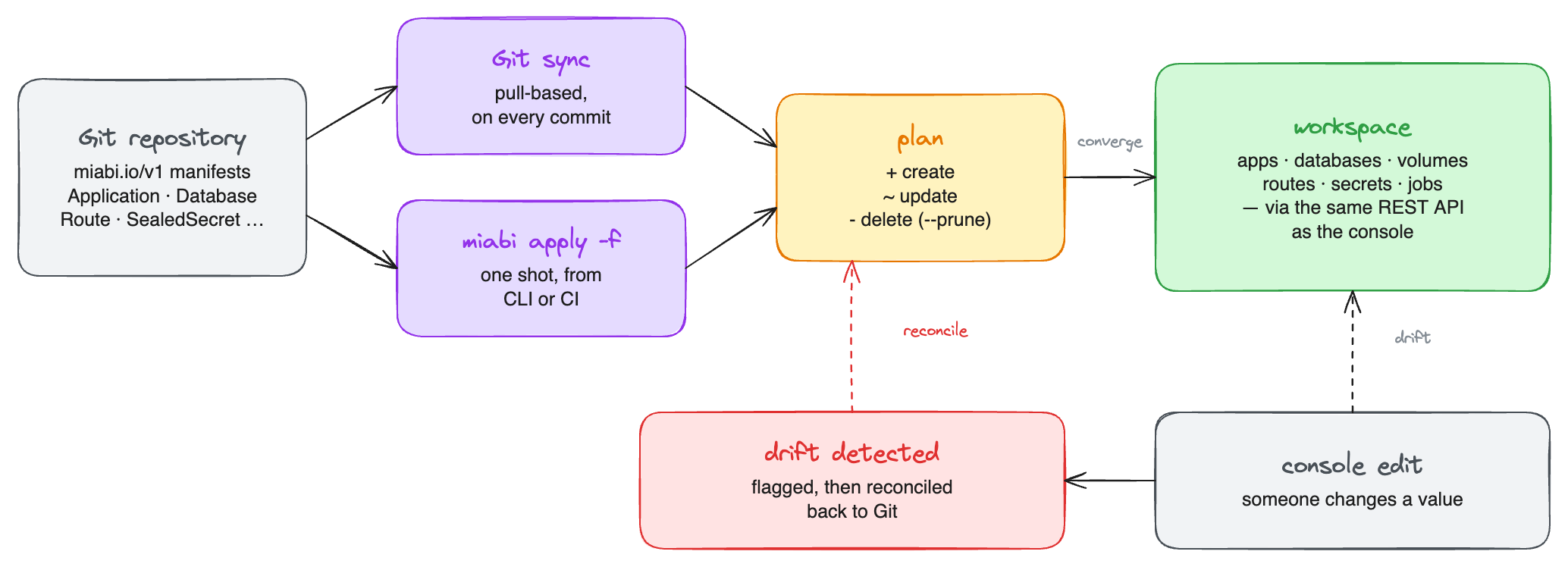
GitOps lets you manage Miabi resources declaratively. You describe the desired state of your apps, domains, and services as miabi.io/v1 manifests, and Miabi makes reality match — either by continuously reconciling from a Git source or via a one-shot apply.
Declarative manifests
A manifest describes what you want, not the steps to get there. Manifests use the miabi.io/v1 API version and a kind for each resource type, with a spec capturing the desired configuration:
apiVersion: miabi.io/v1
kind: Application
metadata:
  name: web
spec:
  image: miabi/guestbook
  tag: "1.0.0"
  ports:
    - container: 8080
      scheme: http
The workspace isn't part of the manifest — it comes from the apply target
(/workspaces/{workspace}/apply). Manifests are strictly parsed: unknown keys are rejected, so a
typo surfaces as an error rather than being silently ignored. Each resource kind has its own spec
(an Application has no domains field, for example — you expose it with a separate Route, as shown
in the full example below).
Manifests are the source of truth: edit the file, and the change flows into Miabi.
Eleven kinds are available — Application, Stack, Database, Volume, Secret, Config,
Registry, Middleware, Route, Domain and Project. The
manifest reference documents every field of each; this page covers
how they are reconciled.
Ordering is automatic. Dependencies are created before their dependants and torn down after them, so one bundle can declare a volume, a database, the app that uses both, and the route in front of it, and converge in a single pass.
Pull-based reconciliation
In the pull model, you connect a Git source (a repository and path holding your manifests). Miabi then continuously reconciles desired state from that source:
- Miabi does not watch the repository. Every three minutes, a sweep clones each
autosource at its ref and syncs it — on every run, whether or not a new commit has landed. Amanualsource syncs only when you select Sync now, or callPOST /api/v1/workspaces/{workspace}/gitops/{gitSourceID}/sync. - On each sync, it compares the manifests against the live state of your resources.
- It applies whatever changes are needed to converge — creating, updating, or removing resources to match.
This makes Git your single source of truth and your audit log: a commit is a change request, and reverting a commit reverts the cluster. Drift introduced outside Git is reconciled back toward the declared state on the next sync.
Keep your manifests in their own repository or a dedicated directory, and protect it with reviews. Every merged change becomes a tracked, revertible deployment.
Starting from an app you already have
You do not have to write the first manifest by hand. An application created in the console — from a Docker image or from a Git repository — can render itself as one: App → Settings → GitOps manifest → Generate. It describes the app as it is configured, including its source, ports, environment and the volumes it mounts, so you can commit it and point a Git source at it.
Two things it deliberately leaves out. Secret values are never included — each is listed by name
under secretEnv, so the vault stays the only place the value lives, and you create the secrets
separately (or declare them with generate: true). And the export covers that app and its
volumes, not the rest of the workspace: a bundle carrying resources the app does not own would
prune them if applied elsewhere with --prune.
Apps created by a marketplace install, or by apply or GitOps — a one-shot miabi apply included —
cannot be exported: the first is described by its template, and the second already has a manifest.
Source options
A Git source points at a repository, a ref (branch, tag or commit; main when omitted) and a
path (the subdirectory holding the manifests, . when omitted — every .yaml/.yml file under
it is parsed into one bundle). For a private repository, select a stored
Git credential; the source clones with it.
Five switches decide how far reconciliation goes and what the repository may contain:
| Option | Default | Effect |
|---|---|---|
| Sync policy | manual | auto syncs on the three-minute sweep; manual syncs only when you ask. |
| Prune | off | Delete managed resources that disappear from Git. Without it, removals are ignored. |
| Self-heal | off | Re-apply when live state drifts from Git, not only when Git changes. |
| Allow empty | off | Permit a manifest set with no resources to prune everything the source owns. |
| Sealed secrets only | off | Refuse a sync while any Secret carries a plaintext value. Use a SealedSecret or generate: true instead. |
Prune only ever deletes resources this engine created, and only those owned by this source — so a hand-created app, a console-provisioned database, or a sibling project's resources can never be removed by your manifests. A missing path is always an error rather than an empty desired state, so a wrong path can't be read as "delete everything".
An empty manifest set with prune enabled is refused unless Allow empty is set. That is the guard that stops a wiped directory from tearing down a workspace.
Deleting a source can optionally cascade, tearing down exactly the resources that source created and leaving everything else untouched.
Source status
| Status | Meaning |
|---|---|
Never synced (unknown) | The source has not been reconciled yet. |
| Progressing | A sync is running. |
| Synced | The last sync fetched the source and applied every change. |
| Error | The last sync failed — the clone, the path, parsing, or at least one change. The message names the first failure. |
The source's diff (GET …/gitops/{gitSourceID}/diff) shows the plan a sync would run without applying
it, and POST …/gitops/{gitSourceID}/resources/{kind}/{name}/sync converges one resource while leaving
the rest of the source alone.
Last sync vs. last check
The source's detail page shows both, and they answer different questions:
| Meaning | |
|---|---|
| Last check | The most recent reconcile, whether or not it changed anything — and whether it succeeded or failed. On an auto source this moves on every sweep, so it is how you tell the source is still running. |
| Last sync | The last reconcile that actually converged something — the commit whose apply created, updated or deleted a resource, with its author and message. It deliberately stands still while nothing ships. |
So a healthy source whose repository has only seen documentation commits for a month reads checked a minute ago, last synced a month ago — which is the truth. When the two commits differ, the check line names the newer revision and says it changed nothing.
One-shot apply
When you don't want continuous syncing, Miabi also supports an imperative apply — submit a manifest (or a set of them) once and Miabi reconciles to it a single time. Apply is useful for:
- One-off changes and quick experiments.
- Bootstrapping resources before wiring up a Git source.
- Scripted, ad-hoc updates from your own tooling.
Pull reconciliation vs apply
| Pull-based reconciliation | One-shot apply | |
|---|---|---|
| Trigger | A three-minute sweep (auto) or Sync now | Once, on demand |
| Source of truth | Git | The manifest you submitted |
| Drift handling | Corrected on every sync | Not re-checked after apply |
| Best for | Production, GitOps workflows | Bootstrapping, ad-hoc changes |
Both paths use the same miabi.io/v1 manifests. Start with apply to learn the schema, then connect a Git source when you're ready for continuous reconciliation.
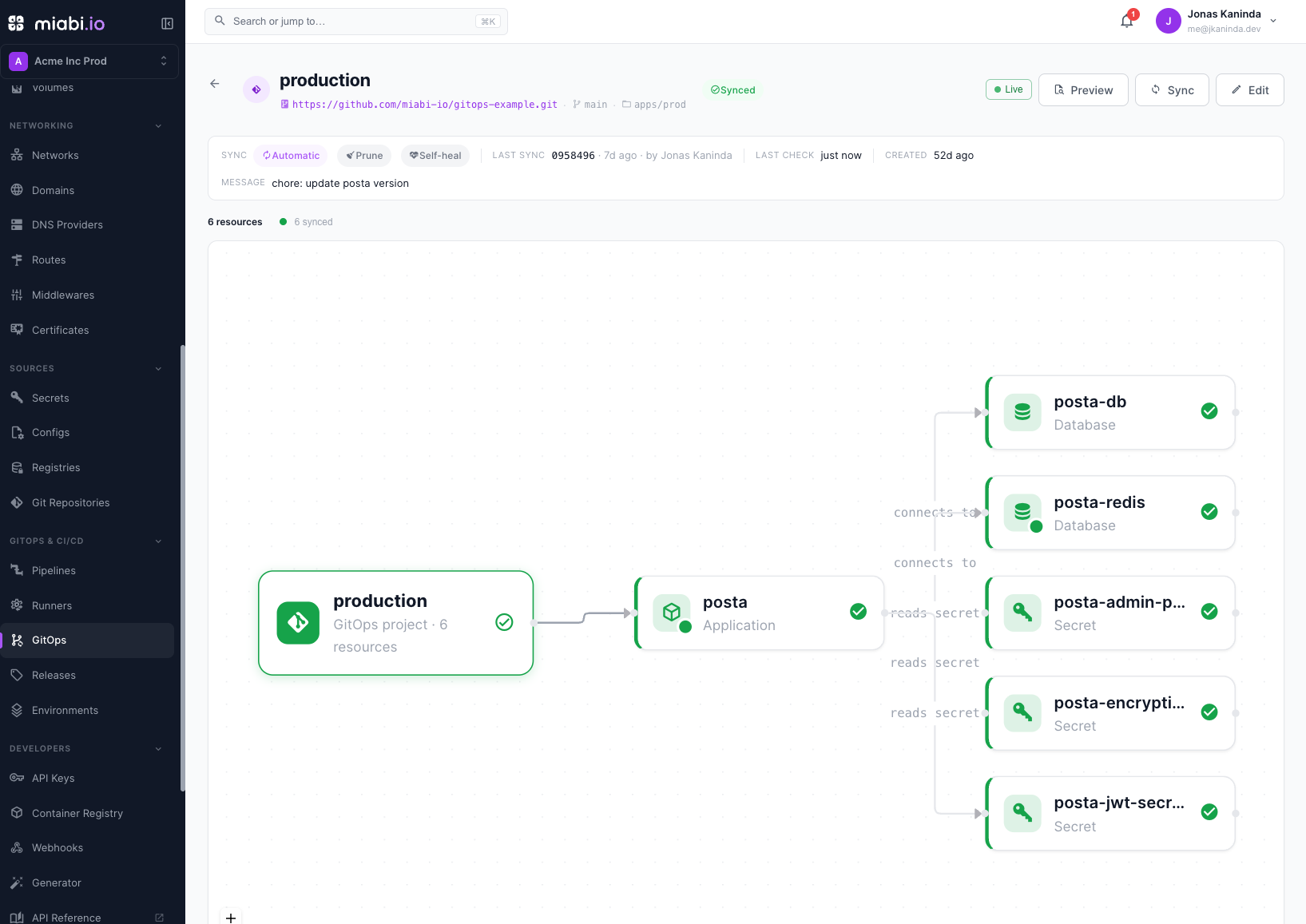
Full example: a Posta project
A real project usually bundles several resources — an app, its databases, a domain, and a route.
The Project kind groups them into one unit you apply or reconcile together. This example deploys
Posta (a self-hosted transactional-email platform) as a managed
PostgreSQL database, a dedicated Redis, the Posta server, and a public HTTPS route with automatic TLS.
apiVersion: miabi.io/v1
kind: Project
metadata:
  name: posta
spec:
  description: Self-hosted transactional email platform — Postgres, Redis, server, and route.
  resources:
    # Managed PostgreSQL — Posta's primary datastore.
    - apiVersion: miabi.io/v1
      kind: Database
      metadata: { name: posta-db }
      spec:
        engine: postgres
        version: "17-alpine"
        instance: auto           # auto | dedicated | shared

    # Dedicated Redis — async job queue + caches. Miabi sets a password on the
    # instance, surfaced below as .databases.posta-redis.password.
    - apiVersion: miabi.io/v1
      kind: Database
      metadata: { name: posta-redis }
      spec:
        engine: redis
        version: "8-alpine"
        instance: dedicated

    # Miabi generates these on the first apply and stores them encrypted — the
    # values never appear in this file or in Git. They are created before the
    # app that references them, and left untouched on every later apply, so
    # re-applying never rotates a running deployment's keys or locks you out.
    - apiVersion: miabi.io/v1
      kind: Secret
      metadata: { name: posta-jwt }
      spec:
        generate: true
        length: 48
    - apiVersion: miabi.io/v1
      kind: Secret
      metadata: { name: posta-encryption-key }
      spec:
        generate: true
        length: 32               # Posta requires exactly 32 bytes
    - apiVersion: miabi.io/v1
      kind: Secret
      metadata: { name: posta-admin-password }
      spec:
        generate: true
        length: 24               # reveal it in the vault to sign in the first time

    # The Posta server: HTTP API + web UI on :9000 with the worker embedded.
    - apiVersion: miabi.io/v1
      kind: Application
      metadata: { name: posta }
      spec:
        image: jkaninda/posta
        tag: "0.11.0"
        ports:
          - container: 9000
            scheme: http
        env:
          POSTA_ENV: production
          POSTA_WEB_URL: "https://posta.example.com"    # must match the route host

          # Database — resolved from the managed posta-db instance.
          POSTA_DB_HOST: "{{ .databases.posta-db.host }}"
          POSTA_DB_PORT: "{{ .databases.posta-db.port }}"
          POSTA_DB_USER: "{{ .databases.posta-db.user }}"
          POSTA_DB_PASSWORD: "{{ .databases.posta-db.password }}"
          POSTA_DB_NAME: "{{ .databases.posta-db.name }}"

          # Redis — host:port + password from the dedicated instance.
          POSTA_REDIS_ADDR: "{{ .databases.posta-redis.host }}:{{ .databases.posta-redis.port }}"
          POSTA_REDIS_PASSWORD: "{{ .databases.posta-redis.password }}"

          # Security — resolved from the generated secrets above, so nothing
          # sensitive is written here.
          POSTA_JWT_SECRET: "{{ .secrets.posta-jwt }}"
          POSTA_ENCRYPTION_KEY: "{{ .secrets.posta-encryption-key }}"

          # The first admin account. Set the email to yours; the password is
          # generated — reveal it once from the vault to sign in.
          POSTA_ADMIN_EMAIL: admin@example.com
          POSTA_ADMIN_PASSWORD: "{{ .secrets.posta-admin-password }}"
        secretEnv:            # these keys are stored encrypted at rest
          - POSTA_DB_PASSWORD
          - POSTA_REDIS_PASSWORD
        resources:
          memory: 512Mi
          cpu: "1"

    # The hostname Posta is served on (ownership + default TLS policy). DNS
    # verification is a runtime action after apply.
    - apiVersion: miabi.io/v1
      kind: Domain
      metadata: { name: posta.example.com }
      spec:
        tls: acme                # acme | custom

    # A gateway policy the route below runs. Declaring it here keeps the limit in
    # Git with everything else it protects.
    - apiVersion: miabi.io/v1
      kind: Middleware
      metadata: { name: posta-ratelimit }
      spec:
        type: rateLimit
        rule: { unit: minute, requestsPerUnit: 120 }

    # Public HTTPS route for the web UI / API, with automatic Let's Encrypt TLS.
    - apiVersion: miabi.io/v1
      kind: Route
      metadata: { name: posta-web }
      spec:
        hosts: [posta.example.com]
        app: posta
        port: 9000
        tls: acme                # acme | custom | off
        middlewares: [posta-ratelimit]   # the gateway chain, in execution order
Environment interpolation
Notice the {{ .databases.<name>.* }} references. In apply and GitOps you can resolve a managed
database's live connection details into an app's environment, so you never hardcode credentials:
{{ .databases.<name>.host }}   {{ .databases.<name>.port }}   {{ .databases.<name>.user }}
{{ .databases.<name>.password }}   {{ .databases.<name>.name }}   {{ .databases.<name>.uri }}
{{ .databases.<name>.url }}        # alias of .uri
Keys listed under secretEnv are stored encrypted at rest.
You can also pull values from the secret vault rather than writing them
into the file — {{ .secrets.<name> }} resolves at apply time, and a Secret declared in the same
bundle is created first, so a bundle can generate its own credentials:
- apiVersion: miabi.io/v1
  kind: Secret
  metadata: { name: posta-jwt }
  spec:
    generate: true        # Miabi generates a strong value; it never appears in the file
    length: 48
# …then, in the application's env:
#   POSTA_JWT_SECRET: "{{ .secrets.posta-jwt }}"
And one application can address another by name — {{ .applications.<name> }} resolves to the
address a sibling dials, with .host, .port and .scheme available separately:
# in the web app's env:
#   API_URL: "{{ .applications.api }}"        # http://api:8080
The target need not be declared in the same bundle, and declaration order does not matter. Both apps do have to be in the same location, and on the same node unless that location runs a swarm — see Addressing another application.
({{ .inputs.* }} is marketplace-template only.)
Apply it
Preview the plan first with a dry run, then converge:
miabi apply -f posta.yaml --dry-run   # print the plan; change nothing
miabi apply -f posta.yaml             # converge the workspace to it
miabi apply -f posta.yaml --prune     # …and remove managed resources no longer declared
miabi delete -f posta.yaml            # the inverse: delete exactly what the bundle names
Or over HTTP:
POST /api/v1/workspaces/{workspace}/apply
{ "manifests": "<the YAML above>", "dry_run": true, "prune": false, "delete": false }
Ordering is handled for you: databases come up before the app that references them, and the domain
before its route. After apply, verify the domain's DNS to activate TLS. To keep it in sync, commit
this file to a repository and connect it as a Git source with the auto sync policy — from then
on every commit is reconciled on the next three-minute sweep.
Start with dry_run: true to read the plan, apply once to bootstrap, then connect the Git source
for continuous reconciliation. The same file drives all three.
What converges
The plan compares the manifest against a live snapshot, and only fields that can be mapped back unambiguously take part — so a converged resource never shows phantom drift:
- Diffed: image, tag, digest, build
source, registry credential, command, resource caps, non-secret env, container labels, thesecurityblock, and per-port exposure. Routes and domains compare every field they declare. - Diffed only when stated:
deploymentandplacement, so a manifest silent about them leaves the console's settings alone. - Not diffed: create-time structure — the ports themselves, mounts, and stack membership.
- Never diffed: secret values (an existing
Secretis always in sync), andsecretEnvvalues, which appear in a plan as(secret).
The manifest reference covers this per kind.
Related
- Manifest reference — every kind and field.
- Creating a marketplace template — the same resources, packaged as a versioned, one-click template with user inputs.
- Pipelines
- Deploy on push
- Examples — a GitOps folder for every example app, a multi-app project, and staging and production.