Deploy on Push
There is no Git remote to push to in Miabi: you push to GitHub or GitLab as usual, and Miabi picks the change up. Two things can act on a push:
| Listener | What a push does | Set up in |
|---|---|---|
A pipeline with an on.push trigger | Runs the pipeline at the pushed commit: build, test, then deploy the app it is bound to | The pipeline's Push webhook dialog |
| A GitOps source | Reconciles the workspace against the manifests in the repository on its next sweep, when the source syncs automatically | The GitOps source |
A Git-backed application on its own does not redeploy when you push. Deploys of it are started from the console, the CLI, the API or GitHub Actions — or by a pipeline, as below.
Push to deploy an application
-
Give the app a pipeline. The simplest is to commit a
.miabi/pipeline.yamlto the repository. When you create a Git-source app from a repository that carries one, Miabi offers to adopt it, and from then on a deploy of that app runs through the pipeline. You can also create a pipeline in the console and bind it to the app. See Pipelines. -
Add a push trigger to the pipeline, listing the branches that should deploy:
on:
  push: { branches: [main] }
steps:
  - name: build
    uses: build
  - name: deploy
    uses: deploy
Leave
branchesempty and every branch fires a run. -
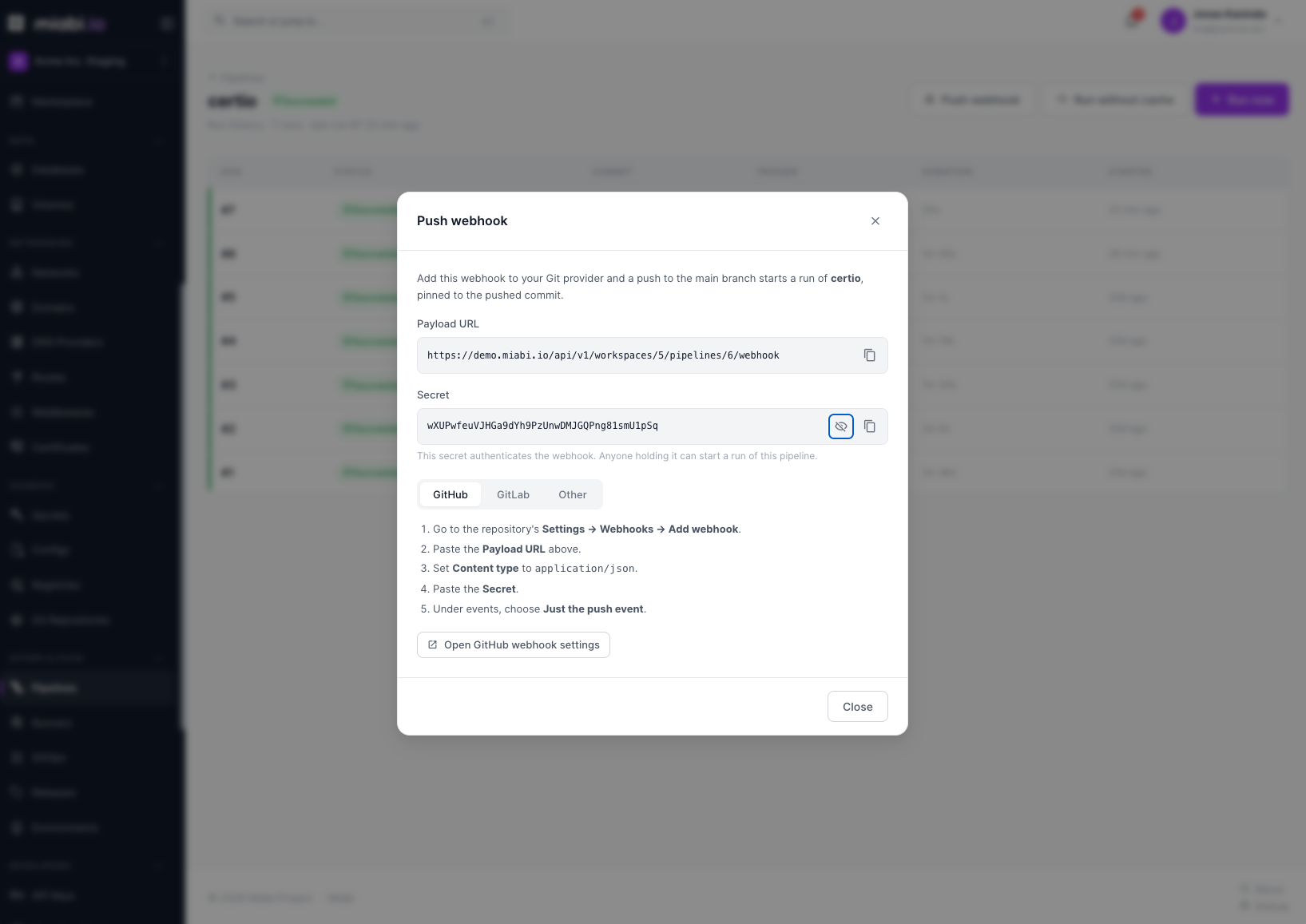
Add the webhook to your Git host. Open the pipeline and choose Push webhook. It shows the payload URL and the secret, with steps for GitHub and GitLab:
- GitHub — Settings → Webhooks → Add webhook: paste the URL, set Content type to
application/json, paste the secret, and choose Just the push event. - GitLab — Settings → Webhooks: paste the URL, paste the secret into Secret token, and tick Push events.
- GitHub — Settings → Webhooks → Add webhook: paste the URL, set Content type to
From then on:
- You push a commit.
- Your Git host calls the webhook. Miabi verifies it with the pipeline's secret — GitHub's
X-Hub-Signature-256HMAC, or GitLab'sX-Gitlab-Token— and rejects anything else. - If the pushed branch matches
on.push.branches, a run starts, pinned to the pushed commit. A push to any other branch is accepted and ignored. - The run builds the image on a runner, and its
deploystep rolls out a new deployment. Traffic shifts to the new release using the app's deploy strategy; the previous release stays available for rollback.
Because each push produces a standard deployment, you get the usual deployment history and rollback for free.
Deploy a stable branch (such as main) to production, and point a separate app and pipeline at a staging
branch. Put tests and scans in the same pipeline, before the deploy step, so a failing commit never ships.
Anyone holding a pipeline's webhook secret can start runs of it. Revealing it requires the Developer role; treat it like any other credential.
Push to reconcile a workspace
A GitOps source applies the manifests in a repository to a workspace. An automatic source reconciles every three minutes, so a push reaches the workspace within a few minutes with no webhook to configure. To apply a change sooner, or on a manual source, choose Sync now on the source.
Stored credentials
To build from private repositories and deploy private images, Miabi stores two kinds of credentials, encrypted at rest:
| Credential | Used for |
|---|---|
| Git credentials | Cloning private repositories — for builds, pipelines, and GitOps sources |
| Container-registry credentials | Pulling base images and private application images, and pushing built images to a registry |
Webhooks do not use these: each pipeline has its own webhook secret.
Both are managed in the console and are never stored in plain text and never logged. See Encryption for how secrets are protected at rest.
Grant credentials the least access they need — a deploy key or a scoped token rather than a personal account password — so a single connection can't reach more than it should.
Roles
| Action | Minimum role |
|---|---|
| View repositories and registry credentials | Viewer |
| Add, update, and test Git repositories and registry credentials | Developer |
| Reveal a pipeline's webhook URL and secret | Developer |
| Delete a Git repository or registry credential | Admin |
Related
- Deploy from Git
- Pipelines
- GitOps
- Encryption
- GitHub Actions — deploy from your own workflow instead.
- Webhooks & notifications — outbound webhooks for deploy events.