Pipelines
Pipelines bring pipeline-as-code CI/CD to Miabi. You describe the ordered steps that turn a specific commit into an image and a release — test, build, scan, deploy — and Miabi runs them on a build runner, streaming logs and per-step status to the console.
The spec
A pipeline is a declarative kind: Pipeline document. Keep it in your repo at .miabi/pipeline.yaml (versioned with the code), or create one from GitOps & CI/CD → Pipelines → New pipeline:
apiVersion: miabi.io/v1
kind: Pipeline
metadata: { name: web }
on:
  push: { branches: [main] }   # a push to main fires a run, pinned to that commit
  manual: true                 # also runnable from the UI / API
  schedule: "0 3 * * *"        # optional cron (runs the app's branch HEAD)
env:                           # optional; applied to every step
  NODE_ENV: production
  NPM_TOKEN: ${{ secrets.NPM_TOKEN }}   # resolved from the workspace vault
steps:
  - name: test
    image: node:20
    env: { CI: "true" }        # optional; adds to the pipeline's env
    run: "npm ci && npm test"
  - name: build
    uses: build                # builds the checked-out source, pushes it, captures the digest
    dockerfile: docker/Dockerfile   # optional; default "Dockerfile"
  - name: scan
    image: aquasec/trivy:latest
    continue-on-error: true    # report vulnerabilities without blocking the deploy
    run: "trivy image --exit-code 1 --severity HIGH,CRITICAL $MIABI_IMAGE"
  - name: deploy
    uses: deploy               # deploys the built image by digest
For a pipeline that uses every feature on this page, see A complete example.
Pipelines from your repository
A pipeline comes from one of two places:
| Defined in | Edited | |
|---|---|---|
| Repository pipeline | .miabi/pipeline.yaml in the app's repository (also .yml, or pipelines.yaml) | In Git — Miabi re-reads the file before each run |
| Console pipeline | The spec you save in the console or API | In the console or API |
When you create a Git-source app from a repository that carries a pipeline file, Miabi offers to adopt it. The adopted pipeline is bound to the app, and from then on deploying the app runs the pipeline instead of building directly. Miabi re-reads the file from the repository before every run, so a change you push takes effect on the next run.
Because Git owns it, a repository pipeline's spec, name, and binding cannot be edited in Miabi — change the file instead. It can still be disabled, which is the switch to reach for when a commit breaks it.
Adopting a repository pipeline lets whoever can push to the repository choose the images and commands a
runner executes. A platform admin can turn adoption off for the whole install with Allow pipelines from
.miabi/pipeline.yaml in platform settings; Git apps then always build
directly.
What a pipeline builds
A pipeline is bound to one source, chosen when you create it. The binding decides what the runner
checks out into the shared /workspace before the first step, and where a uses: build step pushes.
| Bound to | Checks out | Pushes to | uses: deploy |
|---|---|---|---|
| An application | the app's Git repository, at the run's commit | ws_<id>/<app-name> | yes — deploys that app |
| A repository | the registered Git repository, at the run's commit | ws_<id>/pl_<pipeline-name> | no |
| Nothing | nothing — steps run against an empty workspace | — | no |
Binding to a repository is how you build and push an image without an application attached: a library, a base image, a tool — anything you want built from a repo but not deployed as a Miabi app. Pick the repository and, optionally, a branch.
Over the API the field is git_repository, and it takes a name or an id — the JSON type decides
which, because an all-digit name is a valid handle:
"git_repository": "acme-api"   // the repository named acme-api
"git_repository": 3            // the repository with id 3
"git_repository": "123"        // the repository *named* 123, not id 123
Prefer the name: repository names are immutable and unique per workspace, and unlike an id they mean the same thing on another install. Names resolve within the workspace only.
- Branch is what manual and scheduled runs build. Leave it blank to use the repository's default branch. A push trigger always builds the commit it carries, whatever this says.
- Images land under
pl_<pipeline-name>in your workspace's registry namespace, kept apart from application images so a pipeline and an unrelated app of the same name never collide.
A pipeline binds to an application or a repository, never both — each supplies the checkout, so together there is no answer to what a run clones. Miabi refuses the combination.
The repository is picked from your registered Git repositories rather than typed as a URL. That keeps the choice of which repositories a workspace may reach inside its permissions, and reuses the credential already stored there.
An application-bound build shares its layer cache with direct deploys of that app, so invalidating the app's cache applies to both. A repository-bound pipeline has no application: its builds still reuse cached layers, but the only way to rebuild it from scratch is a run without cache.
A uses: deploy step needs an application, and a uses: build step needs a source. Both are
rejected when you save the pipeline, not at the moment a runner picks it up.
Steps
Each step is either a container step (image + run) or a built-in (uses:).
Container steps — image + run
run: is a shell command executed in a non-login shell inside the step image — the same model as a GitHub Actions run: step, so pipes, &&, and environment expansion all work. It overrides the image's entrypoint, so images that ship their own entrypoint (e.g. aquasec/trivy) still run your script — write the full command, including the tool name.
  - name: lint
    image: golangci/golangci-lint:latest
    run: "golangci-lint run ./..."
uses: build
Turns the checked-out workspace into an image — a Dockerfile build, or Cloud Native Buildpacks (see below) — pushes it to the built-in registry, captures the digest, and records an Image with build provenance (which runner produced it).
These optional keys configure the build:
| Key | Default | Description |
|---|---|---|
dockerfile | Dockerfile | Path to the Dockerfile, relative to the repository root — not to context, matching docker build -f. |
context | the repository root | Build context directory, relative to the repository root. |
build-args | — | Dockerfile ARG values, as a map. Not for secrets: build args are baked into the image history. |
cache | true | false rebuilds every layer of this step on every run. See Build cache. |
platforms | the runner's own | Platforms to build for, pushed as one image. See Multi-platform images. |
A monorepo commonly keeps its Dockerfile under docker/ while still building from the root:
  - name: build
    uses: build
    dockerfile: docker/Dockerfile
The path must stay inside the repository — an absolute path or one that climbs out with .. is rejected when the pipeline is saved, not at build time.
To build one service of a monorepo from its own directory, with a Dockerfile kept elsewhere:
  - name: build
    uses: build
    dockerfile: docker/api.Dockerfile
    context: services/api
    build-args:
      APP_ENV: production
      GO_VERSION: "1.25"
Build-arg names must be valid Dockerfile ARG names — letters, digits and underscores, not starting
with a digit — or the pipeline is refused when saved. Never pass a credential as a build arg: anyone
who can pull the image can read it back. See
Getting a credential into a Dockerfile build instead.
context and build-args need runner v0.0.8 or newer. An older runner would ignore them and
build the wrong image, so a run that uses either waits for a runner new enough, and its status says
so. Upgrade the runner to clear it.
Buildpacks
When dockerfile names a file that does not exist, the runner falls back to Cloud Native Buildpacks. Without a dockerfile key the build expects a Dockerfile at the repository root and fails if there is none. Buildpack builds need a docker-backed runner (MIABI_RUNNER_BUILDER=docker); the rootless BuildKit backend builds Dockerfiles only.
Multi-platform images
By default a build produces an image for the runner's own platform, so an image built on an amd64 runner
cannot start on an arm64 node. List the platforms your nodes run to build for all of them:
  - name: build
    uses: build
    platforms: [linux/amd64, linux/arm64]
They are pushed as one image: its digest names all of them, deploys stay deploy-by-digest, and each node
pulls the variant for its own architecture. Accepted values are linux/amd64, linux/arm64, linux/arm/v7,
linux/arm/v6, linux/386, linux/ppc64le, linux/s390x and linux/riscv64; anything else is refused when
the pipeline is saved.
- Runner — a multi-platform build runs only on a runner that supports it (runner 0.0.11 or later; its
detail page lists
multi-platformunder Features). Until one is connected the run waits and says why. - Emulation — building for another architecture than the runner's executes that architecture's
RUNinstructions under QEMU, which must be registered on the runner's host once (docker run --privileged --rm tonistiigi/binfmt --install all). A Dockerfile that cross-compiles on$BUILDPLATFORMneeds no emulation, and builds much faster. The build log warns when an emulator is missing. - Buildpacks build for the runner's own platform only; multi-platform needs a Dockerfile.
Build cache
Builds reuse cached layers, so a run rebuilds only what changed. The cache is kept per branch: a build of another branch reads its own cache and the app's main branch's, but writes only its own, so a branch can never seed layers into the cache the app's main branch builds from.
To rebuild from scratch:
- One step, always — set
cache: falseon thebuildstep. - One run — choose Run without cache on the pipeline, or Re-run without cache on a run (
no_cache: trueon the trigger or re-run API,--no-cachein the CLI). - An application's next build — invalidate the app's build cache (
miabi apps invalidate-cache). It applies to pipeline runs and direct deploys of that app alike.
uses: deploy
Deploys the image the build step produced, by digest — no rebuild: the node pulls exactly the digest the runner pushed. It targets the pipeline's bound app by default; app: <name-or-id> overrides the target. The deploy is queued once the whole run succeeds, so a failing later step stops it. This produces a normal Miabi deployment with the app's own deploy strategy, so releases, health checks, canary rollouts, and rollback all apply.
Triggers
on: decides how a run starts — a run is always pinned to a specific commit:
push— your Git host's push webhook fires a run for the pushed commit, when the branch is inbranches(an empty list matches every branch). See Deploy on push.manual— the Run now button orPOST …/trigger(HEAD of the app's ref, or a commit you pass).schedule— a cron entry that runs the bound app's branch HEAD.
Your own CI can also start a run by calling the trigger API, or with miabi pipeline run — full setup is in the pipeline example.
Environment & step outputs
Defining your own
env sets variables for every step; a step's own env adds to it and wins on a collision:
env:
  NODE_ENV: production
  NPM_TOKEN: ${{ secrets.NPM_TOKEN }}   # resolved from the workspace vault
steps:
  - name: test
    image: node:22
    env:
      CI: "true"
    run: npm ci && npm test
Values may reference a workspace secret as ${{ secrets.NAME }}. The
reference is resolved by the control plane when the job is dispatched — a runner never reads
your vault — and the resolved value is masked out of the live log stream. A reference to a secret
that does not exist fails the run before it starts, rather than running a build with a blank token.
When the same name is set twice, the last one wins:
pipeline env < values exported via $MIABI_ENV < step env
The run itself records what you asked for, not what it resolved to: the run and step detail (and
the API) show ${{ secrets.NPM_TOKEN }} verbatim, so a run stays a readable audit record and no
plaintext credential is stored alongside it.
A resolved secret travels to the runner and lives in that job's process environment for the duration of the step — the same trust already placed in a runner for registry credentials. A workspace's secrets are therefore only as protected as the runners registered to it, which is worth weighing before pointing a pipeline that references production credentials at a self-hosted runner on a shared machine.
MIABI_* names are reserved for the build context below and are rejected at save time, so a
pipeline cannot shadow the credentials the deploy step authenticates with. env is also rejected
on a uses: step: a built-in step runs no container of its own, so the value would be accepted and
silently dropped.
A uses: build step sees neither pipeline nor step env — it shells out to docker build, and
nothing crosses that boundary. (Build args would not be a safe channel either: a build arg is recorded in
the image history, where anyone who can pull the image can read it.)
Until BuildKit build secrets are supported, do the credentialed work in a container step before
the build and leave the result in the shared /workspace, which the build context is read from:
  - name: npmrc
    image: node:22
    env:
      NPM_TOKEN: ${{ secrets.NPM_TOKEN }}
    run: 'echo "//registry.npmjs.org/:_authToken=$NPM_TOKEN" > .npmrc'
  - name: build
    uses: build
Then make sure the file does not end up in the image — add it to .dockerignore, or write it
outside the build context.
Provided by the runner
The runner exports run context to every step as environment variables:
| Variable | Meaning |
|---|---|
MIABI_IMAGE | Image ref the build step produced (repo:tag) — set for steps after build |
MIABI_IMAGE_DIGEST | Immutable repo@sha256:… form of the same image |
MIABI_IMAGE_REPOSITORY | The repository a build step pushes to |
MIABI_COMMIT | Resolved commit the workspace was checked out at |
MIABI_REF / MIABI_BRANCH | The ref and branch the run builds |
MIABI_PIPELINE | The pipeline's name |
MIABI_RUN_ID / MIABI_RUN_NUMBER | The run's id, and the per-pipeline run counter |
MIABI_APP_NAME / MIABI_APP_ID | The bound application, when there is one |
MIABI_WORKSPACE_NAME / MIABI_WORKSPACE_ID | The workspace the run belongs to |
MIABI_WORKDIR | The shared workspace path inside steps (/workspace) |
MIABI_ENV | File to append KEY=VALUE lines to, for later steps |
MIABI_REGISTRY / MIABI_REGISTRY_USER / MIABI_REGISTRY_TOKEN | Registry host + per-job credentials (e.g. for a scanner to pull $MIABI_IMAGE) |
Exporting values between steps — $MIABI_ENV
Any step can hand values to later steps by appending KEY=VALUE to $MIABI_ENV — the same contract as GitHub Actions' $GITHUB_ENV:
  - name: version
    image: alpine
    run: "echo VERSION=$(cat VERSION) >> $MIABI_ENV"
  - name: tag
    image: alpine
    run: "echo building $VERSION"   # later steps see it
MIABI_IMAGE is published through this same channel by the build step.
continue-on-error
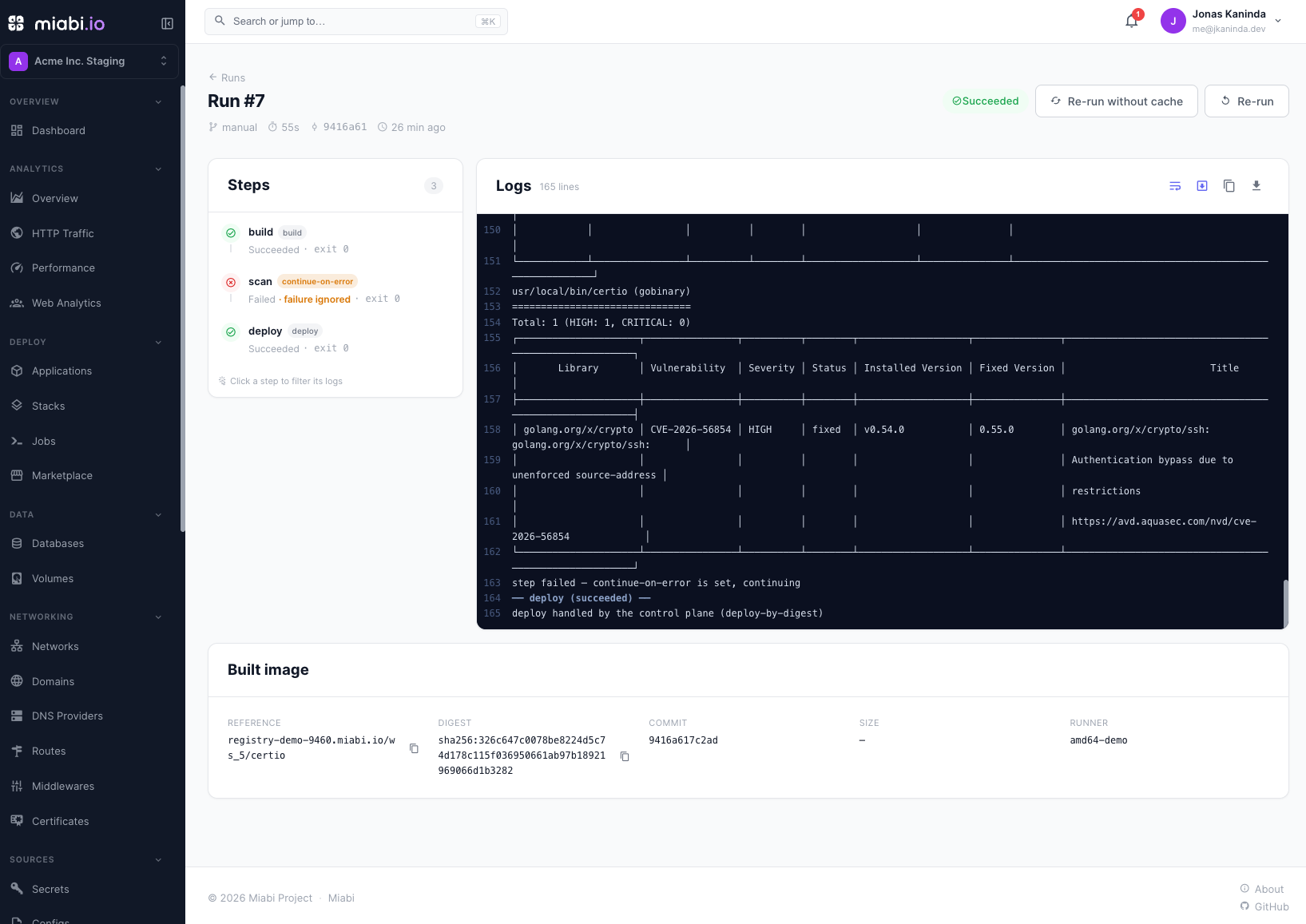
By default any step that fails aborts the run. Set continue-on-error: true to let the run keep going and still succeed when that step fails (the step is still recorded failed) — for report-only stages like a vulnerability scan:
  - name: scan
    image: aquasec/trivy:latest
    continue-on-error: true
    run: "trivy image --exit-code 1 --severity HIGH,CRITICAL $MIABI_IMAGE"
In the run view the step shows a red failed state with a continue-on-error marker and a "failure ignored" note, while the run itself is green — the same semantics as GitHub Actions.
Running & observing a run
Runs execute on a registered runner; with no runner available, a run waits for one and then fails. The run view shows a live stepper — each step transitions running → succeeded/failed in real time over SSE — with streaming logs you can filter per step, plus the built image (repository, digest, commit, size, runner). Every run records its resolved commit and produced image, and the history is retained for audit.
A run is pending until a runner takes it, then running, and ends succeeded, failed, or canceled. It records what started it — push, manual, schedule, or rerun. Re-run starts a new run of the same commit (POST …/runs/{runID}/rerun). The pipelines list follows run transitions live, and the API exposes the same stream at GET …/pipelines/runs/stream.
From a terminal, miabi pipeline ls, miabi pipeline run <pipeline> [--branch …] [--commit …] [--no-cache], and miabi pipeline rerun <run-id> [--no-cache] do the same — see the CLI.
Relation to deployments
A pipeline's deploy step produces a deployment — the same release object you see everywhere in Miabi, so deployment history, health checks, and rollback all apply. Pipelines orchestrate how a release is produced; deployments are what gets produced. To deploy on every push, add a push trigger and webhook — see Deploy on push.
A complete example
A Go API in a monorepo, released on every push to main: tested, versioned, built for two
architectures, scanned, announced, and deployed. The repository looks like this:
.miabi/pipeline.yaml
docker/api.Dockerfile
services/api/        # go.mod, main.go, VERSION
services/web/        # another service, built by its own pipeline
.miabi/pipeline.yaml:
apiVersion: miabi.io/v1
kind: Pipeline
metadata:
  name: api

on:
  push:
    branches: [main]          # every push to main runs, pinned to the pushed commit
  manual: true                # "Run now", the trigger API, `miabi pipeline run`
  schedule: "0 3 * * *"       # nightly rebuild of main, to pick up base-image fixes

env:                          # every container step gets these
  GOFLAGS: -mod=readonly

steps:
  - name: test
    image: golang:1.25
    env:
      CGO_ENABLED: "0"        # adds to the pipeline env for this step only
    run: |
      cd services/api
      go vet ./...
      go test ./...

  - name: lint
    image: golangci/golangci-lint:latest
    continue-on-error: true   # report findings without blocking the release
    run: cd services/api && golangci-lint run ./...

  - name: version
    image: alpine:3.20
    run: |
      VERSION="$(cat services/api/VERSION)-$(echo "$MIABI_COMMIT" | cut -c1-7)"
      echo "VERSION=$VERSION" >> "$MIABI_ENV"    # later steps see $VERSION
      echo "$VERSION" > services/api/.version    # the Dockerfile copies it in

  - name: build
    uses: build
    dockerfile: docker/api.Dockerfile   # relative to the repository root
    context: services/api               # build from the service's own directory
    build-args:
      GO_VERSION: "1.25"
    platforms: [linux/amd64, linux/arm64]

  - name: scan
    image: aquasec/trivy:latest
    continue-on-error: true
    run: |
      TRIVY_USERNAME="$MIABI_REGISTRY_USER" TRIVY_PASSWORD="$MIABI_REGISTRY_TOKEN" \
        trivy image --exit-code 1 --severity HIGH,CRITICAL "$MIABI_IMAGE_DIGEST"

  - name: notify
    image: curlimages/curl:latest
    continue-on-error: true
    env:
      SLACK_WEBHOOK: ${{ secrets.SLACK_WEBHOOK }}   # resolved from the workspace vault
    run: |
      curl -fsS -X POST -H 'Content-Type: application/json' \
        -d "{\"text\":\"$MIABI_PIPELINE #$MIABI_RUN_NUMBER built $VERSION ($MIABI_IMAGE_DIGEST)\"}" \
        "$SLACK_WEBHOOK"

  - name: deploy
    uses: deploy              # deploys the image above by digest once the run succeeds
And the Dockerfile it builds. Paths in COPY are relative to the context, services/api:
ARG GO_VERSION=1.25
FROM golang:${GO_VERSION} AS build
WORKDIR /src
COPY . .
RUN CGO_ENABLED=0 go build -o /api .
FROM gcr.io/distroless/static
COPY /api /api
COPY .version /VERSION
ENTRYPOINT ["/api"]
What each step does:
| Step | What it shows |
|---|---|
test | A container step. It sees the pipeline env plus its own, and runs in the checked-out /workspace. |
lint | continue-on-error: findings mark the step failed, but the run can still succeed and deploy. |
version | Exports VERSION to later steps through $MIABI_ENV, and writes it into the build context as a file. |
build | Builds docker/api.Dockerfile from services/api, with a build arg, for both platforms. It sees no env, so the version reaches the image as the file version wrote. |
scan | Uses the per-job registry credentials to pull the image it just built, by digest. |
notify | Reads a workspace secret, and the VERSION exported earlier. |
deploy | Queued only once the whole run succeeds, and deploys exactly the digest build pushed. |
A few things to know before you copy it:
- The scheduled run deploys too. Every successful run ends in
deploy, including the nightly one. Leave outscheduleif a rebuild should not release. - A missing secret fails the run before it starts. Create
SLACK_WEBHOOKin the workspace vault, or drop thenotifystep. context,build-argsandplatformsneed recent runners: v0.0.8 for the first two, 0.0.11 forplatforms. A run waits, and says why, until a runner that supports them is connected.- Keep
.versionout of Git. It is generated on every run. Add it to.gitignore.
Related
- Build runners
- Container registry
- GitOps
- Deploy on push
- GitHub Actions — build on GitHub's runners and deploy the result.
- Webhooks & notifications
- Examples — a ready
.miabi/pipeline.yamlfor Node.js, Go, Python, PHP, Laravel, Java and Spring Boot.