Licensing
Miabi Enterprise is unlocked by a signed license key. The key is verified offline, with no phone-home — your instance never contacts a licensing server to validate or renew. The anonymous installation statistics are separate, and can be turned off.
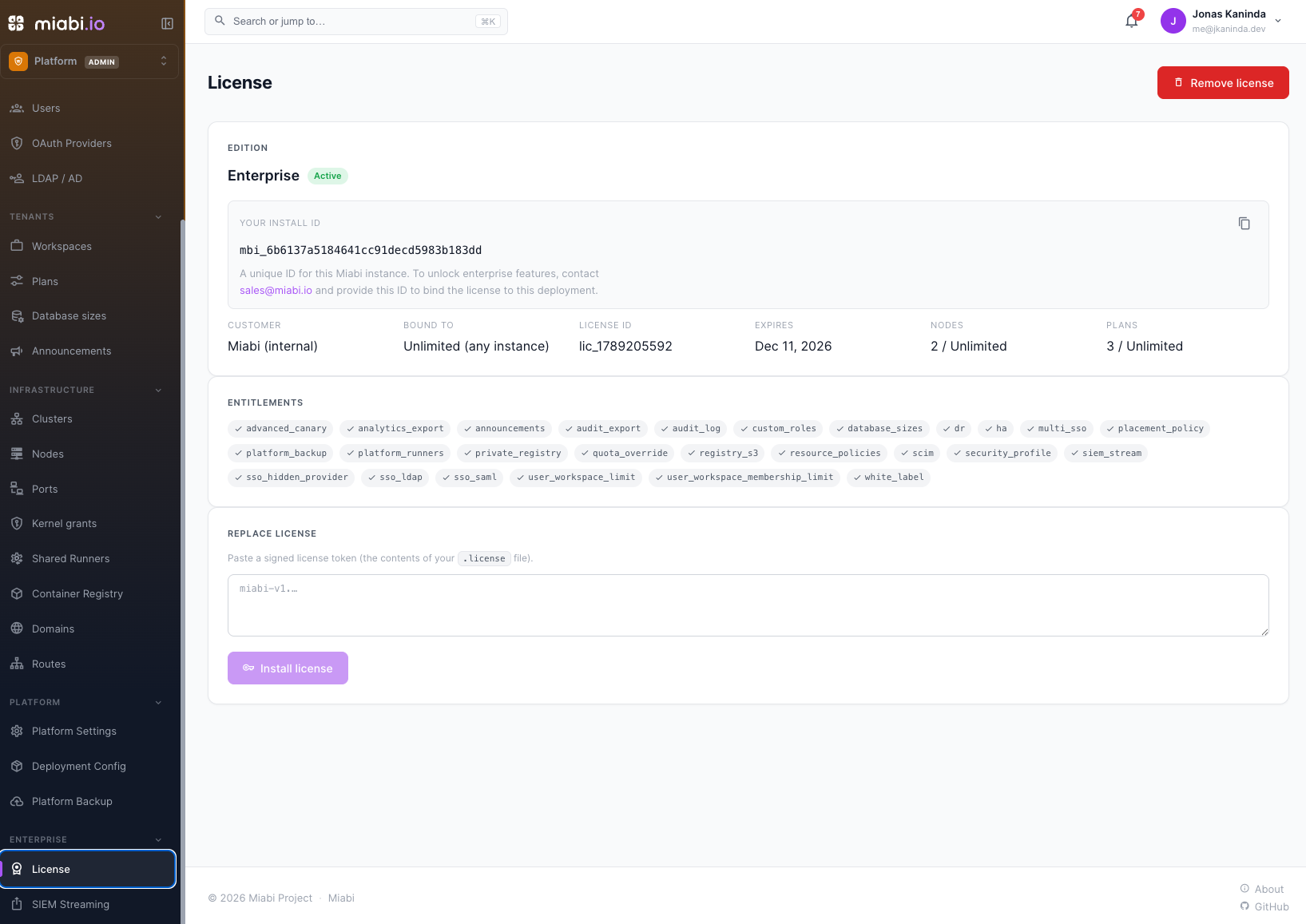
Getting a license
To unlock Enterprise features, contact sales@miabi.io.
- As a platform admin, open Admin → License in the web console and copy your Install ID.
- Email sales@miabi.io with that Install ID to obtain a license key.
- Install the key on the same Admin → License screen. Enterprise features unlock immediately — no restart or network call required, and the console reflects your active edition.
Keep your license key somewhere safe alongside your other operational secrets. You'll need it again if you rebuild or migrate the instance.
Installing from a file
For an install described as code, point Miabi at the license on disk instead of pasting it: set
spec.license.file in the install manifest, or
MIABI_LICENSE_FILE on a Compose install. The file is only read when the database holds no
license, so a key installed from Admin → License takes precedence.
What a license is bound to
A license can name the deployment it belongs to, and every binding it carries must match:
| Binding | Matches |
|---|---|
| Install ID | This instance's Install ID exactly. It is generated once, stored in the database, and survives restarts and upgrades. |
| URL | The hostname of the instance's configured web URL. At install, the host you are installing through also counts. Scheme, port and path are ignored. |
A key bound to a different instance is refused at install. If a binding stops matching later — a database restored onto a new instance, say — the license stays installed but grants no features, and the License screen names the binding that failed.
License states
| State | What it means |
|---|---|
| Valid | Within its term. Everything it grants works. |
| Grace | Past its expiry date, within the grace days the license carries. Everything still works, and admins see a warning. |
| Degraded | Past the grace period. Enterprise features keep running but become read-only: existing configuration is served, and nothing licensed can be created or changed. |
| None | No license, or one that fails verification. The instance runs as Community. |
Removing the license from Admin → License returns the instance to Community.
Limits
Besides feature flags, a license can carry two caps. Where it sets neither, Enterprise is uncapped.
| Limit | Effect | Community |
|---|---|---|
| Nodes | Registering a node beyond the cap is refused. Nodes already registered keep working, and the License screen warns when usage is over the cap. | 3 |
| Plans | Creating a plan beyond the cap is refused. | 3 |
Storage classes are capped the same way, but by edition rather than
by a license value: Community holds two in total, the built-in default included, and any license
granting the feature lifts the cap outright.
The commercial tiers set them as follows:
| Tier | Nodes | Plans |
|---|---|---|
| Professional | 10 | 5 |
| Business | 25 | 15 |
| Enterprise | Unlimited | Unlimited |
The License screen shows current usage against both.
Where to go next
- Community vs Enterprise — what each edition includes.
- Platform Admin — the account that activates the license.