Node Agent
The node agent is a small, standalone program (Go module github.com/miabi-io/agent) that connects a remote Docker host to your Miabi control plane. It is intentionally thin: it is a Docker proxy that exposes only the local Docker socket and nothing else.
What the agent does
The agent has one job — let the control plane drive Docker on the remote host. It:
- Dials the control plane over an outbound WebSocket tunnel.
- Authenticates with the node's join token each time it connects.
- Relays Docker API calls (pull, create, start, stop, inspect, prune…) to the local Docker socket.
- Reports node status, container state, and resource usage back over the same tunnel.
- Says which node it is. On connect it reads its own Docker
/info— over the socket it already has — and reports the host's name and, in cluster mode, its swarm node id. The control plane cannot work that out for itself, and without it a service's replica cannot be traced back to the node running it, so its logs and metrics become unreachable. The node is the authority on which node it is. - Forwards gateway analytics. On a node that runs its own gateway, it drains the gateway's request events from the node-local Redis to the control plane, so those apps appear in Workspace Analytics.
It runs no scheduling logic of its own — all decisions live in the control plane. That keeps the agent tiny and easy to audit.
The agent needs no host paths mounted
The install command mounts only the Docker socket, and that is deliberate. In particular you do
not need to bind /proc or /mnt to give Miabi visibility into the host:
-
Host CPU and memory.
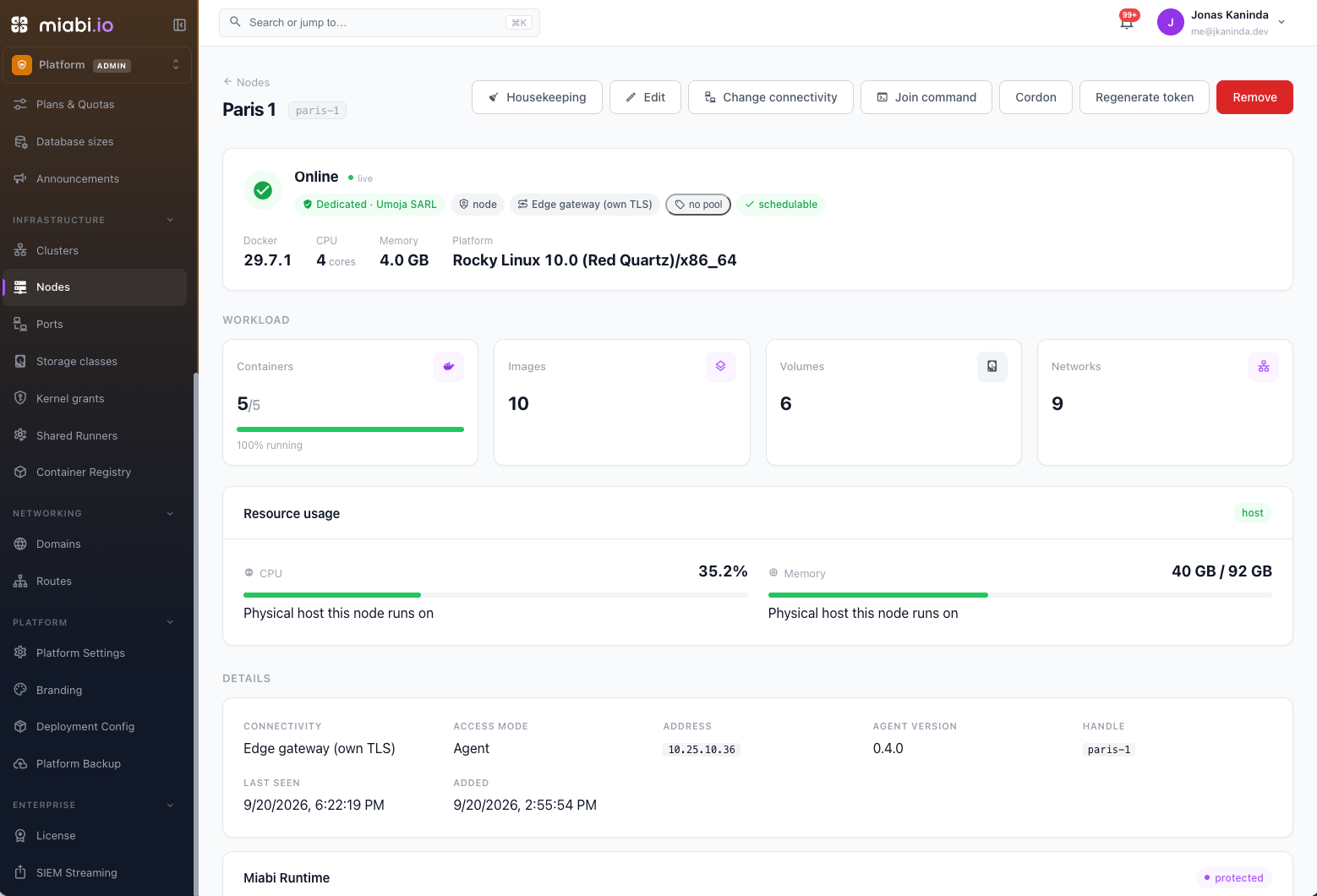
/proc/statand/proc/meminfoare not namespaced — a container reads the host's values. Miabi samples a node by running a short-livedbusyboxon it through the Docker API, so a node's real CPU and memory appear on its node page and on the admin dashboard with no extra mounts and no agent upgrade. The figure is cached for up to a minute, because each sample costs a container start.A node that is itself a container/procis not cgroup-aware: a node running as a container or a memory-limited VM reports the machine underneath it, not its own limit. Miabi checks each sample against Docker'sMemTotal(which is cgroup-aware) and, when they disagree, labels the node page "Physical host this node runs on" and leaves that node out of the fleet totals — otherwise several nodes on one box would each add that box's whole usage. -
Storage class directories. A bind's source path is resolved by the node's own Docker daemon, so
/mnt/ssd1means the node's/mnt/ssd1— the agent never touches it.
Both work identically on nodes reached without an agent at all (a swarm member, or a node exposed over TCP), because both go through the Docker API rather than through the agent's own filesystem.
Security model
The agent is designed to be safe to run on hosts behind NAT or a firewall:
- Outbound only. The agent initiates the connection; the node needs no inbound ports open. The control plane never connects to the node.
- Local socket only. The agent exposes the host's Docker socket to the tunnel and nothing more — no shell, no arbitrary file access, no extra listeners.
- Token-authenticated. The node's join token authorizes the agent on every connection. Miabi keeps only its hash; Regenerate token on the node page invalidates the old one.
- Encrypted transport. With an
https://control URL, the WebSocket tunnel runs over TLS to the control plane.
Exposing the Docker socket is equivalent to root on the host. Run the agent only on machines you trust and control, and protect the join token like any other secret.
Installing and running the agent
The agent is configured through environment variables (with equivalent CLI flags for the bare binary — see Binary). The two required values are:
| Variable | Description |
|---|---|
MIABI_CONTROL_URL | Your control plane's base URL, e.g. https://miabi.example.com |
MIABI_NODE_TOKEN | The node's join token (mbn_…), shown once when you added the node |
After you create the node in the console, Miabi shows the exact docker run command for that node —
copy it and run it on the host. It looks like this:
docker run -d --name miabi-agent --restart unless-stopped \
  -v /var/run/docker.sock:/var/run/docker.sock \
  -e MIABI_CONTROL_URL=https://miabi.example.com \
  -e MIABI_NODE_TOKEN=mbn_xxxxxxxx \
  miabi/agent:latest
Install script
The install script does the same thing with a preflight check and status verification. It installs Docker Engine when the host has none (run it as root; the same way the Miabi installer does), then starts the agent and confirms it stayed up. It installs the agent's newest stable release, read from versions.miabi.io:
curl -fsSL https://get.miabi.io/agent | \
  MIABI_CONTROL_URL=https://miabi.example.com MIABI_NODE_TOKEN=mbn_xxxxxxxx bash
You can also pass the values as flags (--control-url, --token), pin a release with
AGENT_VERSION=v0.6.2 or the whole image with --image / MIABI_AGENT_IMAGE (either skips the
lookup), rename the container with --name / MIABI_AGENT_NAME, or skip TLS verification with
--insecure. Set MIABI_SKIP_DOCKER_INSTALL=1 on a host whose packages are managed elsewhere: the
script then requires Docker to be present instead of installing it. Run with no values on an
interactive shell and it prompts for them.
The install script has no option for a private certificate authority. If your control plane uses one,
start the agent with docker run and MIABI_CA_CERT instead — see
Private certificate authorities.
Binary
Pre-built binaries are published for Linux and macOS (amd64 and arm64) on each release. Use them to run the agent as a host process — under systemd or launchd — on a node where you would rather not add a container to supervise the containers.
There is no Windows build, deliberately. The agent reaches Docker over a unix socket or TCP, and Windows serves its daemon on a named pipe — a Windows binary would build cleanly and then fail to find Docker on every machine it ran on.
Pass the same environment:
MIABI_CONTROL_URL=https://miabi.example.com \
MIABI_NODE_TOKEN=mbn_xxxxxxxx \
./miabi-agent
Or use the equivalent flags — each defaults to its environment variable, and a flag wins when both are set:
./miabi-agent \
  --control-url https://miabi.example.com \
  --token mbn_xxxxxxxx
All settings
| Flag | Variable | Default | Description |
|---|---|---|---|
--control-url | MIABI_CONTROL_URL (falls back to MIABI_API_URL) | — | Control plane base URL. Required. |
--token | MIABI_NODE_TOKEN | — | The node's join token. Required. |
--ca-cert | MIABI_CA_CERT | — | CA that signed the control plane's certificate: a path, base64, or PEM. See Private certificate authorities. |
--insecure | MIABI_AGENT_INSECURE_SKIP_VERIFY | false | Skip TLS verification. Last resort. |
| — | DOCKER_HOST | unix:///var/run/docker.sock | The local Docker endpoint (unix:// or tcp://). |
| — | MIABI_DEV_MODE | false | Debug-level, human-readable logs instead of JSON. |
The analytics forwarder takes its settings from the control plane. MIABI_NODE_SLUG,
MIABI_GATEWAY_REDIS_ADDR, GATEWAY_REDIS_PASSWORD and MIABI_ANALYTICS_STREAM override them if you
need to pin one by hand.
Run the agent under a process supervisor (systemd Restart=always or --restart unless-stopped) so it reconnects automatically after reboots or transient network drops.
Private certificate authorities
If your control plane serves a self-signed or private-CA certificate, the agent will refuse to connect:
agent disconnected  error="tls: failed to verify certificate:
                          x509: certificate signed by unknown authority"
This is the single most common agent failure, and the reason is worth stating plainly: the host may
trust your CA, but the agent container does not. The container ships its own certificate bundle,
which has never heard of your authority. curl works on the node and fails inside a container — same
machine, different trust store.
There are two ways out, and they are not equivalent:
| What the agent does | |
|---|---|
MIABI_CA_CERT | Trusts this authority. Verification still happens, anchored on your CA — a forged certificate is still rejected. |
--insecure | Trusts any certificate. No verification at all. Anyone able to intercept the connection can impersonate a control plane that drives Docker on this node. |
Prefer the first. --insecure (env MIABI_AGENT_INSECURE_SKIP_VERIFY=true) exists as a last
resort for someone who cannot get their CA onto the node.
Supplying the CA
MIABI_CA_CERT accepts three forms, and the agent works out which:
A file path — usually the best option. The node already trusts the CA; mount the file it already has, and it stays correct when the CA is rotated on the hosts:
docker run -d --name miabi-agent --restart unless-stopped \
  -v /var/run/docker.sock:/var/run/docker.sock \
  -v /etc/pki/ca-trust/source/anchors/my-ca.crt:/etc/pki/ca-trust/source/anchors/my-ca.crt:ro \
  -e MIABI_CONTROL_URL=https://miabi.example.com \
  -e MIABI_NODE_TOKEN=mbn_xxxxxxxx \
  -e MIABI_CA_CERT=/etc/pki/ca-trust/source/anchors/my-ca.crt \
  miabi/agent:latest
Base64 — a flat, transport-safe token. A certificate is multi-line, and an environment variable is a poor place for newlines: they survive some transports and not others, and a PEM whose line breaks were eaten is not a PEM at all.
-e MIABI_CA_CERT="$(base64 -w0 < my-ca.crt)"
The PEM itself, inline, for a hand-run agent.
The CA is added to the system trust pool, not swapped for it — an agent trusting a private CA can still verify a public certificate later.
Trusting a CA does not skip the hostname check. A certificate that does not name the address the
agent dials will still be rejected (cannot validate certificate for <host>), however well its
authority is trusted. Issue a certificate whose SANs include your control plane's hostname.
In a cluster
When you deploy agents from Clusters → a swarm cluster → Manage cluster nodes, the dialog offers the same three choices — trust a CA file already on the nodes, paste a certificate, or skip verification — and Miabi can fetch the certificate your control plane currently serves so you do not have to find it. Whichever is in force stays visible on the cluster's page, so a workaround taken once to get a self-signed certificate working cannot quietly become permanent. See Cluster mode.
Verifying the connection
Back in the console, the node flips to online once the tunnel is up and the Docker socket responds. From there it becomes an eligible scheduling target. If it stays offline, check the agent's logs, the host's outbound network access, and that the token is the node's current one — after Regenerate token, the old token is rejected.
Keeping the agent current
Miabi checks once a day whether a newer agent has been released, and shows the answer on Admin → Nodes. It only ever notifies — it never upgrades an agent for you. The agent is the control plane's only route to its host, so an agent that replaced itself and came back broken would take the node's remote management with it. That is a decision for a human with a shell.
The Agent column carries one of two badges:
| Badge | Meaning | Urgency |
|---|---|---|
| Update | A newer release exists. | None. This agent is supported. |
| Unsupported | The agent is older than the minimum this control plane supports (0.4.0). | Upgrade it. |
An agent below the minimum still connects, deploys and reports healthy — but it does not forward its node gateway's request events, so the node contributes nothing to Workspace Analytics and its traffic is simply missing from the graphs.
A node with no badge is either current or has never reported a version. Miabi deliberately shows nothing rather than guessing: an install that cannot reach versions.miabi.io must not have its whole fleet painted as out of date. The Unsupported verdict is decided locally against the minimum, so it stays accurate on an air-gapped install where the release check has never succeeded.
Only stable releases are offered. Release candidates and betas are filtered out by version as well as by channel, so a candidate cannot reach your nodes even if it is published to the wrong channel.
Upgrading an agent
On the node's page, Upgrade beside the agent version produces a command to run on that host. It reads the running agent's token back out of its own container, so you do not need to regenerate one, and it pulls the new image before removing the old container — a pull that failed after the agent was gone would leave you without a way back into the node.
If you installed the agent with Docker Compose, prefer your own docker compose pull && docker compose up -d: it preserves the environment you configured, which a hand-written docker run does
not.