Docker Import
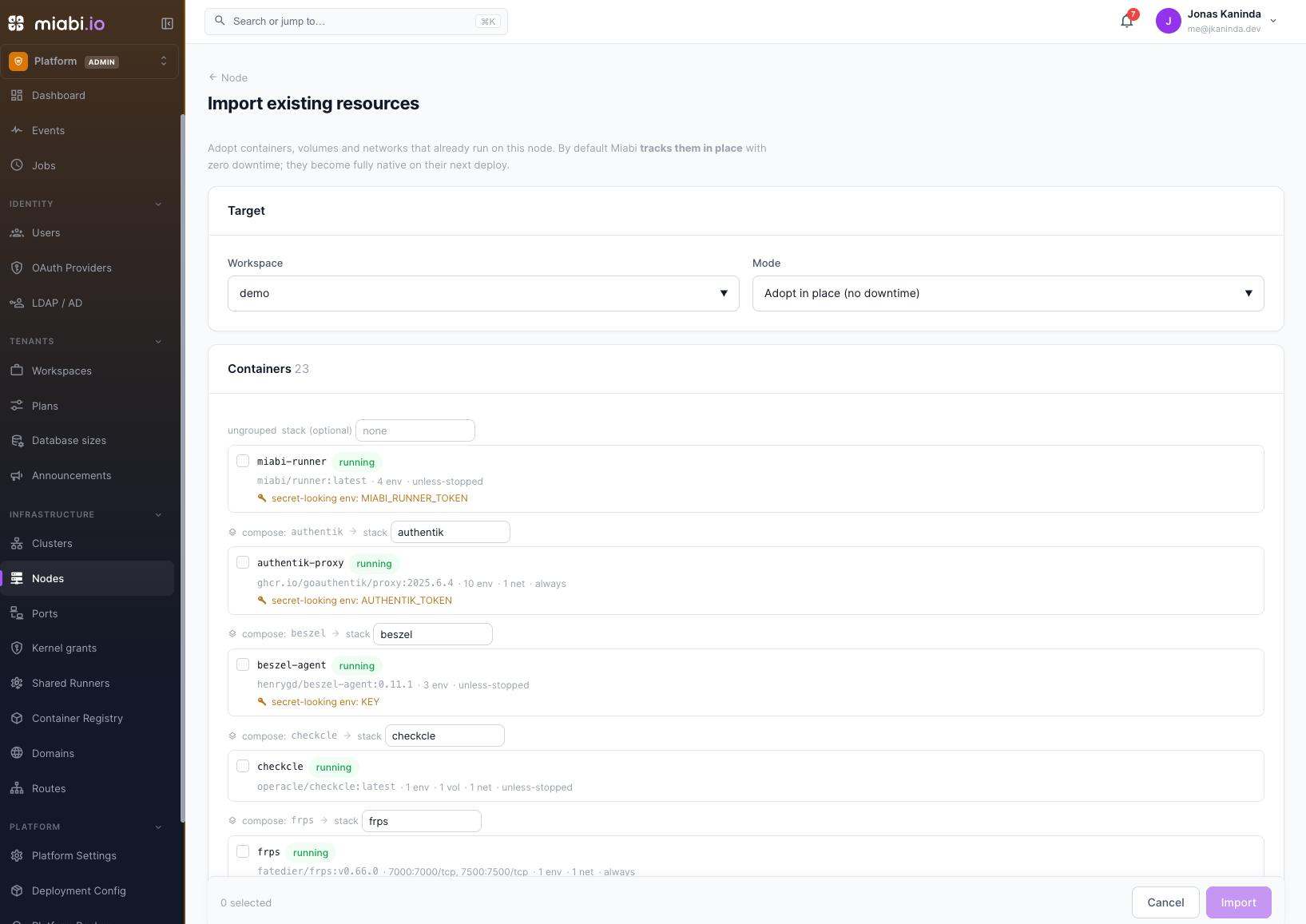
Docker import lets you adopt resources that already exist on a node — containers, volumes, and networks created by hand or by another tool — and bring them under Miabi management. It's the bridge between an existing Docker setup and a Miabi-managed one, with no need to tear anything down.
Why import
If you're moving an existing host into Miabi, you likely have workloads already running:
- Containers you started with
docker runor Compose. - Volumes holding real data you can't recreate.
- User-defined networks wiring services together.
Rather than recreating these from scratch, import lets Miabi discover them and take over their lifecycle — so they show up in the console, count toward drift reconciliation, and can be managed like anything else.
What you can import
| Resource | Result after import |
|---|---|
| Containers | Adopted as applications, with their image, environment variables, attached volumes and published ports |
| Volumes | Tracked as Miabi volumes, attachable like any other |
| Networks | Recorded as workspace networks, so connected workloads are wired correctly |
Containers that belong to the Miabi platform itself — its database, gateway, agents — are never offered, and are refused if a request names them.
How import works
- Open the node in the console and choose Import existing (a platform-admin area — see Platform Administration).
- Miabi scans the node's Docker engine and lists resources it found that aren't yet managed. Containers are grouped by Compose project, and environment variables that look like secrets are flagged.
- Pick the workspace to import into and the mode (below).
- Select the containers, volumes, and networks you want to adopt. Each Compose project becomes a stack of the same name — rename it, or leave ungrouped containers out of any stack.
- Confirm. Each item reports its own result, so one failure never aborts the rest.
Adopt or reconcile
| Mode | What happens to a container |
|---|---|
| Adopt in place (default) | Miabi records the live container as the app's current release. It keeps running, with no downtime, and becomes fully native on its next deploy. |
| Reconcile now | Miabi adopts it, then immediately deploys the app under Miabi's conventions, replacing the original container. |
Adopt in place is non-destructive: your containers keep running and your volume data is untouched. Reconcile now recreates each container, so expect a restart.
Environment variables are imported as plain app variables. Move anything sensitive into secrets after importing. Host ports the container already publishes are recorded as approved bindings.
After importing
Once adopted, imported resources behave like any Miabi workload:
- They appear in the console and are subject to drift reconciliation.
- An adopted app keeps its original container until its first deploy through Miabi.
- You can update, restart, or remove them through Miabi.
Import early when onboarding an existing host, then open Housekeeping. Any container still listed as untracked is a candidate for import or cleanup.