Plans & Quotas
Every workspace is governed by a plan that defines its quotas (how much of each resource it may use) and capability gates (which features it can access). Limits are applied per workspace, so one workspace's usage never affects another.
Everything on this page is gated by MIABI_PLAN_ENFORCEMENT, which defaults to true. Set it
false and nothing here binds: every quota check passes and every capability gate is open, whatever
plan a workspace is on.
The plan catalog
A platform admin manages plans under Admin → Plans. A fresh install is seeded with two:
| Plan | What it is |
|---|---|
| Pro | The default. Every workspace with no plan assigned lands on it. |
| Unlimited | A system plan: no limits, pinned to Miabi's own system workspace. It carries a system badge in the console and cannot be renamed, deleted, made the default, or assigned to a workspace — it grants unlimited resources and every capability, and the platform manages its one assignment itself. |
Community allows three plans in total, so you have one slot to add a plan of your own — a smaller starter tier, say, or a bespoke one for a particular team. The system plan counts toward that total like any other. An Enterprise licence raises or lifts the limit.
Adding a fourth without a licence is refused with PLAN_LIMIT_REACHED; the New plan button is
disabled once you are at the cap, and the admin page shows how many of your slots are used.
Quotas
A quota is an upper bound on a countable resource. Typical quotas include:
| Quota | Limits… |
|---|---|
| Applications | Apps deployed in the workspace. |
| Database instances / Databases per instance | Provisioned database servers, and logical databases inside one. |
| Database CPU & memory | The CPU and memory limits of all database instances added up, a budget separate from apps and jobs. See plan limits. |
| DB instance size | The declared data-volume size of one instance. |
| CPU & memory | CPU and memory across all apps. A replicated service app counts once per replica. |
| Cron jobs | Scheduled jobs. |
| Volumes / Total storage | Managed volumes, and total disk across volumes and database data volumes. |
| Networks | Custom Docker networks. |
| API keys | API keys bound to the workspace. Account-wide keys don't count. |
| Members | Workspace members, Owners included. |
| Runners | Build and pipeline runners the workspace may register. |
| GPUs | GPU units the workspace's running apps may hold. |
Quotas are checked when a resource is created — and, for CPU and memory, also when an app's limits or replica count change. If the change would exceed a quota, Miabi rejects the request with a clear error rather than silently degrading service.
Because the check happens at creation, you never end up with a half-provisioned resource. Free up capacity (delete an unused app or database) or raise the workspace's plan, then retry.
Capability gates
Beyond raw counts, a plan can gate features. Examples include custom TLS certificates, privileged host mounts, shell access into containers, shared (NFS/CIFS) storage, connecting DNS providers, custom container labels, and GPU access (with a separate GPUs quota counting the units a workspace's running apps may hold). Advanced security capabilities such as multiple SSO providers, SAML 2.0, and SCIM provisioning are gated to higher editions. See Community vs Enterprise for the full breakdown.
When a feature is gated off, the corresponding controls are disabled in the console and the API returns a structured error explaining which capability is required.
A platform admin can override a plan's quotas and capabilities for a single workspace from Admin → Workspaces. Setting overrides requires an Enterprise licence with quota overrides (quota_override; HTTP 402 in Community). Reading and clearing them stays open, so a lapsed licence never strands a workspace with an override it can't remove.
Placement
A plan can also decide where its workspaces run. On the plan's page, under Placement:
- Locations: the locations its workspaces may use. The location picker shows only these, and creating, applying a manifest or installing from the marketplace anywhere else is refused. The first location is the plan's default, used when a workspace has not picked one of its own. With none checked, every location is allowed.
- Node pool: its workspaces' apps, databases and volumes land only on nodes in this pool, and service apps get a Swarm constraint that keeps their replicas there. A plan without a pool runs only on nodes that are in no pool, so pooled hardware stays reserved for the plans that name it.
A location with no usable node in the plan's pool refuses the create with a message naming the pool. Placement is decided when a resource is created or a service deploys: changing a plan's placement, or a node's pool, moves nothing that is already running.
A platform admin can override placement for a single workspace from Admin → Workspaces, like any other quota.
Placement needs an Enterprise licence with plan placement (Business and up), and plan enforcement on. Without them, every workspace may use any location and any node. In Community, an admin can still hide a cluster from workspaces by restricting it to platform admins.
Database sizes
A plan can offer database sizes: named CPU and memory limits a platform admin defines under
Admin → Database sizes, such as small (0.5 CPU, 1 GB) or large (2 CPU, 4 GB). On the plan's
page, under Database sizes, check the sizes its workspaces pick from; the first is the default.
- Creating a database offers only those sizes, and a database created without one gets the default. If the default is too small for the engine (MySQL needs 1 GB, for example), the smallest checked size that is big enough is used instead.
- A database created with memory and CPU instead, through the API, a manifest or a marketplace template, gets the smallest checked size covering them. It is refused only when no checked size is big enough.
- With none checked, sizes are optional: a workspace may pick any size, or set memory and CPU itself.
A size's CPU and memory count against the plan's database budget like any other limits. Editing a size changes it for databases given it from then on; databases already on it keep their limits. A size that a plan or a workspace override offers cannot be deleted.
A platform admin can override the sizes offered to a single workspace from Admin → Workspaces.
Database sizes need an Enterprise licence with database sizes (Business and up). A plan's list is enforced only while plan enforcement is on; without it, sizes are optional everywhere.
Platform runners
A plan's platform runners capability decides whether its workspaces may build on the platform-shared runner pool at all. With Enterprise, the plan's page also has a Shared Runners section naming which of those runners it offers — useful when one shared machine is bigger, GPU-equipped, or reserved for a particular tier.
- With none checked the plan offers the whole pool, which is how every plan behaves until you narrow one.
- A workspace's own runners are never bound by its plan. They are the tenant's machines, and a build prefers them over the shared pool anyway.
- A shared runner a plan still names cannot be deleted; remove it from the plan first.
A platform admin can override the runners offered to a single workspace from Admin → Workspaces.
Naming specific runners needs an Enterprise licence with platform runners (Business and up), and is enforced only while plan enforcement is on. The capability itself works in every edition.
Viewing usage
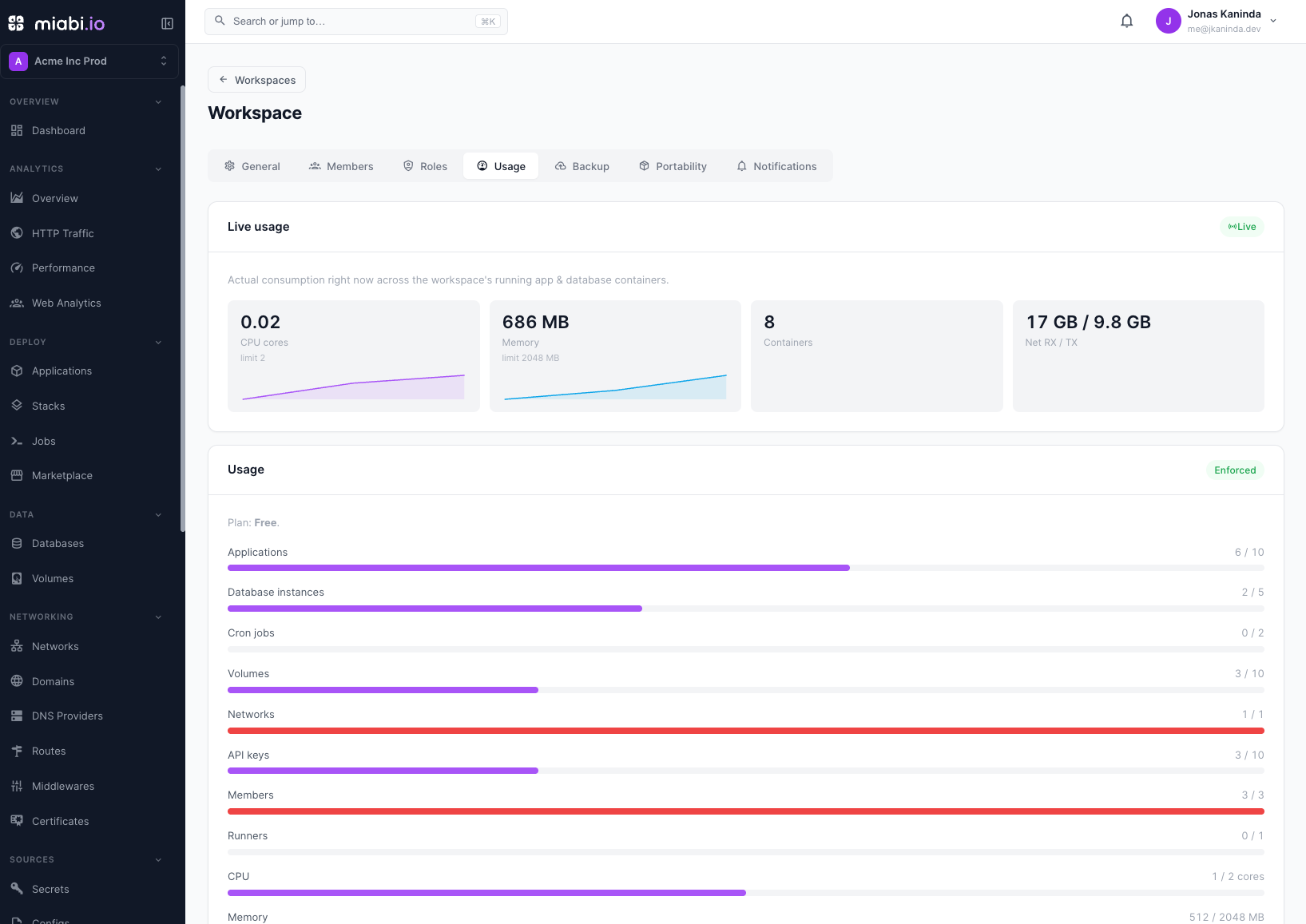
Open the workspace's Usage tab (Workspace → Settings → Usage) to see live consumption and current usage against each quota. Usage bars highlight resources approaching their limit so you can act before a creation request is rejected.
Plan your workspace layout early. Splitting workloads across multiple workspaces can keep each workspace comfortably within its quotas.
When a limit is hit
- Miabi rejects the creating request at the API boundary.
- The console surfaces the reason (which quota or capability).
- You resolve it by freeing capacity or upgrading the plan, then retry.