Container Security Profile
By default a container runs as whatever user its image declares — often root. The container
security profile hardens how a workspace's application and job containers run, so a compromised
or misbehaving container has far less power on the host.
Profiles
Every workspace has an effective security profile, resolved from its plan (or a per-workspace override):
| Profile | Behaviour |
|---|---|
| Default | Containers run as the image's own user (may be root), with the platform baseline below and nothing else. |
| Restricted | Containers are forced to run as a non-root platform UID with no-new-privileges set — similar to OpenShift's restricted SCC. |
The baseline
One rule applies on both profiles, on every install: the NET_RAW capability is dropped.
NET_RAW is what lets a container open raw and packet sockets — which on a bridge it shares with
other tenants means forging ARP replies and reading traffic that was not addressed to it. Almost
nothing needs it, so it is not part of the restricted opt-in.
An app that genuinely does need raw sockets — ping, traceroute, packet capture — asks for the
NET_RAW capability grant, which adds it back. Under
the restricted profile no grant is admitted, so there it is dropped for good.
ping and traceroute stop working inside containers that have not been granted NET_RAW. Most
images never use them; an image whose healthcheck shells out to ping is the case to watch. Grant
the capability to that app, or use a TCP healthcheck instead.
A profile only ever takes capabilities away. Granting one to an individual application is a separate, opt-in mechanism — see Capabilities & devices — and the restricted profile admits none of them, so the two cannot be combined.
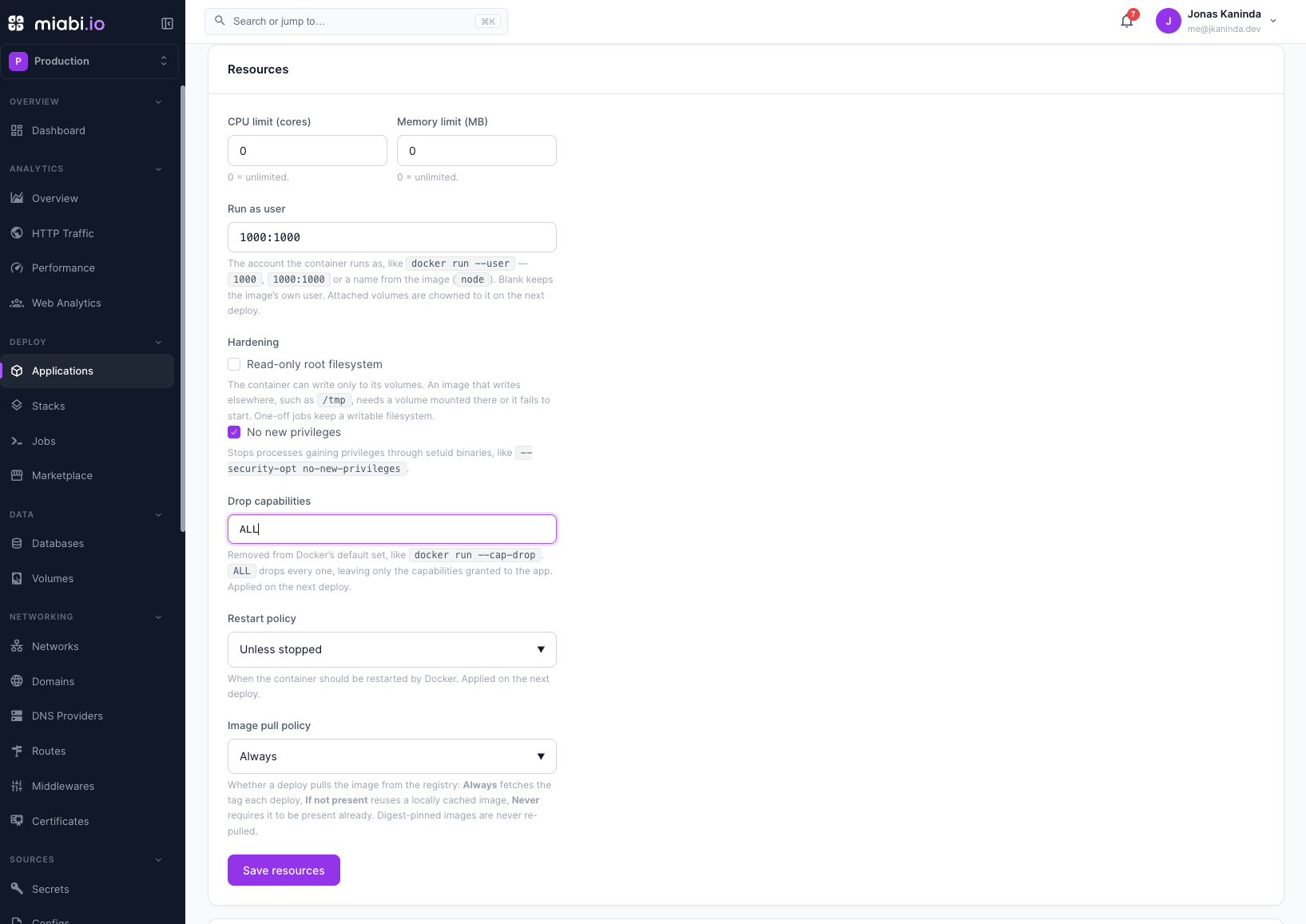
An individual app can also harden itself further on either profile — a read-only root filesystem, no-new-privileges, dropped capabilities — see Hardening an app. It can never loosen the profile: a manifest setting security.noNewPrivileges: false in a restricted workspace is refused. The profile's hardening applies to replicated service apps as well as containers.
Under the restricted profile, application and one-off/cron job containers are started as
MIABI_RESTRICTED_UID:0 (GID 0, the arbitrary-UID convention). Images that hard-depend on being
root at runtime may not work under it.
Enabling it
The restricted profile can be turned on two ways:
- Per plan / workspace — an admin sets the security profile to Restricted on a plan (or as a per-workspace override). This is an Enterprise capability; on Community, or once a license lapses, the effective profile is clamped back to Default.
- Globally — set
MIABI_FORCE_NON_ROOT_USER=trueto force every workspace's containers non-root regardless of plan. This is an absolute operator mandate and is not relaxed by the exemption below.
Relevant settings (see Configuration):
| Setting | Controls |
|---|---|
MIABI_RESTRICTED_UID | The platform non-root UID containers run as (default 100000). |
MIABI_FORCE_NON_ROOT_USER | Force the restricted profile platform-wide (default false). |
MIABI_SECURITY_INIT_IMAGE | Tiny fallback image used to fix volume ownership (default busybox:latest). |
Choosing the user yourself
An app can pin the account its container runs as, instead of taking the image's default or the
platform UID — the equivalent of docker run --user. Set Run as user in the app's Settings
tab, security.runAsUser in a manifest, or run_as_user on the API. A
one-off or scheduled job can pin its own too, at creation; blank inherits the app's.
Accepted forms are uid, uid:gid, name and name:group. Blank keeps the image's own user.
How it interacts with the profile:
| Effective profile | What you may set |
|---|---|
| Default | Any account the image understands, root included. |
| Restricted | A non-root numeric uid only — 1000, 1000:1000, 65534:0. It replaces the platform UID; no-new-privileges and the baseline NET_RAW drop still apply. |
Under the restricted profile a name is refused, not just root. A name is resolved from the
image's own /etc/passwd, which the workload controls, so appuser is free to be uid 0 — the
platform cannot verify it. Only a numeric uid is checkable. A gid of 0 is fine: it is the
arbitrary-UID convention the profile itself uses.
The rule is enforced when you save the app, job or manifest and again at deploy time. So if an
admin moves a workspace to Restricted later, an app still running as root fails its
next deploy with a clear error rather than quietly continuing to run as root.
This is the way to keep hardening for a workspace while accommodating an image that insists on its
own baked-in account — say one that must be uid 1001 because its files are owned by it. Prefer it
over dropping the whole workspace back to Default.
Volumes and file ownership
A non-root process can't write to a volume owned by root. Whenever a container is pinned to a user
— the platform UID under the restricted profile, or your own Run as user — Miabi makes the app's
managed volumes writable by that user before the real container starts.
There's a subtlety worth knowing: Docker seeds an empty named volume with the image's content — and
the image's file ownership — the first time a container mounts it. So Miabi runs the ownership fix
using the app's own image: that first mount performs the seed copy, and the ownership fix then
corrects the seeded data, leaving a populated, correctly-owned volume the real container mounts
without re-copying. Images that lack a shell fall back to the MIABI_SECURITY_INIT_IMAGE.
You don't configure any of this — it happens automatically on deploy and for jobs.
Official marketplace apps
Many curated marketplace images (WordPress, Ghost, Nextcloud, and
database engines) need their own baked-in user or a brief root startup and break when forced to
an arbitrary UID. Rather than dropping the whole workspace back to Default and losing hardening
for your own apps, a plan can grant the Allow official image user capability:
- Apps installed from an official marketplace template keep the image's own default user, even while the workspace profile is Restricted.
- Your own apps and jobs stay hardened.
- Only official-source installs qualify — a tenant cannot self-declare an app "official" to escape the profile. The marker is set by the platform at install time.
- The exemption never overrides a platform-wide
MIABI_FORCE_NON_ROOT_USERmandate.
Toggle it on the plan next to the security profile selector (see Plans & Quotas).
Roll the restricted profile out to a test workspace first. Your own apps are usually fine; the
common breakage is a third-party image that assumes root — for official marketplace apps, enable
Allow official image user; for your own, set Run as user to the non-root uid the image
expects, or adjust the image to run as a non-root user.
This profile hardens the app/job containers Miabi runs. Managed databases run their engine images as their own users and are not subject to the restricted profile.