Deploy from Git
Deploying from Git is the most common way to run an application in Miabi. You connect a repository, pick a branch, and Miabi builds an image from the code on a build runner — automatically detecting how to build it.
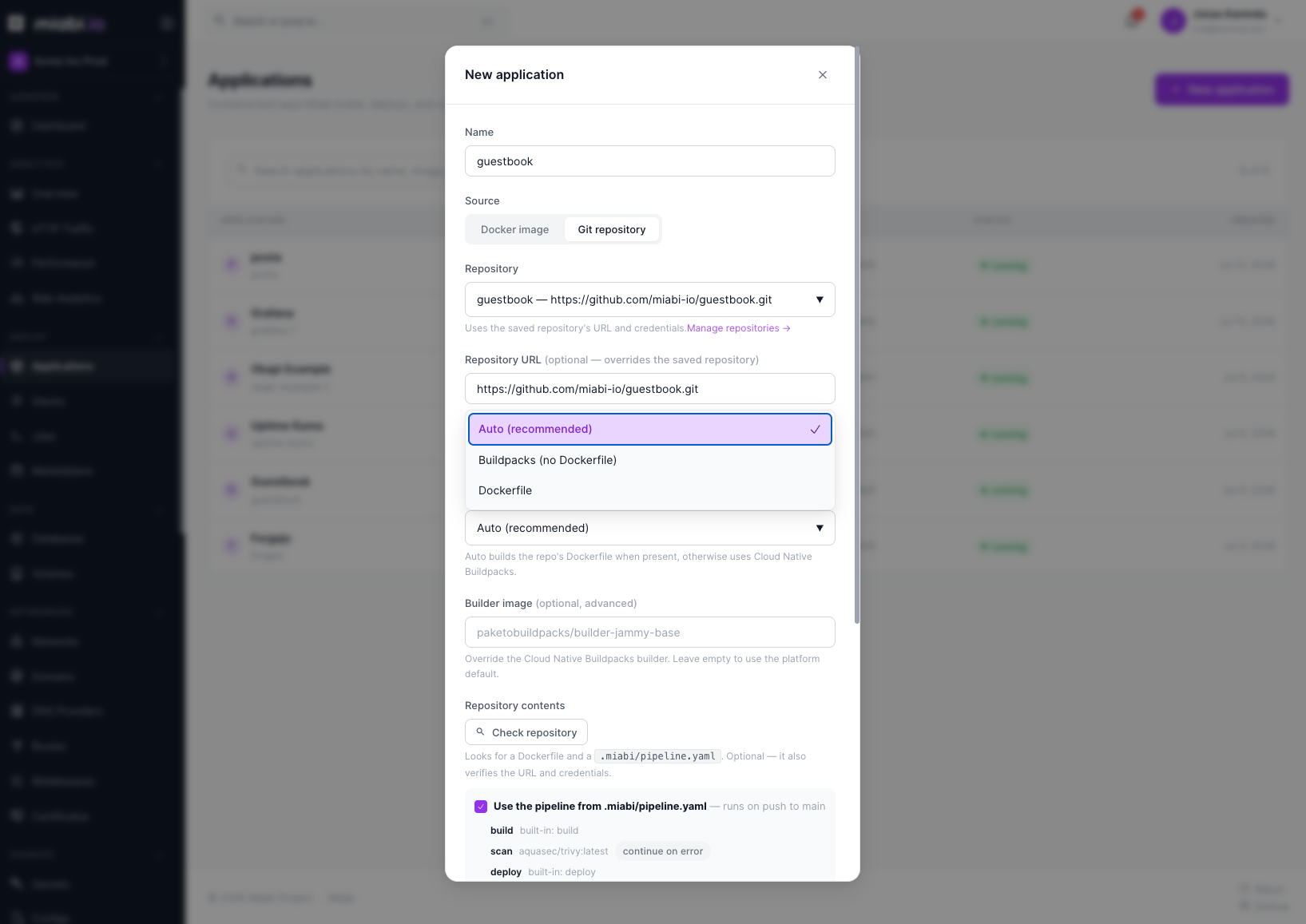
Connecting a repository
When creating an application, choose Git repository as the source. Any Git host reachable over HTTPS works — GitHub, GitLab, and Bitbucket are simply the common cases; there is no provider to select.
- Repository — pick a saved repository to reuse its URL and credentials, or leave it on Public URL for a public repo.
- Repository URL — the HTTPS clone URL (optional when a saved repository is selected).
- Branch / ref — the branch to deploy (for example
mainorproduction). - Build method — see How builds work.
Miabi builds from the repository root. There is currently no per-application build-context or
subdirectory setting, so monorepos need a Dockerfile at the root.
Git credentials
For private repositories, Miabi needs access. Save the repository under Sources → Git Repositories with an access token: the credential is stored per workspace, encrypted at rest, and reused across applications.
A saved repository can use the ssh auth type, but builds run on a runner, which clones over HTTPS
with the token embedded — a deploy of an app whose repository uses an SSH key fails. Use a
token (a read-only deploy token or fine-grained access token) instead.
Use scoped, read-only deploy keys or tokens where possible. Credentials are never logged and are stored encrypted — see Encryption.
How builds work
The app's Build method decides how the image is built:
- Auto (the default) — builds the repository's
Dockerfilewhen there is one, otherwise uses buildpacks. - Dockerfile — always builds the
Dockerfile. This gives you full control over the runtime. - Buildpacks — Cloud Native Buildpacks detect the language and produce a runnable image without you writing any Docker configuration. An optional Builder image overrides the platform's default builder.
Every build runs on a registered runner, which pushes the image to the registry; the node only pulls it. There is no fallback to building on the node: with no runner available, the deploy waits and then fails. The result is an immutable image that becomes a new release.
Build cache
Builds reuse cached layers, shared by direct deploys and pipeline runs of the app. When a cached
layer has gone stale, Settings → Source → Build cache → Invalidate makes the next build rebuild
every layer (nothing is deleted), or tick Rebuild without cache when deploying to skip the cache
once. From the CLI: miabi apps invalidate-cache web.
Build limits
Builds run under a platform-wide time limit so a runaway build can't occupy a runner forever:
| Limit | Where it is set | Default |
|---|---|---|
| Build time | MIABI_BUILD_TIMEOUT_MINUTES (operator env) | 30 minutes |
These are platform settings, not per-application ones — an app has no build-memory or build-time
field. The CPU and Memory limits on an application cap its running container, not its build.
Re-syncing the repository pipeline
If your repository carries a pipelines.yaml, Miabi adopts it when the app is created and deploys
run through it. Two cases leave the app out of step with the file, and Settings → Source →
Re-sync fixes both:
- You added the file after creating the app (or the app only just became a Git app). Re-sync adopts it, and deploys start running through the pipeline.
- You edited the file. Miabi re-reads it on each run, so this is only needed to pick the change up now — for instance to confirm the document still parses before your next deploy.
Re-sync reports what it did: adopted, updated, or already up to date. A repository with no pipeline file is not an error — the app simply keeps building directly.
From the CLI:
miabi apps resync-pipeline web
Moving it into GitOps
An app you built here can be described as a manifest and committed alongside your code: Settings →
GitOps manifest → Generate manifest. The generated document carries the repository, ref and build settings
under source, so applying it elsewhere rebuilds from the same code rather than pulling the image
this install happened to produce. See the
manifest reference.
Switching to a prebuilt image
A Git app can switch to pulling a prebuilt image without being recreated — see Switching between image and Git. Note that switching away from Git removes any pipeline adopted from the repository.
Redeploying
Trigger a new build manually from the Deployments tab at any time, or add a pipeline with a push trigger so a push to your branch builds and ships a release with no manual step. See Deploy on push and Pipelines.
Every Git deploy produces a tracked release. If a build ships a regression, roll back instantly from the Releases tab.