Version Upgrades
Miabi upgrades a managed database's engine version for you, so you can move to a newer release without rebuilding the database or rewiring your apps. The instance keeps its address, credentials and injected environment variables throughout.
Before you upgrade
- Check your app's compatibility with the target engine version.
- Pick a low-traffic window. The database is unavailable while the engine is swapped, briefly for an in-place upgrade and longer for a dump and restore.
For PostgreSQL, MySQL, MariaDB and MongoDB, Miabi takes a safety backup of every logical database before it touches the data (see what happens). If you want a copy in your own bucket as well, take a recovery point first.
No safety backup is taken for a Redis or libSQL upgrade, even though the console says a full backup is taken first. Both upgrade in place on the same volume. For libSQL, run a backup yourself before upgrading; Redis has no backup support yet.
Performing the upgrade
Open the database, go to its Settings tab, and find the Engine version card:
- Type the target in Upgrade to, or pick one of the suggested versions.
- Review the plan Miabi shows for that target. It is marked major or minor and names the upgrade path.
- If apps use the database, keep Stop the N app(s) using this database during the upgrade, then restart them ticked. Stopping writers is strongly recommended for a major upgrade, so no write lands on the old engine after its data was copied.
- Select Upgrade and confirm.
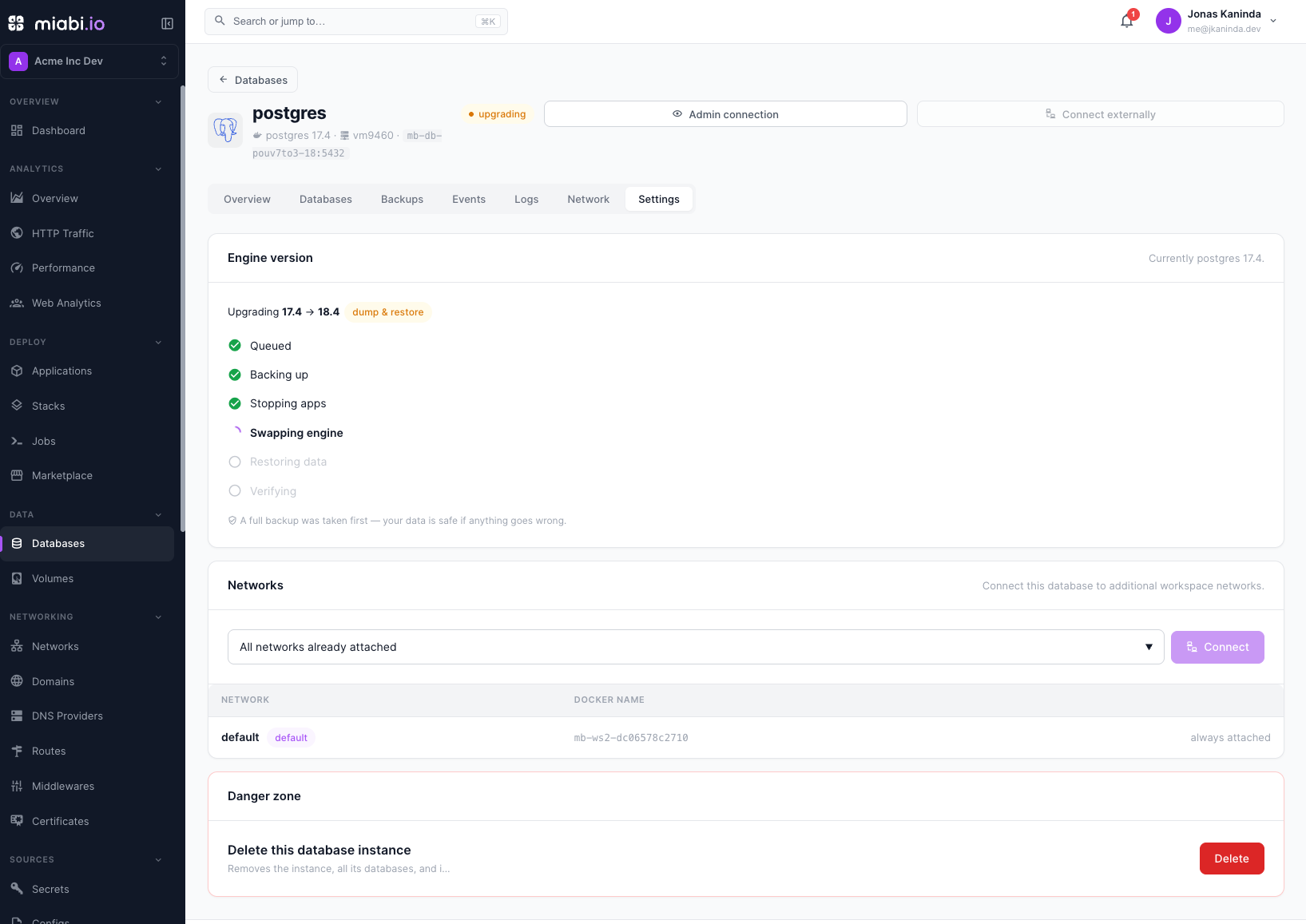
The instance must be running or stopped. The card shows live progress: Queued, Backing up, Stopping apps, Swapping engine, Restoring data (major upgrades only), and Verifying.
What happens
The upgrade runs on the worker, so it survives a restart of the API server.
-
Safety backup (PostgreSQL, MySQL, MariaDB, MongoDB). Each logical database is dumped to the local backup volume, labelled Safety backup before the X → Y upgrade, with the
upgradetrigger. These dumps appear in the database's Backups tab. They are not encrypted, even when the workspace has a backup passphrase. If a dump fails, the upgrade stops before any data moves. -
Stop apps, if you asked for it.
-
Move the data, by one of two paths:
Path When What it does In-place Same major version; any Redis or libSQL upgrade; a MongoDB minor upgrade Swaps the engine image on the same data volume. Seconds of downtime. Dump & restore A major version bump on PostgreSQL, MySQL, or MariaDB Restores the safety dumps into a fresh volume running the new engine, then switches the instance to it. The old volume is removed only once every database has restored. -
Restart apps that were stopped, whether the upgrade succeeded or not.
If it fails
A failed upgrade rolls back automatically. An in-place upgrade returns to the old image; a dump & restore discards the new volume and brings the old engine back up on the original data. The card then shows Upgrade to X failed. with the reason, and notes that the instance was rolled back and is safe to use. Adjust the target and try again.
If the rollback itself cannot bring the engine back, the instance is marked failed. Restore from the safety backup or a recovery point.
Limits
- No downgrades. A target older than the running version is refused, and so is the version it already runs.
- MongoDB major upgrades are refused. MongoDB majors must be applied one at a time and gate on
featureCompatibilityVersion, which a dump & restore can't honour safely. Minor upgrades within a major are allowed. - libSQL image tags are not numeric (
latest), so any tag change is an in-place swap. - A backup taken from a newer major version can't later be restored into an instance that still runs the older one.
Upgrades are available to Owners, Admins, and Developers. Because they involve downtime, coordinate with anyone relying on the database first.