API Tokens
API keys let scripts, CI pipelines, and integrations talk to Miabi without a browser session. A key belongs to your account: it acts as you, can optionally be bound to a single workspace, and is stored only as a hash — Miabi never keeps the plaintext.
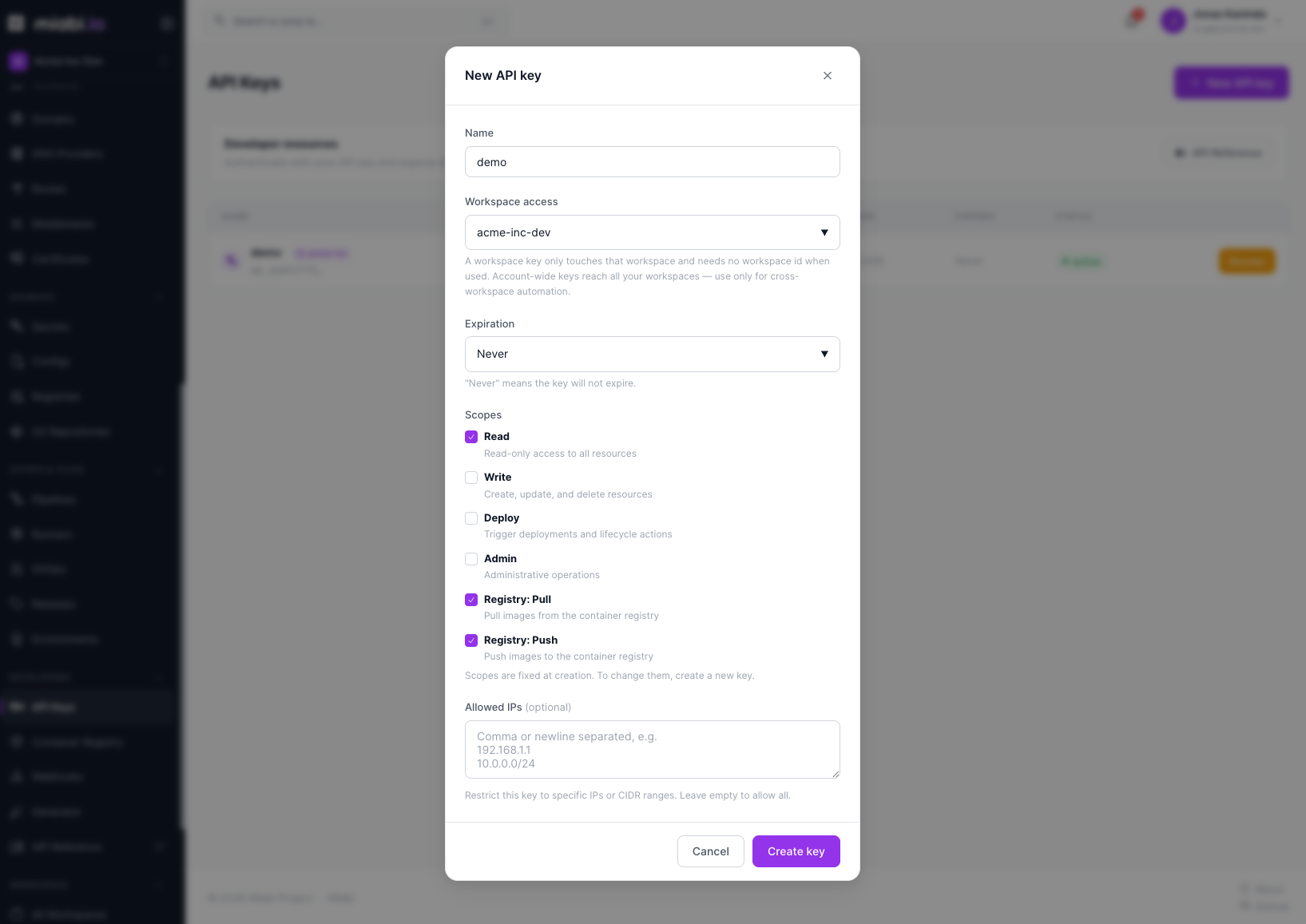
Creating a key
- Open Developers → API Keys in the sidebar.
- Click New API key.
- Fill in the form:
- Name — a label such as
CI pipeline. - Workspace access — one of your workspaces (the default is the one you are in), or Account-wide (all my workspaces).
- Expiration — Never, 30 days, 60 days, 90 days, 180 days or 365 days.
- Scopes — the key's labels: Read, Write, Deploy, Admin, Registry: Pull, Registry: Push. Scopes can't be changed later; create a new key instead.
- Allowed IPs (optional) — IP addresses or CIDR ranges, comma- or newline-separated. A request from any other address is refused. Leave it empty to allow all.
- Name — a label such as
- Click Create key.
Miabi displays the key (it starts with mb_) once, at creation time. For a workspace-bound key it also
shows the workspace ID to use with the API, CLI, or Terraform. Copy both immediately and store the key in a
secret manager.
The plaintext key is shown only once and cannot be retrieved later. If you lose it, revoke the key and create a new one.
Registry-only keys
A key carrying only Registry: Pull and/or Registry: Push is limited to the built-in
container registry (docker login, pull, push) and is refused by the rest of the
API — a good fit for a CI job that only publishes images.
Hashed storage
Miabi stores only a SHA-256 hash of each key, never the key itself, plus a short prefix so you can tell keys apart in the list. On each request, Miabi hashes the presented key and compares it to the stored hash. Because the original value is never persisted, a database leak does not expose usable keys.
What a key can reach
A key acts as the user who created it, so it can never do more than that user:
- Workspace-bound keys are refused for any other workspace.
- Account-wide keys reach every workspace the user belongs to.
- Every request re-checks the user's current membership and role in the target workspace, with the
same dual enforcement as the console — middleware plus repository-layer
workspace_idscoping. See Roles & Permissions.
Workspace-bound keys count toward the workspace's API keys quota; account-wide keys don't.
What each scope allows
A key's scopes decide which operations it may perform, on a ladder — each scope grants everything below it:
| Scope | Grants | Covers |
|---|---|---|
| Read | read | every GET, and nothing else |
| Write | write, read | creating, updating and deleting resources |
| Deploy | deploy, read | deploy, start, stop, restart, rollback, scale, canary, trigger, rerun, sync, promote, approve |
| Admin | admin, write, deploy, read | everything below, plus the administrative routes named under it |
* | everything | no restriction |
Write and Deploy are siblings, not a sequence: a Deploy key cannot edit an application, and a Write key cannot ship one. Give a CI key both if it does both.
Admin is required for anything that changes who may act, what the platform recorded, or that hands back a credential:
/admin/*,/api-keys, two-factor endpoints and session management- workspace members, invitations, roles and per-resource policies
- the audit log and its export
- deleting a workspace, and taking or restoring a portable backup
- creating or changing runners and webhooks (reading them is
read) - reads that return a secret:
/exec,…/reveal,…/credentials,…/connection,…/recovery-kit,…/webhook-info, and downloading a backup artifact
A key created with no scope is read-only.
Scopes are checked according to MIABI_API_KEY_SCOPE_ENFORCEMENT:
| Value | Behaviour |
|---|---|
enforce (default) | the request is refused with 403 and an X-Miabi-Scope-Required response header naming the scope it needed |
warn | the request succeeds, and the violation is recorded as an api_key.scope_violation audit event with the same response header |
off | no check |
Earlier releases stored scopes but did not check them, so a key created with the default Read
scope may have been writing for months. An install upgraded with API keys already issued therefore
stays on warn until you set the variable, and logs a warning at startup. Run on warn until the
audit log is quiet, then set MIABI_API_KEY_SCOPE_ENFORCEMENT=enforce. The log names the key, the
user, the route and the scope it needed, so you can re-issue each key with the right scopes first.
Using a key with the API
Send the key as a bearer token in the Authorization header:
curl -H "Authorization: Bearer <YOUR_KEY>" https://your-instance.example.com/api/...
The complete, interactive API reference — every endpoint, parameter, and response — is auto-generated and served at /docs on any running Miabi instance. Explore it at https://demo.miabi.io/docs.
Wherever a path takes an application, you can use its name instead of its numeric id, for
example /api/v1/workspaces/acme/apps/web/deploy. A name made only of digits is read as an id.
Deploy and rollback accept ?wait=<seconds> (at most 900). The request then returns once the
deployment has settled — succeeded, failed, or paused as a canary — instead of right away. If it has
not settled in time, you get the deployment as it stands, with the response header
X-Miabi-Wait: timeout:
curl -X POST -H "Authorization: Bearer <YOUR_KEY>" \
  "https://your-instance.example.com/api/v1/workspaces/acme/apps/web/deploy?wait=300"
Prefer a command-line tool? The Miabi CLI authenticates with these keys and wraps the common flows (deploy, rollback, logs, apply). For CI and other automation, use a service account rather than a personal key: it keeps working when the person who set it up leaves.
Revoking a key
On Developers → API Keys, click Revoke on an active key. Revocation takes effect immediately, and any request using the key is rejected from that point on. Revoked and expired keys stay listed with their status until you Delete them.
Removing a member from a workspace does not revoke their keys, but those keys immediately lose access to that workspace, because membership is checked on every request.
Create one key per integration so you can revoke a single credential without disrupting the others.