Scheduled Jobs & Image Defaults
Two parts of the admin console rarely need attention and are invaluable when they do: the job scheduler that keeps the platform consistent in the background, and the image catalog that decides which container images the platform itself pulls.
Scheduled jobs
Platform admin → Jobs lists every recurring task, its schedule, when it last ran and runs next, whether it is running now, and the error from its last run if it failed. The page is read-only: jobs run on their schedule, and there is no manual trigger.
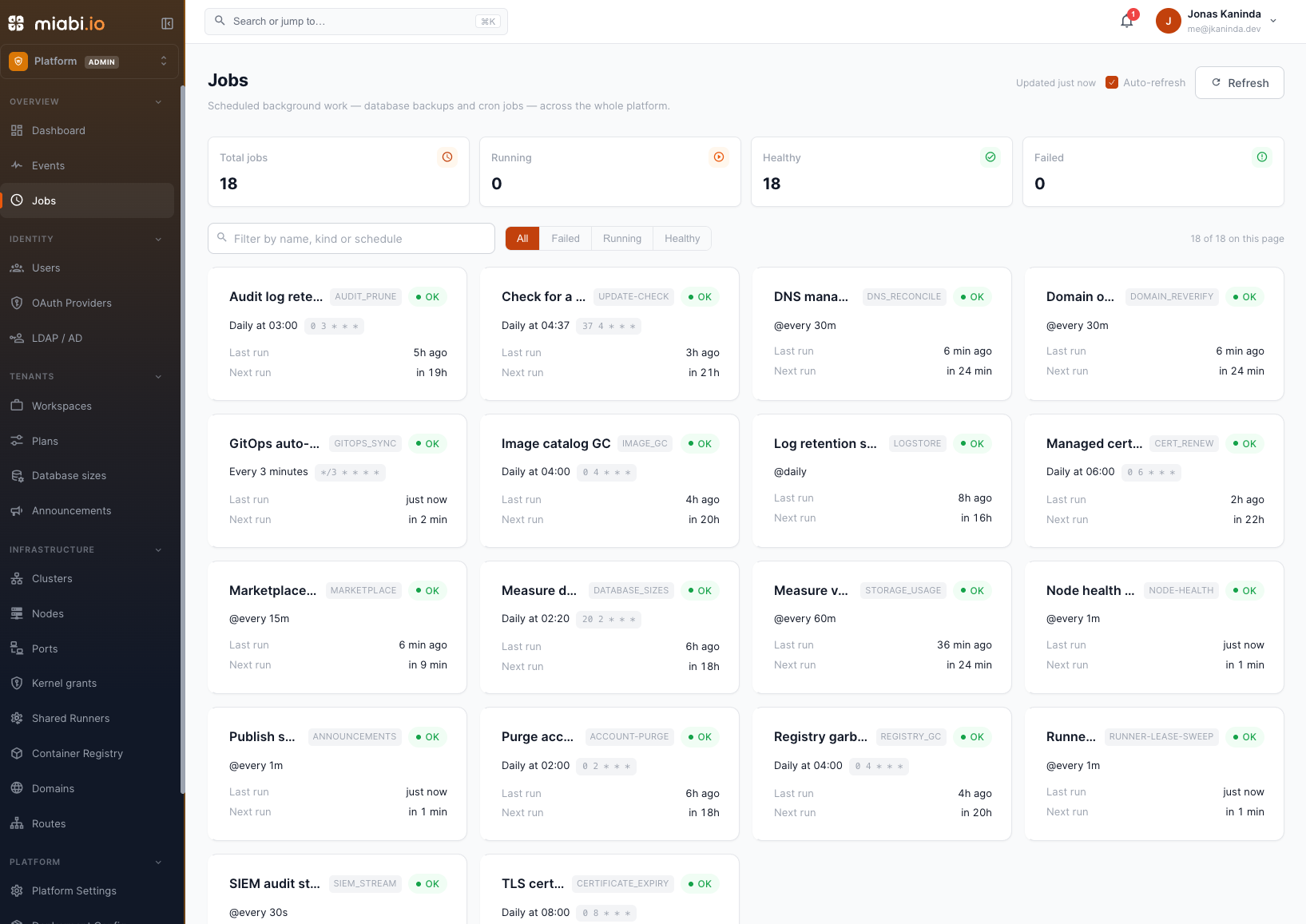
These are mostly Miabi's own housekeeping. The same scheduler also runs the schedules workspaces
define — database backup schedules (backup, backup-set), pipeline on.schedule triggers
(pipeline) and application cron jobs — so they appear in the list too,
one entry each.
| Job | Schedule (control plane TZ) | What it does |
|---|---|---|
control-manager | every minute | Checks that apps, swarm services, node gateways and data volumes still exist. See Reconciliation. |
node-health | every minute | Probes each connected agent tunnel and drops ones that stopped responding |
runner-lease-sweep | every minute | Releases build-runner leases whose job died without releasing them |
announcements | every minute | Publishes scheduled announcements |
siem_stream | every 30 s | Streams audit events to a configured SIEM (a no-op without the Enterprise entitlement) |
gitops_sync | every 3 min | Sweeps GitOps projects for upstream changes |
marketplace | every 15 min | Syncs the marketplace template registry |
dns_reconcile | every MIABI_DNS_RECONCILE_MINUTES (30) | Reasserts the DNS records Miabi manages through a connected provider |
domain_reverify | every MIABI_DNS_RECONCILE_MINUTES (30) | Re-checks ownership of verified domains and un-verifies ones whose record vanished |
storage_usage | every MIABI_STORAGE_USAGE_MINUTES (60) | Measures real volume disk usage |
gpu_inventory | every MIABI_GPU_INVENTORY_MINUTES (30) | Refreshes each node's GPU device inventory |
account-purge | daily 02:00 | Deletes accounts whose grace period has expired |
database_sizes | MIABI_DATABASE_SIZE_CRON (daily 02:20) | Measures database sizes for the console and quota accounting |
audit_prune | daily 03:00 | Applies the audit-log retention window |
image_gc | daily 04:00 | Prunes the image catalog |
registry_gc | daily 04:00 | Garbage-collects unreferenced blobs in the built-in registry |
key_rotate | daily 04:00 | Rotates per-workspace encryption keys older than MIABI_KEY_ROTATE_MONTHS |
update-check | daily 04:37 | Checks versions.miabi.io for newer Miabi, agent, runner and gateway releases |
cert_renew | daily 06:00 | Renews managed (DNS-01) certificates before they lapse |
certificate_expiry | daily 08:00 | Warns before a TLS certificate expires |
logstore | daily | Removes execution logs past their retention |
platform-backup | its configured schedule | Runs the scheduled platform backup |
Not every job exists on every install. A job only registers when what it serves is switched on:
| Job | Present when |
|---|---|
storage_usage | MIABI_STORAGE_USAGE_ENABLED is not false |
gpu_inventory | MIABI_GPU_ENABLED=true |
key_rotate | MIABI_KEY_AUTO_ROTATE=true |
update-check | MIABI_UPDATE_CHECK is not false, on a release build |
telemetry | MIABI_TELEMETRY is not false and DO_NOT_TRACK is unset, on a release build |
database_sizes | MIABI_DATABASE_SIZE_CRON is not empty |
marketplace | A marketplace registry is configured |
logstore | The shared log store is enabled |
platform-backup | A schedule is enabled, with the Enterprise platform-backup entitlement |
Only one control plane runs them
The jobs run in exactly one process. Every control plane campaigns for a leader lease in Redis
(miabi:leader:control-plane, 30-second TTL); only the holder runs scheduled jobs, periodic scans
and cluster reconciliation. A second control plane started by mistake — or a replacement that comes
up before the old one is gone — stands by instead of doing that work twice, and takes over if the
leader's lease lapses. A standby still lists the jobs, but they never run there.
The exception is node-health: agent tunnels belong to the process the agent dialled, so every
process sweeps its own. This is not multi-replica HA. The miabi_leader metric reports 1 on the
process holding the lease and 0 on a standby.
When a job fails
A failed run is recorded with its error. Jobs are independent — one failing does not stop the others — and each retries on its next tick, so a transient failure usually resolves itself. A job slower than its interval never overlaps itself: a tick that arrives while the previous run is still going is skipped. A job failing consistently is worth investigating, because most of them exist to stop something else drifting silently.
When something looks stale — a certificate that should have renewed, a GitOps project that has not picked up a commit, a domain still showing an old verification state — check the job's last run and error here first. See Configuration for the variables above.
Image defaults
Platform admin → Deployment config controls the images the platform pulls for its own components — the gateway, helper containers, backup tooling — as opposed to your application images.
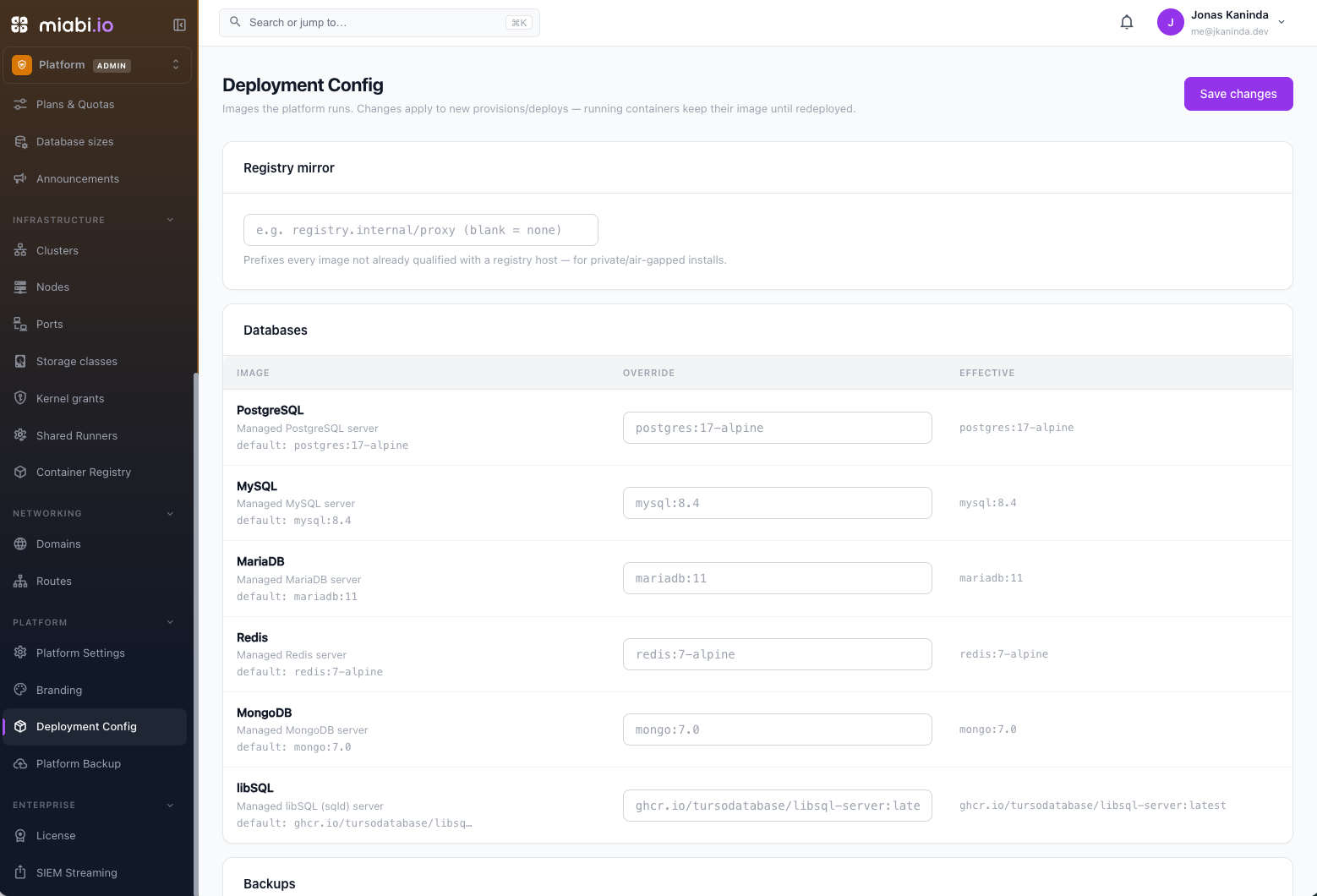
| Setting | Purpose |
|---|---|
| Registry mirror | A prefix applied to every platform image pull (Enterprise) |
| Image overrides | Pin an individual catalog entry to a specific reference |
Why you would change these
A registry mirror is the one most installs eventually want. In an air-gapped or egress-restricted environment, point it at your internal registry and Miabi pulls everything through it instead of Docker Hub. It also insulates you from upstream rate limits.
Changing the mirror needs the Enterprise private_registry entitlement. A mirror set under a
license keeps working after the license lapses — an air-gapped platform must not suddenly
resolve every image to a registry it cannot reach — but it can no longer be changed. Per-image
overrides are available in every edition.
An override pins one component while leaving the rest on their defaults — holding the gateway at a known-good tag while you investigate a regression, or testing a release candidate on one instance. Clear the override to return to the default.
An override survives upgrades. A component pinned to an old tag stays pinned, and it is easy to forget — a Miabi upgrade then quietly leaves that component behind. Note what you pin and why, and revisit after upgrading.
Unknown catalog keys are ignored rather than rejected, so a config carried across versions does not block a save when a component is renamed or removed.
Where to go next
- Upgrades — moving the instance to a newer release.
- Platform Settings — the wider instance configuration.
- Application jobs — the cron workloads a workspace defines.