Configuration files
Some workloads aren't configured by environment variables. Nginx wants an nginx.conf, Prometheus a
prometheus.yml, Grafana a provisioning directory. Baking those into a custom image means rebuilding
to change a line; writing them at boot means a wrapper script.
A config is a workspace-scoped, named set of files that Miabi projects into containers as read-only files at deploy time. It is the file-shaped counterpart to a secret: same workspace scope, same encryption at rest, same reference-it-from-many-apps model — but the unit is a file, not a value. Open Configs in the workspace sidebar to manage them.
| Secret | Config | |
|---|---|---|
| Unit | One opaque value | A set of named files |
| Consumed as | An environment variable | Files on disk |
| Read back | Never (write-only) | Admin-only, audited |
| Typical use | API key, password, token | nginx.conf, prometheus.yml, rules/*.yml |
Config content is always encrypted at rest — config files carry credentials more often than not, and the cost is negligible.
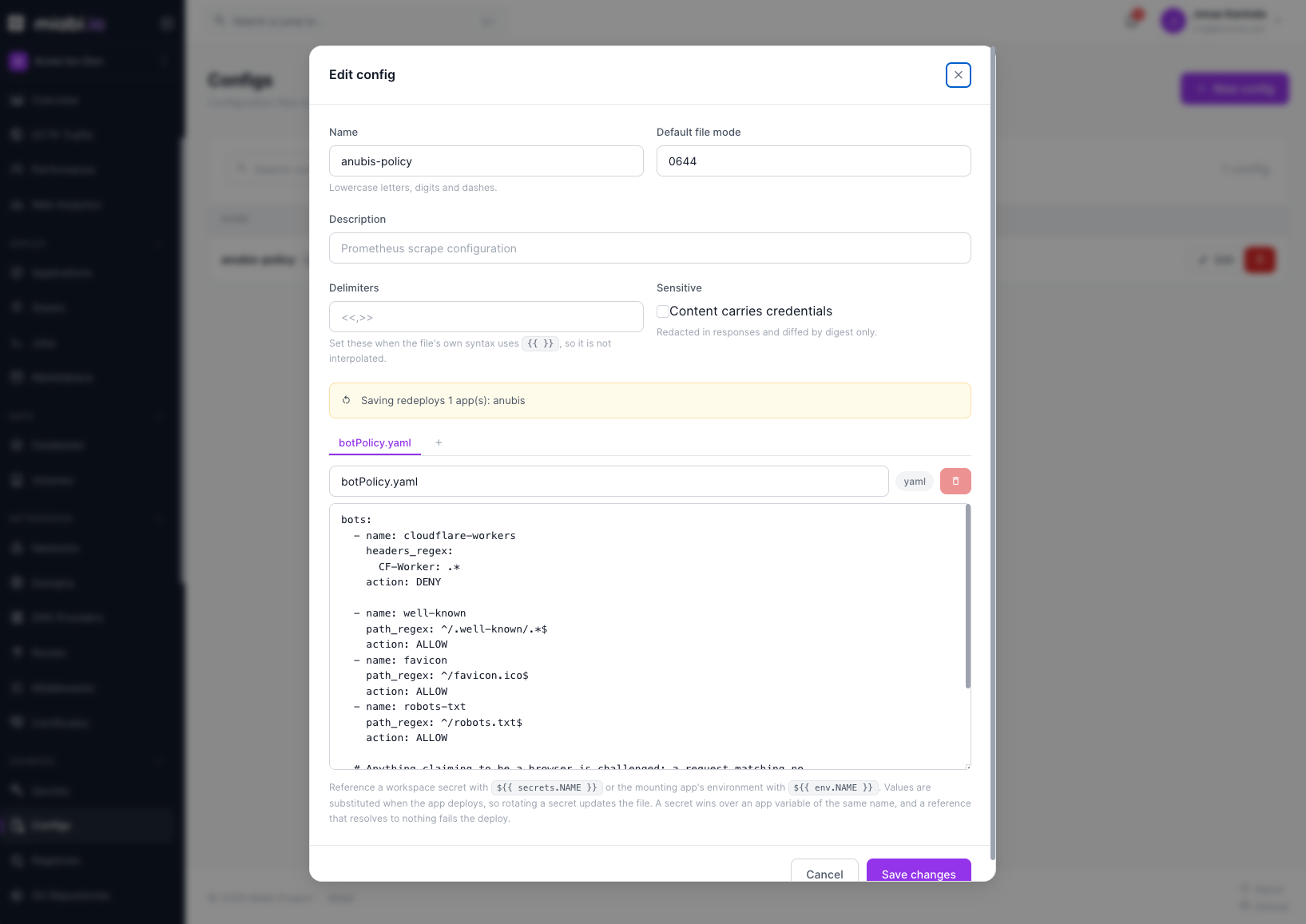
Anatomy
A config has a name (lowercase [a-z0-9-], unique in the workspace), one or more files, and:
| Field | Notes |
|---|---|
data / files | A map of file key → content. The key is a relative path (prometheus.yml, rules/alerts.yml) — never absolute, never containing ... |
mode | The default octal file mode applied to every file. Defaults to 0644; a mount can override it. |
sensitive | Marks the content as credentials: it is kept out of plans and needs --reveal to print. See below. |
delimiters | Overrides the interpolation markers for this config only — see interpolation. |
digest | sha256 over the sorted-key content. Drives redeploy-on-change and the runtime object names. |
version | Bumps on every content change, for display and rollback. |
Limits. 256 KB per file, 512 KB total. The per-file cap is the one that matters: in cluster mode each file becomes a Docker config object, and Docker caps those at 500 KB.
Creating a config
From the CLI, pointing at real files on disk:
miabi configs set prom-conf --from-file prometheus.yml
miabi configs set prom-conf --from-file rules/alerts.yml --merge   # add to the set
miabi configs set nginx --from-dir ./conf.d --recursive
cat app.conf | miabi configs set app --from-file app.conf=-
Without --merge, set replaces the whole set — the files you pass become the config's complete
contents. Replacement is the default because a config is a declarative object and set has to be
idempotent in CI. With --merge, only the named files are patched and the rest are left alone; since
that has to read the current content first, --merge needs admin.
From a manifest, as a Config resource:
apiVersion: miabi.io/v1
kind: Config
metadata:
  name: prom-conf
spec:
  data:
    prometheus.yml: |
      global:
        scrape_interval: 15s
    rules/alerts.yml: |
      groups: []
Or in the console under Configs, which edits the files inline.
Mounting into an application
A config reaches a container through the app's mounts. There are two shapes, and the difference is
whether the mount names a key:
mounts:
  - config: prom-conf              # every file in the set, under a directory
    path: /etc/prometheus          #   → /etc/prometheus/prometheus.yml
                                   #   → /etc/prometheus/rules/alerts.yml
  - config: prom-conf              # exactly one file
    key: rules/alerts.yml          #   path is that file's full location
    path: /etc/prometheus/rules/alerts.yml
    mode: "0444"                   # overrides the config's default mode
Config mounts are always read-only and always projected per file — a config never becomes a directory bind, so it can't shadow the image's own contents at that path the way a volume mount does. Mounting the same config twice (once as a directory, once as a pinned key with a different mode) is fine and common.
From the console
Open the application's Volumes tab and find the Config files card:
- Pick the Config.
- Under Mount, choose All files (the whole set under a directory) or A single file, then pick the File.
- Enter the Directory in the container or the File path in the container. The form previews the exact Files in the container the mount produces.
- Select Mount config, then redeploy the app.
The card lists the app's existing config mounts, each with Remove mount. A mount can also come
from a manifest applied with miabi apply, from
GitOps, or from a
marketplace template.
Interpolation
File contents are rendered as templates before they are stored, exactly like application env. That
is what lets a config carry a rendered database password without a bootstrap script:
spec:
  data:
    datasource.yml: |
      url: postgres://{{ .databases.shop-db.user }}:{{ .databases.shop-db.password }}@{{ .databases.shop-db.host }}:{{ .databases.shop-db.port }}/{{ .databases.shop-db.name }}
      token: {{ .secrets.grafana-token }}
The same collections and helpers as manifest interpolation are available, and an unresolvable reference is a hard error rather than a blank.
Plenty of config formats use {{ }} themselves — Prometheus alert annotations, Grafana dashboards,
Helm-style files. Set delimiters so Miabi renders on different markers and leaves the file's own
braces alone:
spec:
  delimiters: ["<<", ">>"]
  data:
    alerts.yml: |
      annotations:
        summary: "{{ $labels.instance }} is down"   # untouched
        team: "<< .inputs.team >>"                  # interpolated
delimiters takes exactly two distinct, non-empty entries.
Referencing secrets and app env
The interpolation above runs when a manifest is applied, and its result is what gets stored. A config can also carry references that stay in the stored file and are resolved for each app that mounts it, at deploy time:
| Reference | Resolves to |
|---|---|
${{ secrets.NAME }} | A workspace secret |
${{ env.NAME }} | An environment variable of the app mounting the config |
# app.conf
database_password = ${{ secrets.shop-db-password }}
public_url        = ${{ env.PUBLIC_URL }}
- Resolved per app. One config mounted by three apps can render three different
envvalues. - A secret wins over an app variable of the same name, whichever namespace you wrote, so moving a value from env into the vault needs no edit to the file.
- Unresolvable is fatal. A reference that resolves to nothing fails the deploy rather than mounting a file with the placeholder still in it.
- Rotation reaches the file. Rotating a referenced secret redeploys every app mounting the config, and the secret can't be deleted while a mounted config still references it.
- Sensitive by default. A config whose files reference a secret is marked sensitive automatically, since its rendered content is secret material.
Apply-time interpolation parses {{ }}, so it would try to read ${{ secrets.NAME }} too. Set
delimiters (for example ["<<", ">>"]) on a Config resource whose files carry deploy-time
references, so they are stored untouched.
Changing a config
Editing content bumps the version, changes the digest, and redeploys every application
mounting the config so it picks up the new files — change it in one place, not workload by workload.
miabi configs usage NAME (or the config's detail view) lists exactly which apps that is.
For an app that watches its own config file and reloads without a restart, opt out with
reloadPolicy: none on the application:
kind: Application
spec:
  reloadPolicy: none    # restart (default) | none
Miabi then updates the config and leaves the app running.
How the files land depends on the runtime. On a single node they are materialized into the container at deploy. In cluster mode each file becomes an immutable Docker config object whose name embeds its digest, so a content change creates a new object and the service update swaps it — a rolling restart for free, with no window where a task sees half of each version.
Who can read what
Content is never returned by the list or detail endpoints — they carry file names, sizes and the digest only. Reading content is an explicit action:
- List and inspect (names, sizes, digest, version) — any workspace member with read access.
- Create, edit, delete — members with edit permission (see Roles & Permissions).
- Reveal the content — workspace admins only, and every reveal is audit-logged, exactly like a secret reveal.
Marking a config sensitive tightens it further: its content never enters an apply plan (only the
digest and per-file present/absent), and miabi configs cat refuses to print it without an explicit
--reveal.
Deleting a config is refused while an application still mounts it, so a deploy can never break on
a missing file. Detach it from the apps first — miabi configs usage NAME tells you which.
From the CLI
miabi configs ls                                   # names, file counts, size, version
miabi configs get prom-conf                        # files and digest (no content)
miabi configs cat prom-conf prometheus.yml         # print one file
miabi configs edit prom-conf prometheus.yml        # open in $EDITOR, save to update
miabi configs usage prom-conf                      # apps mounting it
miabi configs rm prom-conf [--yes]
cat and edit on a sensitive config need --reveal (admin, audited). See the
CLI reference.
Over the API
| Method | Path | Role |
|---|---|---|
GET | /api/v1/workspaces/{ws}/configs | Viewer |
POST | /api/v1/workspaces/{ws}/configs | Developer |
GET | /api/v1/workspaces/{ws}/configs/{id} | Viewer |
PUT | /api/v1/workspaces/{ws}/configs/{id} | Developer |
GET | /api/v1/workspaces/{ws}/configs/{id}/reveal | Admin (audited) |
GET | /api/v1/workspaces/{ws}/configs/{id}/usage | Viewer |
DELETE | /api/v1/workspaces/{ws}/configs/{id} | Developer |
PUT | /api/v1/workspaces/{ws}/apps/{appID}/configs | Developer (mount into an app) |
DELETE | /api/v1/workspaces/{ws}/apps/{appID}/configs/{configID} | Developer (remove a mount) |
Related
- Secrets — the value-shaped counterpart, consumed as env.
- Manifest reference —
kind: Configand config mounts. - Volumes — persistent read-write storage, the other kind of mount.
- Creating a template — shipping config files in a marketplace template.
- Encryption — how content is protected at rest.
- Audit log — where reveals are recorded.