Stacks
A stack groups related applications that make up a single system — a web frontend, an API, a worker, a cache — so you can manage them together, compose-style, within a workspace.
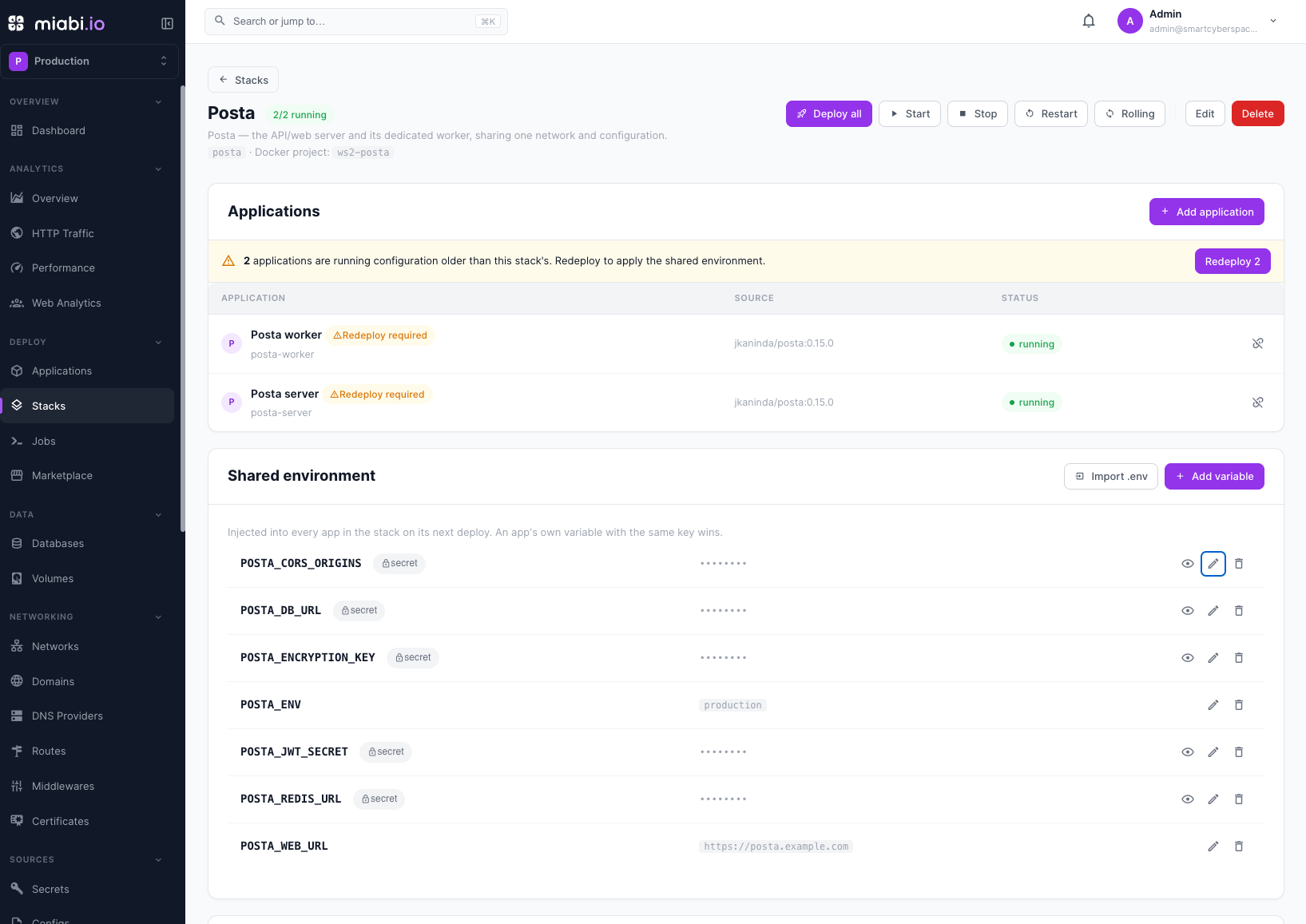
What a stack is
Many real systems are more than one process. A typical app might be a web service plus a background worker, talking to a database and a cache. A stack lets you treat those related applications as one logical group instead of a loose collection of separate apps. It's the Miabi equivalent of a Compose file: the pieces are defined together and belong together.
Each application in a stack is still a full Miabi application — it has its own releases, environment, scaling, and logs. The stack is the grouping that ties them together.
Names
A stack has two names, and only one of them can change:
- Name — the permanent handle, a lowercase slug unique within the workspace. It is the stack's identity: the Docker Compose project name stamped onto every member container's labels, the per-stack Docker network, and the key a GitOps bundle matches the stack by are all derived from it when the stack is created. It cannot be changed — renaming would detach the stack from its own resources and make an apply create a duplicate. To use a different name, create a new stack and move the apps across.
- Display name — the free-text label shown in the console. Change it whenever you like.
Shared environment
A stack can carry environment variables of its own. Shared environment → Add variable (or
Import .env to paste KEY=VALUE lines) sets one, optionally as a secret, which is encrypted
at rest. Every application in the stack receives it on its next deploy.
- An app's own variable wins. When a member defines the same key itself, the shared value never reaches it. The list flags such a variable as overridden in and names those apps, so a value that looks set but is ignored does not go unnoticed.
- Changing a shared variable marks members for redeploy. Every member already deployed is flagged as running older configuration, and the stack page offers Redeploy for just those apps rather than Deploy all.
- Secret values are masked. A workspace Admin can reveal one; revealing is audited.
Talking to each other
Applications in a stack resolve each other by name on the stack's own network — the API is api to
the worker beside it.
That is not a reason to create one, though: every application in a workspace already reaches its siblings by name on the workspace network, stack or no stack. See Pointing one application at another. Group apps into a stack because they belong together, not to give them a hostname.
When to use a stack
Use a stack when several apps:
- Belong to the same system — they're deployed, versioned, and reasoned about together.
- Share configuration — they read the same shared environment, secrets and database credentials.
- Are deployed as a unit — Deploy all ships every member at once.
If an application is genuinely standalone, it doesn't need a stack — create it on its own.
| Scenario | Stack? |
|---|---|
| Web + API + worker for one product | Yes — group them |
| A self-contained marketing site | No — standalone app |
| Two unrelated apps that happen to share a server | No — keep separate |
A stack is a grouping within a single workspace. To isolate entirely separate projects or teams, use separate workspaces instead.