Deploy from a Docker Image
If you already have a built image — from your CI pipeline, a public registry, or an internal one — Miabi can pull and run it directly. There is no build step; Miabi pulls the image and creates a release from it.
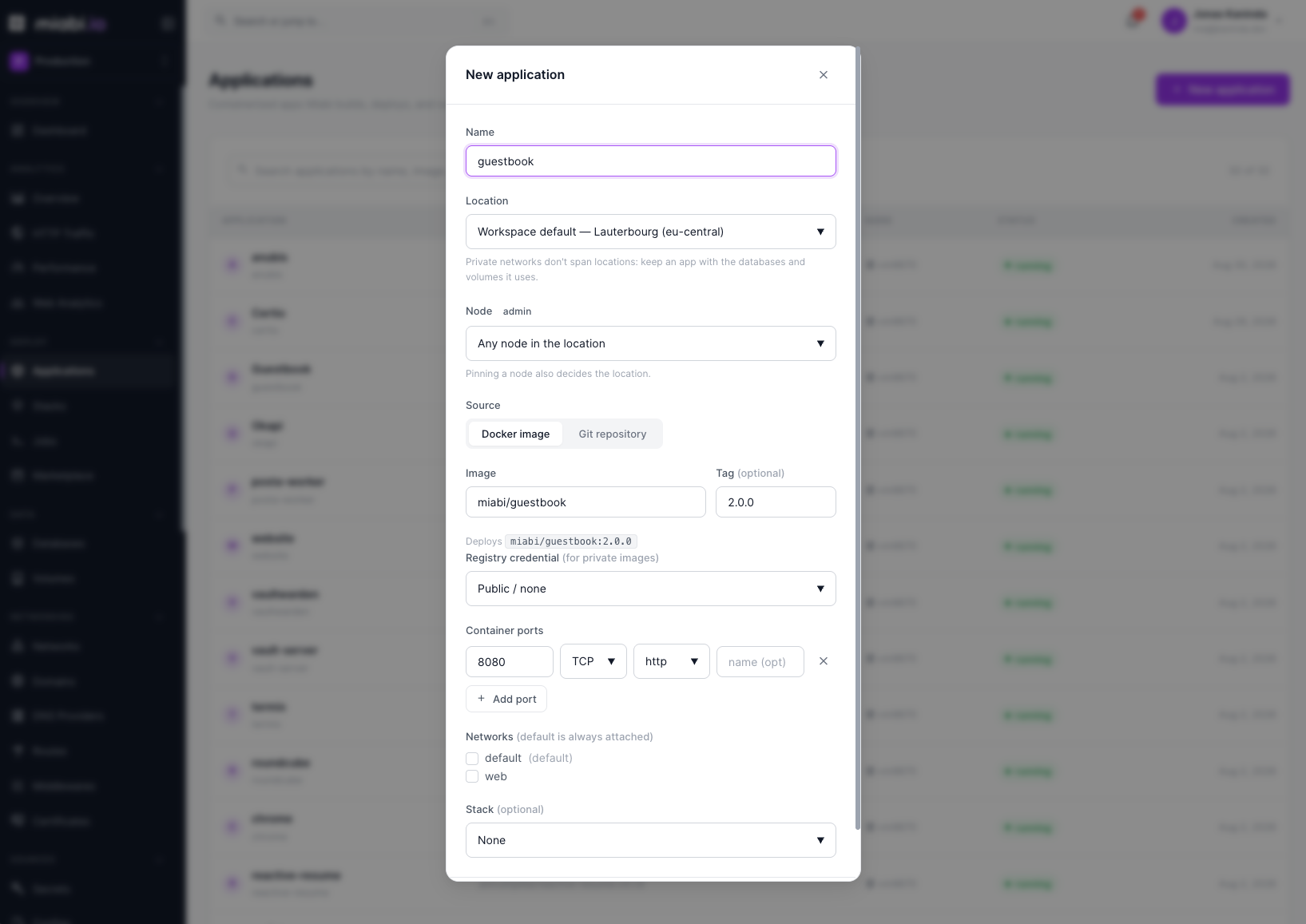
Configuring the image
When creating an application, choose Docker image as the source.
- Image reference — enter the full reference, for example
ghcr.io/miabi-io/guestbook:2.0.0ordocker.io/library/nginx. - Tag or digest — pin the version you want to run (see below).
- Registry credentials — select stored credentials if the image is private.
Tags vs. digests
You can reference an image by tag or by digest:
- Tag (
guestbook:2.0.0) — readable and convenient. A mutable tag likelatestcan change underneath you, so prefer version tags. - Digest (
guestbook@sha256:…) — pins an exact, immutable image. Best for reproducible deploys where you must guarantee the bytes never change.
For production, pin a specific tag or a digest rather than latest. This makes rollbacks meaningful and prevents surprise updates on the next deploy.
Registry authentication
For private images, add container-registry credentials to the workspace. These are stored encrypted at rest (see Encryption) and can be reused across applications. Miabi supports any standard Docker registry, including Docker Hub, GitHub Container Registry, GitLab Registry, and self-hosted registries.
Rather than pasting the token into the credential, you can point it at a secret with ${{ secrets.NAME }}. Miabi then reads the value from the vault on every pull, so rotating that secret rotates every credential using it — no edit, no redeploy of the credential.
Nodes are shared, so an image can already be on disk because another workspace pulled it. Miabi skips the pull only when the workspace could have fetched the image itself — it holds a credential for that same registry host — or when the image comes from the built-in registry, where repositories are namespaced per workspace.
Otherwise the image is pulled even if a copy is present, and the registry decides: a public image succeeds, a private one fails the deploy. So a private image needs its credential attached whatever the pull policy says, and a pull policy of Never is refused outright rather than running a copy the workspace cannot claim.
Credentials are declarative too. A manifest can declare the credential and select it per application:
apiVersion: miabi.io/v1
kind: Application
metadata: { name: api }
spec:
  image: ghcr.io/acme/api
  tag: v1.4.0
  registry: ghcr        # a Registry resource, or a credential already in the workspace
Updating the image
To ship a new version, update the tag or digest in the application's source settings and redeploy. Miabi pulls the new image and rolls it out with a zero-downtime rolling switch, just like a Git deploy. Each pull becomes a new release you can roll back to.
Switching between image and Git
An application's source is not fixed at creation. Open Settings → Source → Edit source and pick the other type: an image app can start building from a repository, and a Git app can switch to pulling a prebuilt image.
Everything else about the app is kept — its domains, environment variables, secrets, volumes, databases, routes and deployment history all survive. Only the source changes.
Three things happen when you switch, and the UI says so before you confirm:
- The old source's fields are cleared. Moving to an image drops the repository, branch and build
settings; moving to Git drops the image, tag and registry credential. They are not kept as
leftovers — an app that still carried a
git_repoafter moving to an image would read as though it built from that repo, and the stale value would come back the moment anyone switched back. - A repository pipeline is removed. If the app adopted a
pipelines.yamlfrom its old repository, that pipeline is bound to a repo the app no longer builds from, so it goes. - A redeploy is required. The running container was built from the old source, so the app is marked for redeploy and keeps serving the old container until you deploy.
An app installed from the Marketplace or managed by
GitOps has its source owned elsewhere. The UI hides Edit source, and the
API refuses the change with 409 Conflict — through the CLI and Terraform too. A GitOps app would
have the edit reverted on the next sync, and a marketplace app would lose the upgrade path its
template provides; in both cases the change silently does not stick, which is worse than being told
no. Change it through a marketplace upgrade or in the Git manifest.
From the CLI
miabi apps set-source web --image nginx --tag 1.27
miabi apps set-source web --git-repo https://github.com/org/web --git-ref main
The source type is inferred from the flags, and a genuine switch asks for confirmation (--yes
skips it). Passing both --image and --git-repo is refused rather than resolved by precedence —
a request carrying both has no obvious intent.
From Terraform
source_type is no longer ForceNew, so changing it is an in-place update rather than a
destroy-and-recreate:
resource "miabi_application" "api" {
  name         = "api"
  source_type  = "git"          # was "image"
  git_repo     = "https://github.com/org/api"
  git_ref      = "main"
}
When to use image vs. Git
| Use a Docker image when… | Use Git when… |
|---|---|
| Your CI already builds and pushes images | You want Miabi to build from source |
| You run a published, off-the-shelf image | You don't maintain a build pipeline |
| You need exact, digest-pinned reproducibility | You want push-to-deploy from a branch |
| You build elsewhere and only deploy in Miabi | You prefer buildpacks with no Dockerfile |
For curated off-the-shelf software, also consider the Marketplace, which wraps common images into one-click templates.