Highly available apps with replicated storage
In a cluster, a stateless app moves to a healthy node when one fails. An app with a volume on a node's own disk cannot: its data is on that disk, so Miabi keeps it pinned there. This setup removes that limit by putting volumes on a replicated filesystem mounted at the same path on every node. The data is everywhere, so the app can start anywhere.
Good for: CMS uploads and media, user files, shared assets served by several replicas, and any app that must keep running, with its data, when a server dies.
Typical users: companies whose production apps keep files on disk, agencies running client CMS sites, hosting providers selling a high-availability tier, and labs that already run Ceph.
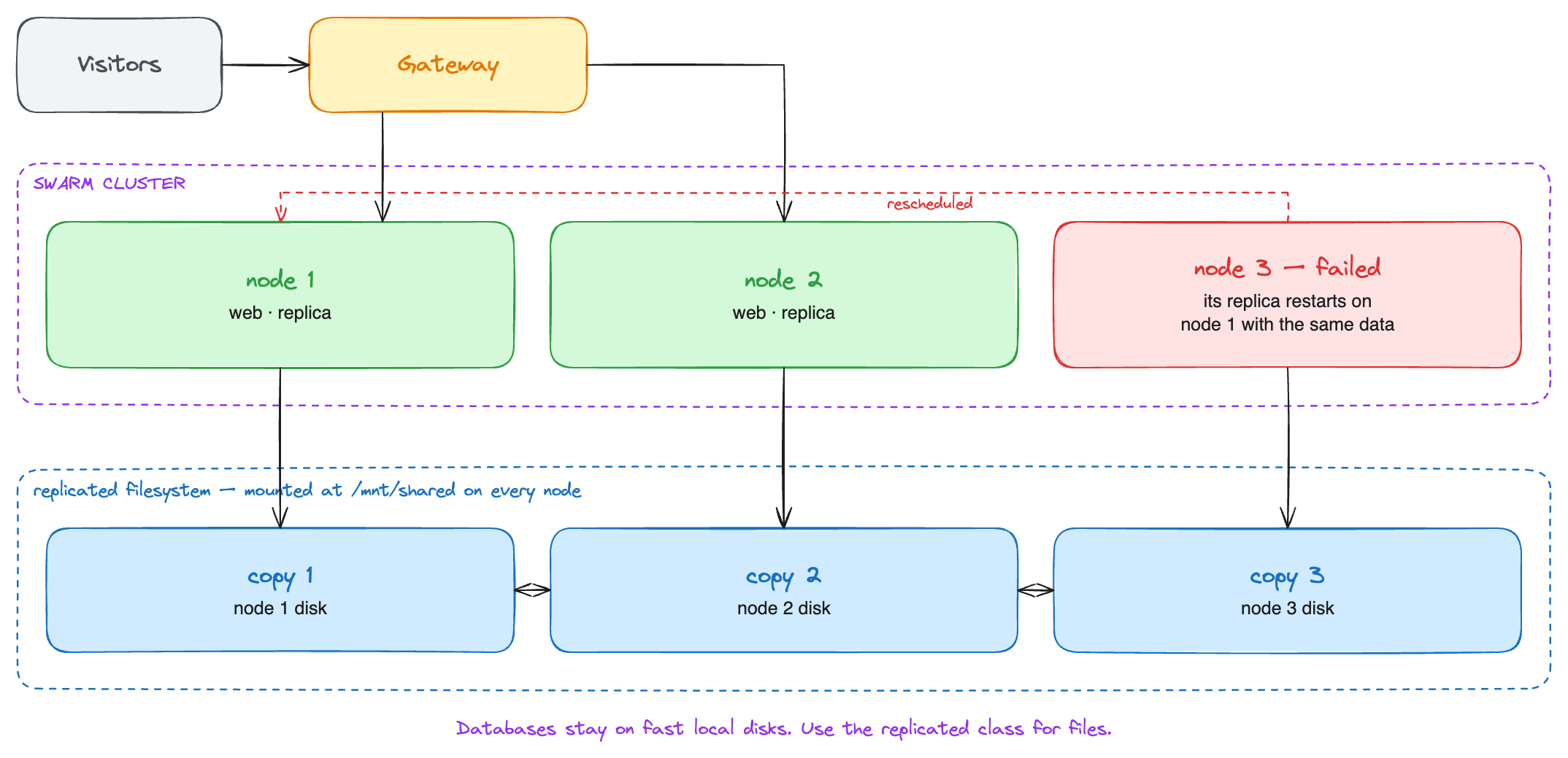
Miabi does not replicate data itself. The filesystem does, and Miabi treats a storage class on it as shared: volumes created there follow their service to any node.
Choosing the filesystem
| Filesystem | Fits | Notes |
|---|---|---|
| CephFS (with cephadm or MicroCeph) | Three or more servers with a spare disk each | The most robust choice: self-healing, keeps serving with a node down. Wants a fast private network and some memory per disk |
| NFS from a NAS or a storage server | You already run one | Simple; the NFS server itself is then the single point of failure unless it is highly available |
| GlusterFS (replica 3) | Small clusters | Easy to set up, but the project is winding down |
| JuiceFS on S3 | VPS without spare disks | Data in object storage; fine for files, slow for small synchronous writes |
Miabi also offers NFS and CIFS volumes directly, one share per volume. A shared storage class is the better fit when the filesystem is yours and every node mounts it: tenants choose it by name and never see a server address or a path.
Setting it up
- Build the cluster as in One cluster, several servers, or as a separate cluster.
- Mount the filesystem at the same path on every node, for example
/mnt/shared, and create the directory Miabi will own once:mkdir -p /mnt/shared/miabi. Use a systemd automount (x-systemd.automountin/etc/fstab) rather than making Docker wait for the mount: when the storage runs in containers on the same nodes, as cephadm does, a Docker that waits for it never starts. - Register a storage class under Admin → Infrastructure → Storage classes with the path
/mnt/shared/miabi, and check Shared across the cluster. See Shared classes and failover. - Offer it on a plan under Storage classes, so workspaces on that plan can use it.
- Create volumes on it and mount them into service apps.
apiVersion: miabi.io/v1
kind: Volume
metadata:
  name: uploads
spec:
  size: 20Gi
  storageClass: replicated
---
apiVersion: miabi.io/v1
kind: Application
metadata:
  name: web
spec:
  image: miabi/guestbook
  deployment:
    runtime: service
    replicas: 3
  mounts:
    - volume: uploads
      path: /data
What happens when a node fails
- Swarm notices the node is gone and starts its replicas on the remaining nodes.
- Each new replica mounts the same directory through the shared filesystem, with the data the old one wrote.
- The replicated filesystem keeps serving from its other copies. With CephFS keeping three copies, the cluster stays writable with one node down and heals when the node returns.
Drain a node before planned maintenance, as in any cluster, so nothing is interrupted at all.
Keep databases on local disks
Network filesystems add latency to every fsync, and some do not implement the locking databases
rely on. Keep managed databases on a fast local storage class and
protect them with backups and recovery points. Use the replicated class for
files: uploads, media, generated assets and shared configuration.
Limits
- The class must really be shared. Marking a node-local disk as shared gives each node its own empty copy of the volume. Miabi cannot tell the difference; the filesystem has to.
- Several replicas means several writers. Whether your app tolerates two replicas writing the same files is up to the app. Many CMSs handle uploads fine and expect one writer for anything else.
- The swarm manager is still one node. See the caution in One cluster, several servers.