One server
The whole platform on one machine: the control plane, the gateway, your apps and your databases. It is how every install starts, and for many it is where they stay.
Good for: side projects and homelabs, a small business's websites and tools, a team's staging platform, demos and workshops, and any workload that fits one server and can be down while that server is.
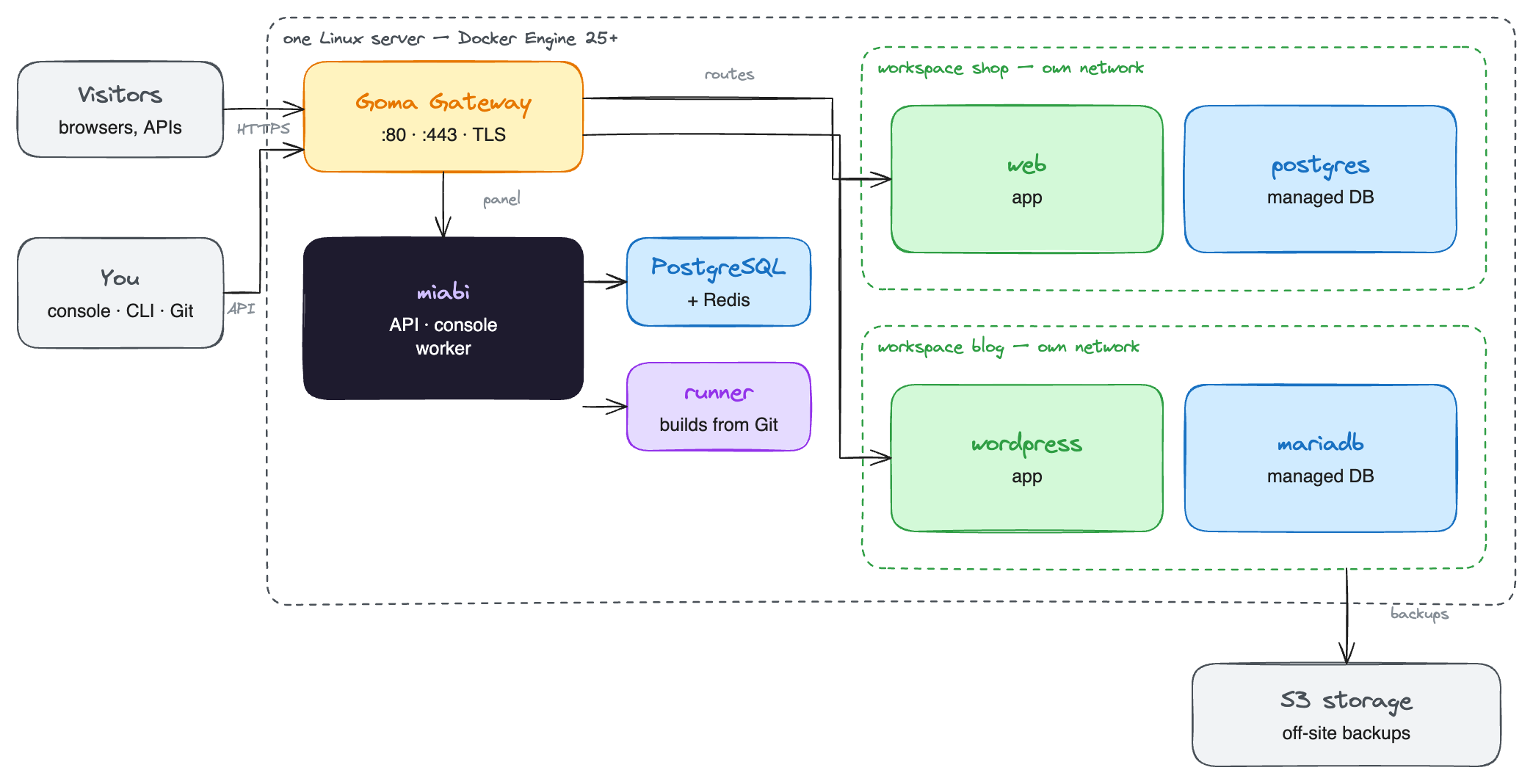
Each workspace gets its own private network, so the shop's app cannot reach the blog's database even though both run on the same Docker engine. Only the gateway listens on the public ports.
Setting it up
- Install Miabi on a Linux host with ports 80 and 443 open and a domain pointing at it. A 2 vCPU / 2 GB server runs the platform itself; size up for the apps and databases you plan to host. It does not need to be a fresh server: Miabi runs beside the containers already there, and can import them.
- Register a build runner on the same host. Every build from Git runs on a runner, and there is no built-in fallback, so a Git-source app waits until one exists. Apps deployed from an image or a marketplace template need no runner.
- Point a wildcard record at the server and set it as the default cluster's external domain, so new apps get a working HTTPS address with one click.
- Configure an off-site backup target and schedule database backups. On one server, the backups are your only copy of the data somewhere else.
If the server has more disks than the system one, register each as a storage class so volumes and databases land on the fast or the large disk instead of the operating-system drive.
Laying out workspaces
A workspace has its own network, secrets, members and quotas. On one server, two layouts cover most needs, and you can mix them:
| Layout | Fits when | What you get |
|---|---|---|
A workspace per stage: dev, staging, production | One product, or a few that ship together | The same manifests apply to each workspace, and ${{ secrets.DATABASE_URL }} resolves to that stage's value. Each stage has its own network, so staging cannot reach the production database |
A workspace per project: blog, shop, bot | Unrelated side projects | Each project is self-contained: back it up, migrate it, share it with a collaborator or delete it without touching the others |
| Stages as workspaces, holding every project | Many small projects run by one person | Three workspaces and one manifest folder per stage. Projects in the same stage share a network and quotas, and one project cannot be shared or moved on its own |
Every stage runs on the same CPU and memory here. Give dev and staging a tighter
plan, so a runaway test hits a quota before it slows production.
How many workspaces one user may own can be capped by the platform's
workspace limits.
Environments do not replace a workspace per stage: they add approval gates and release promotion to an application, but the application keeps one configuration.
What one server gives you
Everything in the core platform: Git and image deploys, zero-downtime rolling updates, canary releases, rollbacks, custom domains with automatic TLS, managed databases, the marketplace, the built-in registry, GitOps, monitoring and analytics. One server is not a reduced edition of Miabi.
What it does not
There is no failover. When the server reboots, every app on it is down until it is back. Plan for it rather than around it:
| Risk | What helps |
|---|---|
| A reboot or kernel update | Schedule it; containers come back with Docker |
| A broken disk or a lost server | Off-site backups, restored on a new host. Platform backup (Enterprise) also restores the control plane itself |
| Outgrowing the machine | Add a second node and form a cluster, or move a workspace to a bigger install with migration |
Where to go next
- One cluster, several servers — the next step when one machine is not enough, or when apps must survive a node failure.
- Teams and companies — organizing workspaces, members and environments.