Universities and training
Students learn more from deploying a real application — with a domain, TLS, a database and logs — than from reading about it. Miabi gives each of them a place to do that on the university's own servers, without an account at a cloud provider and without one student's experiment taking down the class.
Good for: software engineering and web development courses, DevOps and cloud labs, student projects and hackathons, bootcamps and corporate training.
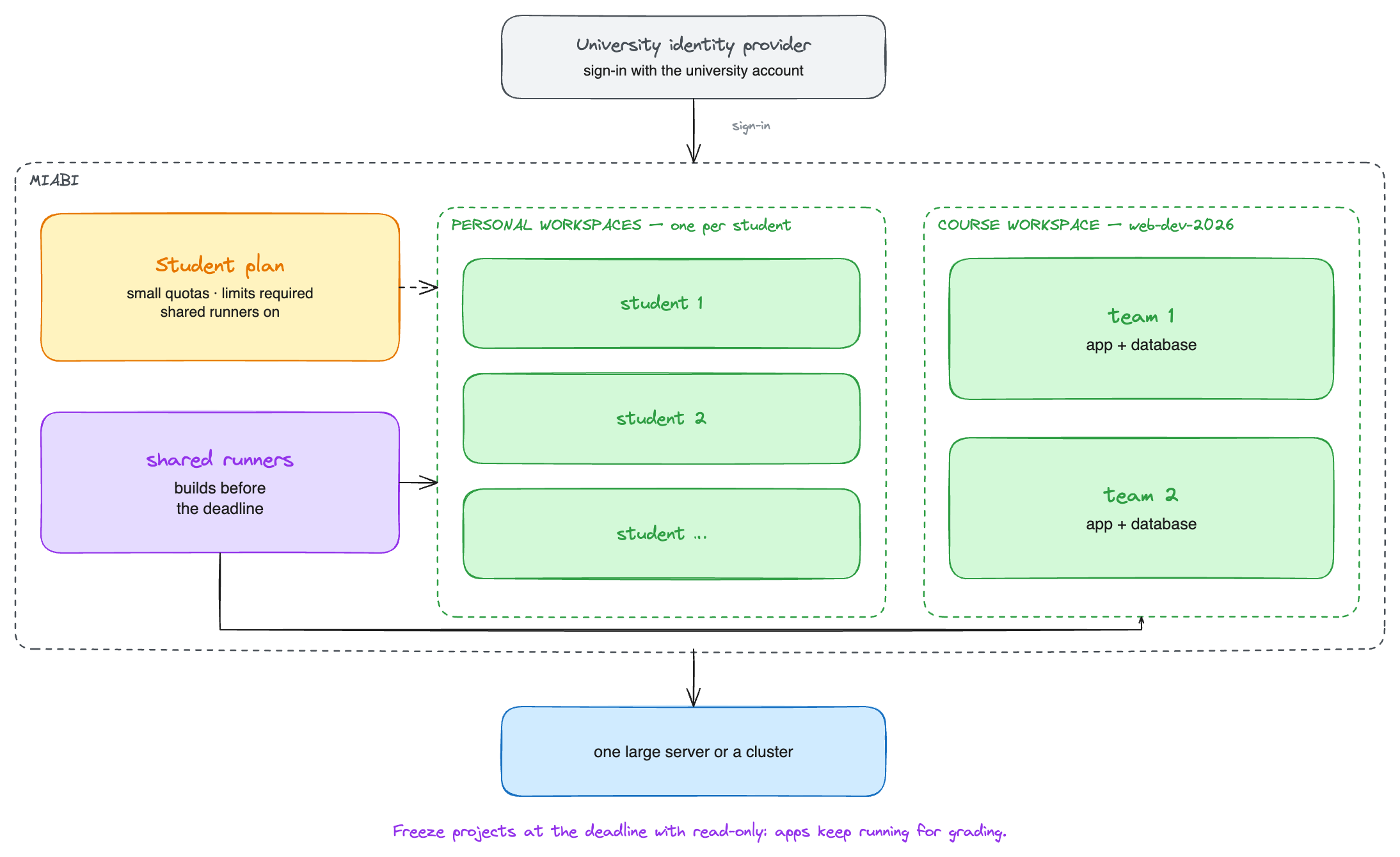
Two ways to organize a class
| Layout | How it works | Fits |
|---|---|---|
| A workspace per student | Every account gets a personal workspace when it is created. Students deploy there; the teacher is invited as a Viewer to grade | Individual assignments, labs |
| A workspace per course or team | The teacher creates the workspace and invites students as Developers; teaching assistants as Admins | Group projects, a shared course environment |
Most courses use both: personal workspaces for labs, and a workspace per team for the project.
Setting it up
Sign-in
Choose one:
- The university's identity provider as an OIDC SSO provider. Students and staff sign in with their university account; nobody manages passwords on Miabi.
- Self-service sign-up limited to the university's domain. Set
MIABI_REGISTRATION_ENABLED=true,MIABI_ALLOWED_SIGNUP_DOMAINSto the student and staff email domains, andMIABI_REQUIRE_EMAIL_VERIFICATION=true. Verification needs a mail server. See Opening self-service sign-up.
A plan for students
Create a Student plan under Admin → Plans & Quotas and make it the default, so every new workspace lands on it:
| Setting | Suggested | Why |
|---|---|---|
| Applications, databases, volumes | A few of each | Enough for a web app with a database and a worker |
| CPU and memory | Small totals | A class of 200 has to fit on the hardware |
| Default CPU and memory, Require limits | On | An app without limits would run unbounded and not count against the plan |
| Platform runners | On | Students build on the shared runners instead of registering their own |
| Privileged host mounts, shared storage | Off | Nothing a lab needs, and both reach outside the workspace |
Set MIABI_QUOTA_CPU_OVERCOMMIT (for example 4) when most student apps sit idle most of the time:
each app keeps its own CPU limit, but the class's limits may add up to more cores than the plan
grants. Memory is never overcommitted. See Shared CPU.
Keep a second plan for staff and course workspaces with larger quotas.
Who may create workspaces
Under Platform Settings, Who can create workspaces decides whether students may open workspaces beyond their personal one:
- Anyone — students form their own project teams.
- Admins only — every course and team workspace is opened by staff; students join by invitation.
Default max workspaces per user — owned, on the same page, caps how many each student may own. See Who can create workspaces.
Builds
Register two or three shared runners on machines with enough CPU for a burst of builds before a deadline. Builds never run on the nodes that host apps, so a class building at once does not slow down the apps already running.
During the course
- One-click URLs. Set an external domain such as
apps.<university-domain>with a wildcard DNS record; every student app gets an HTTPS address without anyone touching DNS. - Databases in one click. PostgreSQL, MySQL, MariaDB, Redis and MongoDB from the console or a manifest; students learn connection strings and migrations, not database administration.
- Logs and metrics per app, so students debug their own deployments.
- Teach the real workflow. Git push to deploy, manifests in the repository, rollbacks and canary releases are all available in a student workspace.
Deadlines and the end of a term
- Freeze submissions at the deadline. A platform admin can set a workspace to read-only from Platform admin → Workspaces: its apps keep running for grading, but nothing can be changed or deployed. See Restricting a workspace.
- Clean up afterwards. A workspace's Owner deletes it from its settings, which also destroys its encryption key and with it every secret.
- Let students keep their work. A workspace can be migrated to another Miabi install with its configuration and data.
For a whole university (Enterprise)
| Need | Feature |
|---|---|
| Each faculty with its own owner, limits and identity provider | Organizations |
| A student who needs more for a thesis project | Per-workspace quota overrides |
| Student apps never run as root | Restricted security profile |
| A maintenance notice to every student | Announcements |
| The faculty's hardware for the faculty's courses | Dedicated locations |
Where to go next
- Plans & quotas — every quota and capability.
- One cluster, several servers — when one server is not enough for the class.