Homelab
A mini PC under the desk, an old laptop, a Raspberry Pi or a Proxmox box: Miabi turns it into a platform you deploy to like a cloud, with Git-push deploys, one-click apps, automatic TLS and backups, instead of a folder of Docker Compose files and hand-written proxy configs.
Good for: self-hosted apps for a household (photos, files, passwords, media, home automation), side projects with real domains, learning how platforms work, and local AI on your own GPU.
Three ways to set it up
| Layout | Fits when | Public apps | Apps only for your network |
|---|---|---|---|
| A. Everything at home | Your router can forward ports 80 and 443 to the server | ✓ | ✓ |
| B. Control plane on a small VPS, home machines as nodes | Your provider blocks inbound connections (CGNAT), or you want public apps off your home connection | On the VPS | At home |
| C. Home network only | Nothing needs to be reachable from outside | — | ✓ |
A. Everything at home
The one-server setup, on hardware you own. Forward ports 80 and 443 from
the router to the server and point your domain at your home address. A home address that changes is
fine: set the cluster's public address to a dynamic-DNS hostname instead of an IP, and the records
Miabi manages become CNAMEs to it. See Public address.
B. A VPS in front, nodes at home
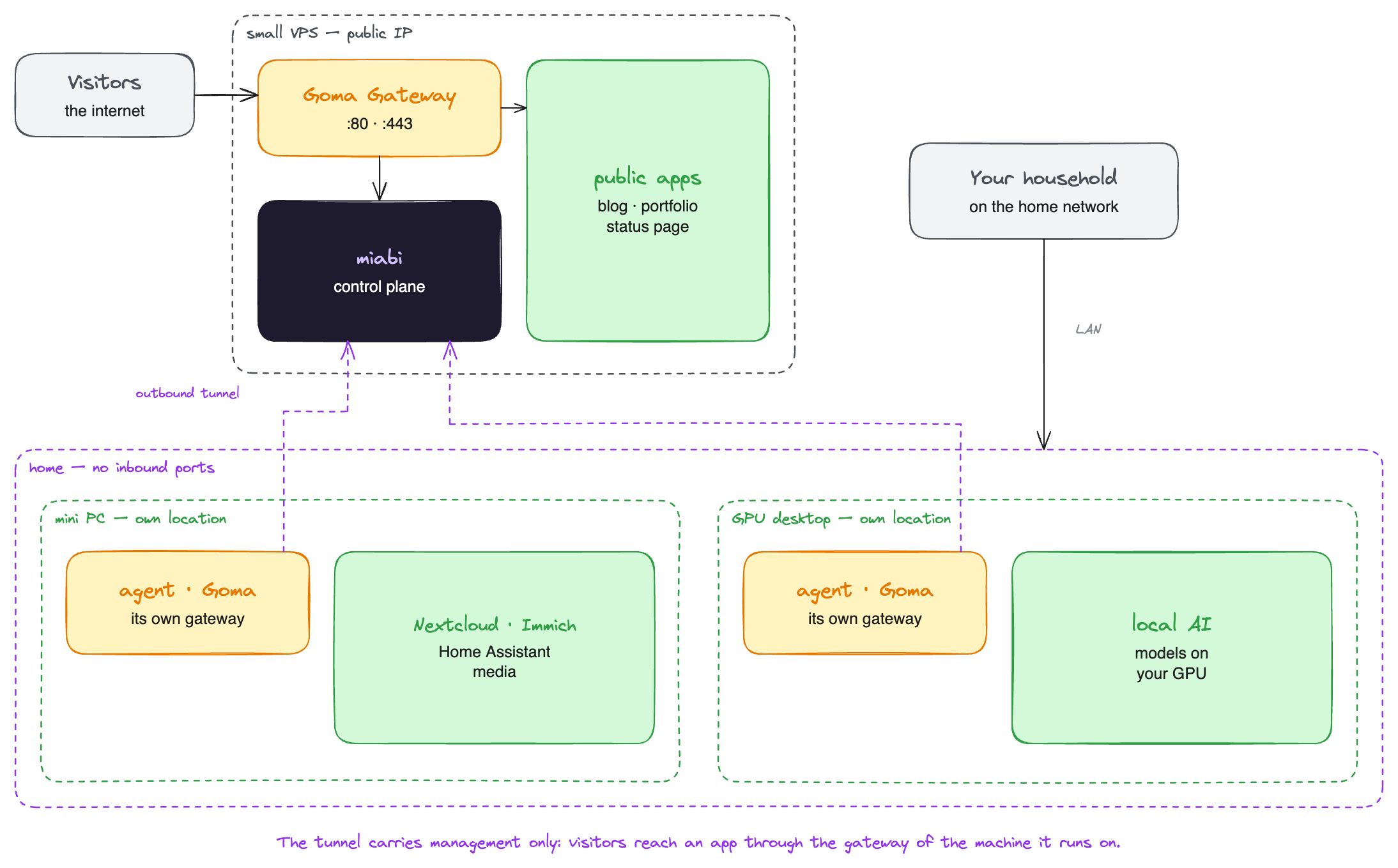
The control plane runs on a cheap VPS with a public address; each machine at home joins as a node. The agent dials out to the VPS, so the home machines need no open port, no port forwarding and no VPN, and it works behind CGNAT. Each home node is a location of its own, and you pick where an app runs when you create it.
What the tunnel does not do is carry visitors. A home node serves its apps through its own gateway, so those apps are reachable from wherever that gateway is reachable: your home network, or the internet too if you forward the ports. Put apps the world should see on the VPS, and keep the rest at home.
C. Home network only
Install as in A, without forwarding any port, and point a local DNS name at the server: a record on
your router or in Pi-hole or AdGuard Home, such as *.home.<your-domain> to the server's LAN address.
HTTPS still works, but not through the usual HTTP challenge, which needs the server to be reachable from the internet. Connect a DNS provider, such as Cloudflare, for a domain you own and issue a wildcard certificate over DNS-01: the certificate authority checks a DNS record, not your server. See TLS certificates.
Hardware
- Anything 64-bit. Miabi, the agent, the runner and the gateway are published for
amd64andarm64, so a Raspberry Pi 4 or 5 with a 64-bit OS works as well as a mini PC. The apps you deploy needarm64images too on a Pi; most popular ones have them. - 2 vCPU and 2 GB run the platform itself; give it more for the apps.
- More than one disk? Register each as a storage class: databases on the SSD, media on the large HDD.
- A NAS? Mount its shares into apps as NFS or CIFS volumes.
- An NVIDIA GPU? Attach it to apps for local AI: GPUs.
- Proxmox? Prefer a VM. Inside an LXC container, Docker's service load balancing may not work; if you enable Swarm there, set the cluster's service load balancing to DNS round-robin.
Moving in
Already running containers? Miabi installs beside them and can
import them with no downtime, so you can move one app at a time. Or
import a whole docker-compose.yml as a stack.
The marketplace installs common self-hosted apps in a click, with their databases and volumes: Nextcloud, Gitea, n8n, Umami, WordPress, Ghost and more.
Side projects can each get a workspace, or share dev, staging and production workspaces; see
laying out workspaces.
Keeping it safe
A homelab with a public address is a public server. The defaults help, and a few settings help more:
- Registration is closed until you open it, and only the gateway listens on public ports.
- Turn on two-factor authentication or a passkey for your account.
- Set
MIABI_ADMIN_UNLOCK=trueso the admin console asks for a TOTP code even in a signed-in session. See Security Center. - Back up off the box. Point a backup target at an S3-compatible service outside the house; a bucket on the same disk is not a backup.
Where to go next
- One server — the limits of a single machine, and what helps.
- Several clusters as regions — how the agent tunnel and per-cluster gateways work.
- Marketplace — what you can install.