One cluster, several servers
Add servers next to the control plane and join them into one Docker Swarm. Apps can then run several replicas spread over the nodes, roll out one replica at a time, and move to a healthy node when one fails. Apps, databases and other apps reach each other by name across nodes over an encrypted overlay network.
Good for: production apps that must stay up through a node failure or a reboot, more capacity than one server has, and teams in one data center, one cloud region or one rack.
Typical users: companies running customer-facing apps or an internal platform, SaaS products, hosting providers and agencies, and universities whose classes outgrow one server.
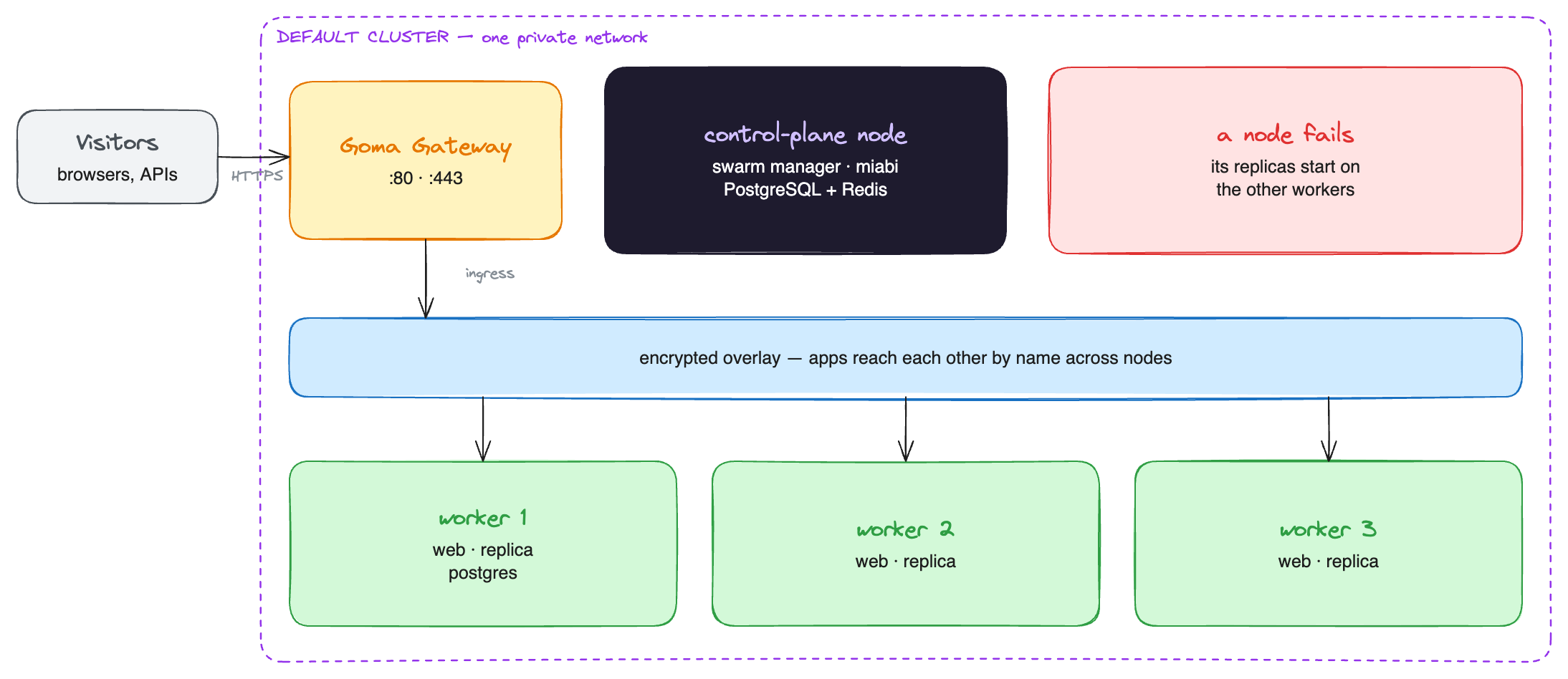
The control plane's gateway serves every app in the cluster: traffic enters there and crosses the overlay to whichever node runs a replica. The workers need no public ports.
Setting it up
- Check the network. Every node must reach every other node directly, with no NAT between them,
on
2377/tcp,7946/tcp+udp,4789/udpand IP protocol 50 (ESP) for the encrypted overlay. See Before you enable it. - Enable Swarm on the default cluster under Clusters, with the control plane's private address as the advertise address. Miabi runs a preflight check first.
- Add each server with the agent, then join it to the default cluster from the cluster's page.
- Manage cluster nodes on the cluster's page installs the agent on every member, current and future, so Miabi has metrics, logs and a shell on all of them.
- Run the network check on the same page. It probes DNS, TCP and a large payload between every pair of nodes and names the port to open when one fails.
- Run apps as services. New apps created in the console default to the replicated service runtime
once cluster mode is on; set the number of replicas on the app. In a manifest, set
deployment.runtime: serviceanddeployment.replicas.
apiVersion: miabi.io/v1
kind: Application
metadata:
  name: web
spec:
  image: miabi/guestbook
  deployment:
    runtime: service
    replicas: 3
    update:
      parallelism: 1
      delaySeconds: 10
  ports:
    - container: 8080
      externalAccess: true
Keeping tenant apps off the control plane
The control-plane node is also a swarm node, so by default it runs apps too. To keep it for the platform alone, cordon it, so nothing new is placed there, and set its swarm availability to drain, so service replicas move to the workers. Both are on the node's page. See Cordoning a node.
What happens when a node fails
| Workload | On a node failure |
|---|---|
| A service app (replicated) | Swarm starts its lost replicas on the remaining nodes. The other replicas keep serving meanwhile |
| A service app with one replica | Restarted on another node after a short interruption |
| An app or database with data on a node-local volume | Pinned to that node, so it waits for the node to come back |
That last row is the limit of this setup: a volume on a node's own disk cannot follow the app. To make stateful apps fail over as well, put their data on a filesystem every node shares. See Highly available apps with replicated storage.
Before a planned reboot, drain the node instead of switching it off: its replicas move first, so nothing is interrupted. Setting it back to active does not move them back; Swarm never rebalances by itself.
Miabi joins added nodes as workers and drives the swarm through its manager, which in the default cluster is the control-plane node. That node also runs the cluster's gateway. While it is down, replicas on the workers keep running, but public traffic cannot reach them, Swarm cannot reschedule anything, and nothing can be deployed. Workers can come and go; the control-plane node is the one to keep healthy, and to back up. To take the gateway and the swarm manager off the control plane, build the swarm as a separate cluster.
Where to go next
- Replicated storage — failover for apps with data.
- Several clusters as regions — a second cluster in another place, or a swarm kept separate from the control plane.
- Cluster mode — the full reference.