Teams and companies
One install, used by everyone who ships software in the company. Developers deploy on their own, without a ticket to operations and without learning Kubernetes. The platform team decides the shape: which workspaces exist, who may do what in them, and where they run.
Good for: startups that outgrew Docker Compose, product teams sharing infrastructure, an internal developer platform, and agencies building and running apps for themselves.
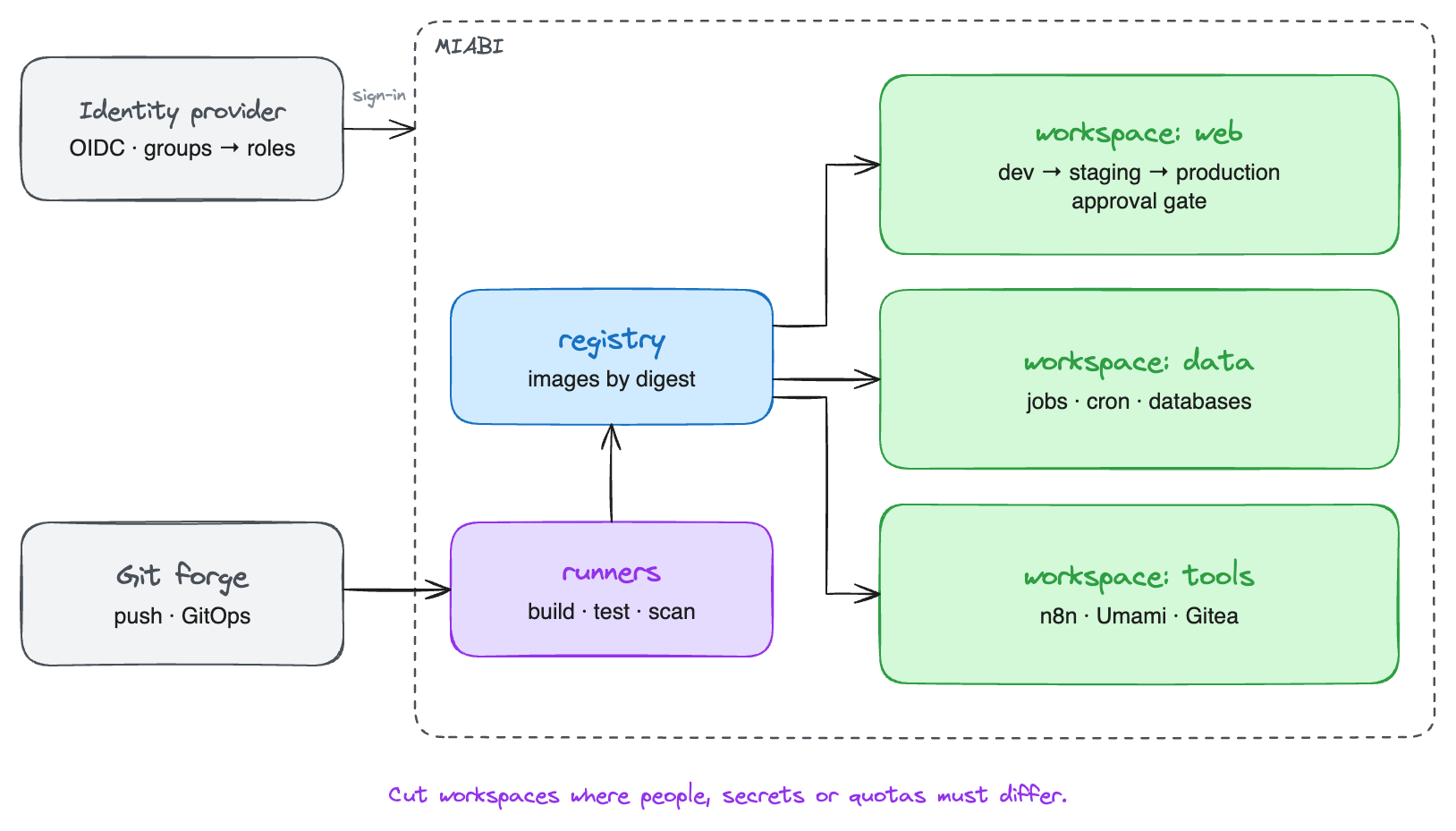
How to cut workspaces
A workspace is the boundary for data, secrets, network, members and quotas. Cut it where one of those must differ.
| Cut by | When | Example |
|---|---|---|
| Team or product | Each team owns its apps and should not touch another's | web, mobile-api, data |
| Environment | Production must have fewer people with write access than staging | shop-staging, shop-production |
| Client | You build and run apps for others; see Hosting providers and agencies | client-jkantech |
Environments add approval gates to releases: a release needs a set number of approvals before it is promoted. Promotion redeploys the same application, so a stage with its own variables, secrets, domain or database still needs its own application, and usually its own workspace. See laying out workspaces for the per-stage and per-project layouts.
Which setup?
How many teams you have does not decide the hardware; how long an app may be down, and where its users are, does. Most companies start on one server and grow without reinstalling.
| Your situation | Setup |
|---|---|
| Internal tools and staging that can wait while a server reboots | One server |
| Customer-facing apps that must stay up through a node failure | One cluster, several servers |
| Those apps also keep uploads or files on disk | Replicated storage on that cluster |
| Offices, factories or customers in several places, or production on separate hardware | Several clusters as regions |
Setting it up
- Connect the company's identity provider as an OIDC SSO provider, so people sign in with their work account and leave when HR offboards them. Mapping identity-provider groups to workspace roles is Enterprise.
- Create the workspaces and invite people with a role: Owner, Admin, Developer or Viewer. Give most people Developer; keep Owner for the few who manage members and settings.
- Register build runners. A workspace may register its own machines, which it alone uses, or build on the platform's shared runners.
- Put the configuration in Git. Declare apps, databases, volumes and routes in
manifests and let GitOps reconcile them, or run
miabi applyfrom CI. The console stays available for anything ad hoc. - Keep secrets in the vault. Reference them as
${{ secrets.NAME }}in manifests and pipelines; values never appear in Git. See Secrets.
Keeping production apart
Production on separate hardware is a placement question, not a separate install:
- Run production and staging in different locations, so a load test in staging never competes with production for CPU.
- Set each workspace's default location, so new apps land in the right place without anyone choosing.
- Use a tighter plan for staging workspaces, so a runaway experiment hits a quota instead of the production nodes. See Plans & quotas.
Automating it
Everything in the console is an API. Teams that manage infrastructure as code can drive Miabi from:
- the CLI and
miabi applyin CI pipelines; - the Terraform / OpenTofu provider;
- pipelines that build, test and deploy on push;
miabi mcp, which exposes the platform to AI agents, read-only by default.
Where to go next
- One cluster, several servers — replicas and failover for production.
- Roles & permissions — what each role may do.
- GitOps — reconciling workspaces from Git.