Several clusters as regions
One control plane, many clusters. Each cluster is a single server or a Docker Swarm somewhere else — another region, another cloud provider, a rack in your office, a box behind a home router — and each serves its own visitors through its own gateway. Tenants see the clusters as locations and pick one when they create an app, a database or a volume.
Good for: serving users close to where they are, keeping data in a country, mixing providers or bare metal with cloud, running production on different hardware from staging, and managing on-premises or edge sites from one console.
Typical users: companies with offices, factories or stores to serve on site, SaaS products with customers in several countries, hosting providers selling more than one region, and groups of companies or universities with several campuses.
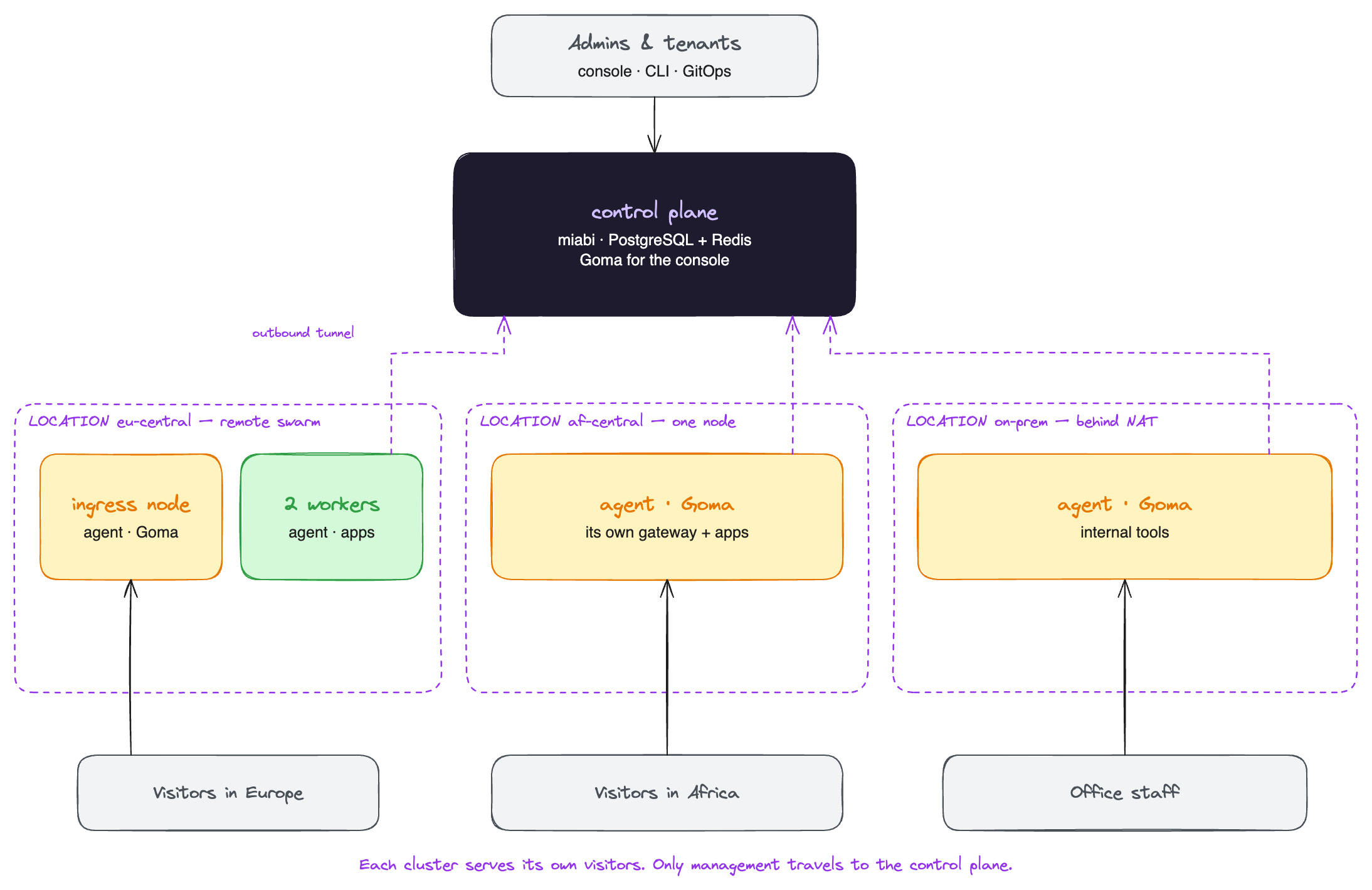
Dashed lines are agent tunnels. Two things make this work:
- The agent dials out. A node connects to the control plane over an outbound tunnel, so it needs no inbound port, no exposed Docker socket and no VPN. That is why a server behind NAT or a corporate firewall can be a node.
- Traffic stays in its cluster. Visitors reach an app through its own cluster's gateway, and DNS records for its routes point at that cluster's public address. Only management traffic travels to the control plane.
Setting it up
- Add a node in the new place. Every added node starts as a standalone cluster of its own, with its own gateway, and is usable right away.
- Name the cluster and give it a location code (for example
Frankfurt·eu-central) with Edit on its page. Tenants see the name. - To make it a swarm, choose Enable Swarm on that cluster and join more empty nodes to it from the same page. Each cluster is its own swarm; see Swarm in other clusters.
- Set its public address and external domain under Networking & DNS and External access, so DNS records and one-click app URLs point at this cluster's gateway.
- Let workspaces choose. A workspace sets its default location under Settings → General; the
create forms show a Location picker; manifests use
placement.location.
apiVersion: miabi.io/v1
kind: Application
metadata:
  name: web
spec:
  image: miabi/guestbook
  placement:
    location: eu-central
What stays inside a location
Private networks never span clusters. Attaching a database, mounting a volume, joining a stack or referencing another app across two locations is refused with a message naming both. Put the pieces of one application in the same location, and give each region its own copy of what it needs.
A resource stays where it was created. Moving an application with its volumes and databases to another location is a location migration (Enterprise).
A control plane that runs no apps
The control plane does not have to host tenant workloads. Build every swarm and every standalone node as a cluster of its own, then restrict the default cluster to platform admins only from its page. Workspaces no longer see it as a location, so their apps land only on the other clusters.
This keeps the control plane small and keeps a busy tenant from slowing down the console. It also gives each swarm its own manager and gateway, so the control plane is no longer in the path of your visitors.
When the control plane is down
Running apps are containers on their own nodes, and they keep running. Remote gateways keep serving the routes they last loaded. What stops is everything that needs the control plane: deploys, changes, new routes, the console and the API. Agents reconnect by themselves when it is back.
Treat the control plane like a database server: back it up with platform backup (Enterprise) or your own PostgreSQL backups, and know how you would rebuild it on a fresh host.
Edge and on-premises sites
A node behind NAT, such as a homelab or an office server, joins as a standalone cluster like any other. Its gateway still has to be reachable by its visitors: forward ports 80 and 443 to it, put it behind a load balancer, or use it only for apps on the local network.
A swarm cannot span NAT: Swarm nodes dial each other directly. Keep each swarm inside one site and connect the sites as separate clusters.
For many tenants (Enterprise)
On a shared platform, decide which tenants may use which clusters:
| Need | Feature |
|---|---|
| A plan may only use some locations | Plan placement |
| A plan runs only on certain hardware inside a location | Node pools |
| A cluster belongs to one customer and nobody else sees it | Dedicated locations |
In Community, a cluster can still be hidden from every workspace by restricting it to platform admins.
Where to go next
- Multi-node & clusters — how the tunnel, gateways and DNS work.
- Replicated storage — failover for stateful apps inside one cluster.
- Hosting providers — tiers and dedicated hardware.