Choosing a setup
Miabi runs the same way on a single VPS and across several regions, for one developer or for thousands of users. What changes between those setups is not the product but two decisions you make about it:
- Where it runs — one server, a cluster of servers, or several clusters in different places.
- Who uses it — one team, many teams, students, paying customers, or several organizations.
The two are independent: any answer from the first list works with any answer from the second. A university can run on one large server; a two-person startup can run in three regions. Pick one of each, then read the matching pages.
Where it runs
| Setup | Fits when |
|---|---|
| One server | Everything fits on one machine and a short outage during maintenance is acceptable |
| One cluster, several servers | Apps need replicas, or must keep running when a server fails, and the servers share one site |
| Several clusters as regions | Servers are in different regions, providers or offices, or some sit behind NAT |
| Highly available apps with replicated storage | Stateful apps and databases must survive a node failure with their data |
| A homelab | Machines at home, with a VPS in front for public apps |
Who uses it
| Users | Fits when |
|---|---|
| Teams and companies | An internal platform: workspaces per team or environment, SSO, GitOps, and production kept apart from staging |
| Universities and training | A workspace per student or course, sign-in through the university, plans that keep a class within the hardware |
| Hosting providers and agencies | Plans sold as products, customers isolated from each other, white-label branding |
| Several organizations on one instance | Several companies or faculties, each with its own users, identity provider and optionally its own servers |
The building blocks
Every setup on these pages is a combination of the same few pieces.
| Piece | What it is | Read more |
|---|---|---|
| Control plane | The miabi server, with PostgreSQL and Redis. One per install. It holds the configuration and drives every node | Architecture |
| Node | A server running Docker. The control-plane host is the first one; others join by running the agent, which dials out | Nodes |
| Cluster | A group of nodes that share private networking and a gateway. Either a single node or a Docker Swarm | Multi-node & clusters |
| Location | A cluster as tenants see it. Every app, database and volume is created in one | Locations |
| Gateway | Goma Gateway: TLS, routing and middlewares at the edge of each cluster | Request lifecycle |
| Workspace | The unit of isolation: apps, databases, domains, secrets, members and its own network and encryption key | Workspaces |
| Organization | A tenant realm owning workspaces, users, an SSO provider and optionally its own clusters | Organizations |
| Plan | Quotas, capabilities and placement for the workspaces on it | Plans & quotas |
| Storage class | A disk or a shared filesystem that volumes can be created on, by name | Storage classes |
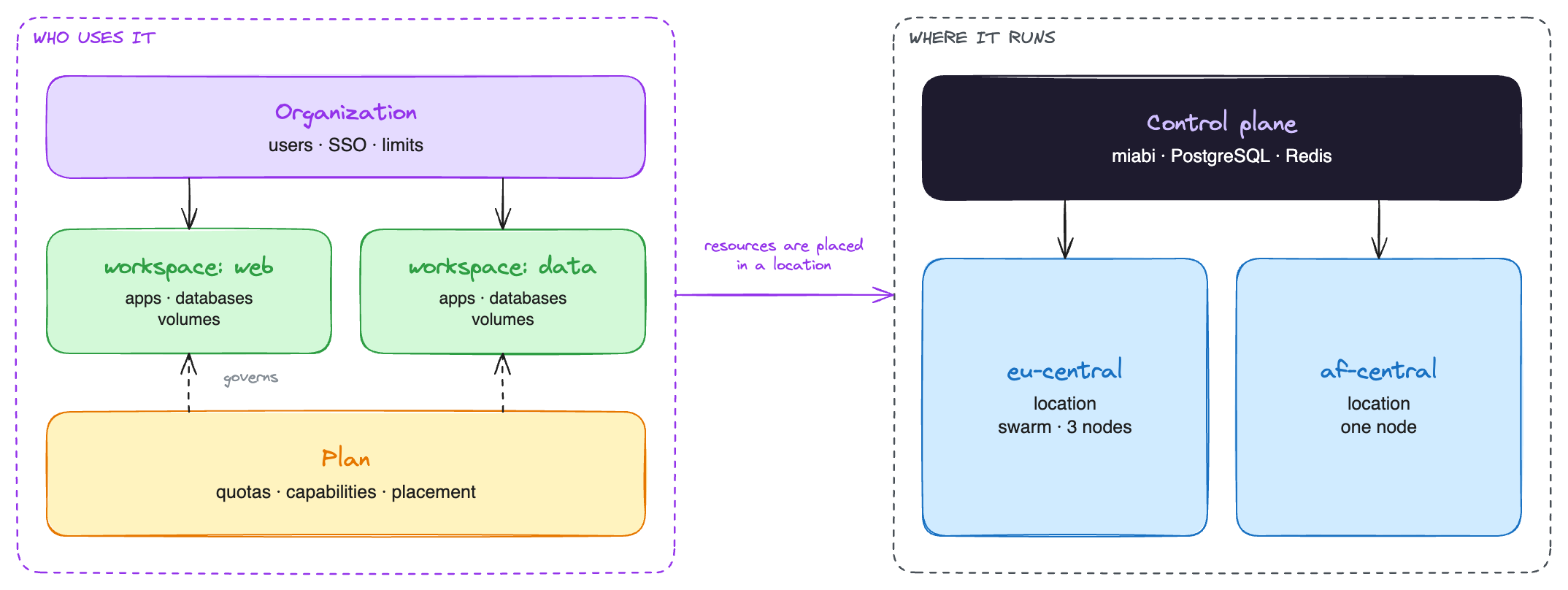
They connect in one place: a workspace's resources are placed in a location. Everything about "where" hangs below the location; everything about "who" hangs above the workspace.
Which topology?
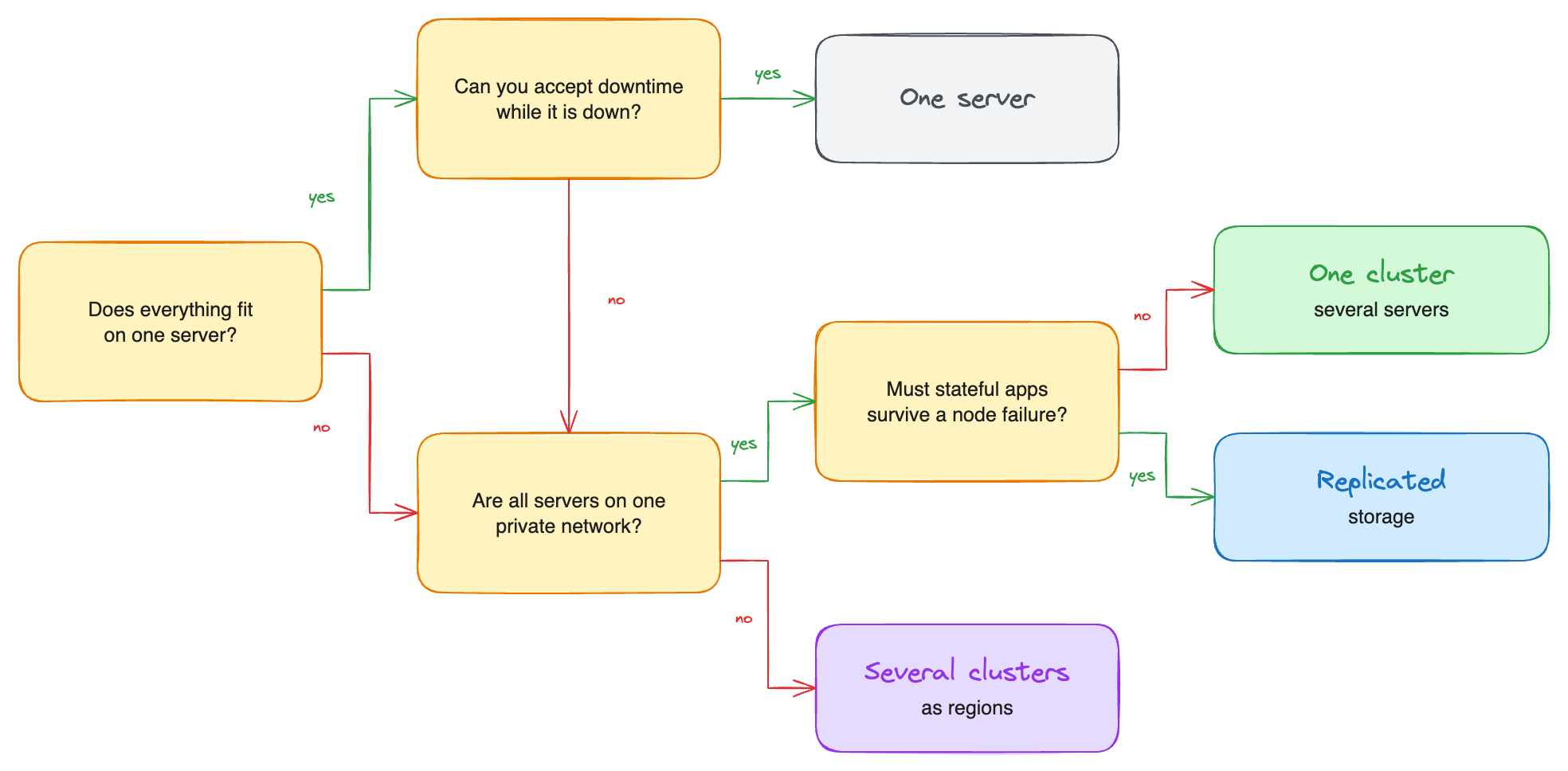
Start at the top and stop at the first answer that fits. You can always move further down later: every step adds nodes or clusters to an existing install, and none of them rebuilds what is already there.
| One server | One cluster | Several clusters | Replicated storage | |
|---|---|---|---|---|
| Servers | 1 | 2 or more, one site | Any number, any site | 3 or more per cluster |
| Replicas and rolling updates | Rolling updates | ✓ | ✓ per cluster | ✓ |
| An app survives a node failure | — | Stateless apps | Stateless apps, within its cluster | ✓ including its data |
| Regions, providers, on-premises sites | — | — | ✓ | Per cluster |
| Nodes behind NAT | — | — | ✓ as single-node clusters | — |
| Extra software to run | — | — | — | A replicated filesystem |
Growing without migrating
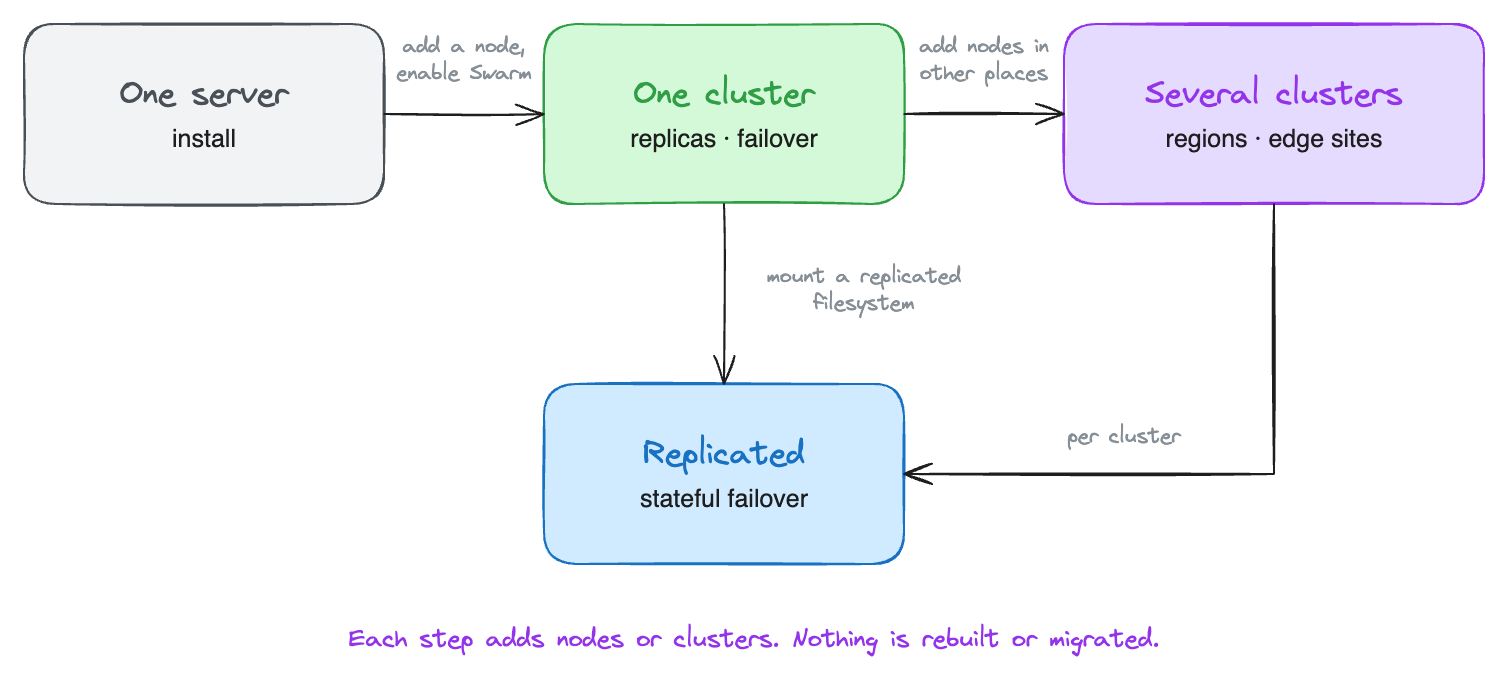
Nodes, clusters, locations and workspace_id scoping exist from the first install. Going from one
server to many, or from one cluster to several, adds rows; it never rewrites the ones you have, and
your workspaces, domains and manifests keep working as they are.
Combining the two
Some common combinations, each covered by one page from each column:
| You are… | Where it runs | Who uses it |
|---|---|---|
| A developer with side projects | One server | One personal workspace |
| A homelab, with a VPS for public apps | A VPS control plane, home machines as nodes | Homelab |
| A startup with staging and production | One cluster, or two clusters to keep production apart | Teams and companies |
| A company running internal tools and customer apps | One cluster, so a server can fail without an outage | Teams and companies |
| A company with on-premises sites and a cloud region | Several clusters, one per site; on-premises nodes can sit behind NAT | Teams and companies |
| A university course | One large server or one cluster | Universities and training |
| A hosting provider | Several clusters, with node pools per tier | Hosting providers |
| A group of companies | Several clusters, some dedicated to one company | Several organizations |
Everything on these pages works in the free Community edition unless it is marked Enterprise. The Enterprise parts are mostly about governing many tenants: extra organizations, plan placement, node pools, per-workspace overrides and branding. See Community vs Enterprise.